JavaScript The Web's Nervous System
Introduction to JavaScript
The Brains of the Webpage
Think of a website as a person. HTML provides the skeleton, the basic structure. It defines the parts, like the head, body, and feet. CSS is the clothing and appearance. It adds style, color, and personality, making the person look good. But without a brain or nervous system, that person can't do anything. It's just a static mannequin.
JavaScript is the brain. It adds behavior and makes the webpage interactive. It's the part that responds when you click a button, fill out a form, or watch a video. While HTML and CSS create a static page, JavaScript brings it to life.

JavaScript code is typically placed within a <script> tag in an HTML file. This allows it to access and interact with the page's content.
<!DOCTYPE html>
<html>
<head>
  <title>My Web Page</title>
  <link rel="stylesheet" href="styles.css">
</head>
<body>
  <h1>Hello, World!</h1>

  <!-- JavaScript can be included right here -->
  <script src="app.js"></script>
</body>
</html>
The Page as an Object
So how does JavaScript actually change things on a page? It does so by interacting with something called the Document Object Model, or DOM for short.
When a web browser loads an HTML file, it doesn't just read it as plain text. It creates a live, tree-like model of the page in memory. Every single HTML element—the <body>, the <h1> headers, the <p> paragraphs, the buttons—becomes an 'object' in this tree. The DOM is this structured representation of the document.
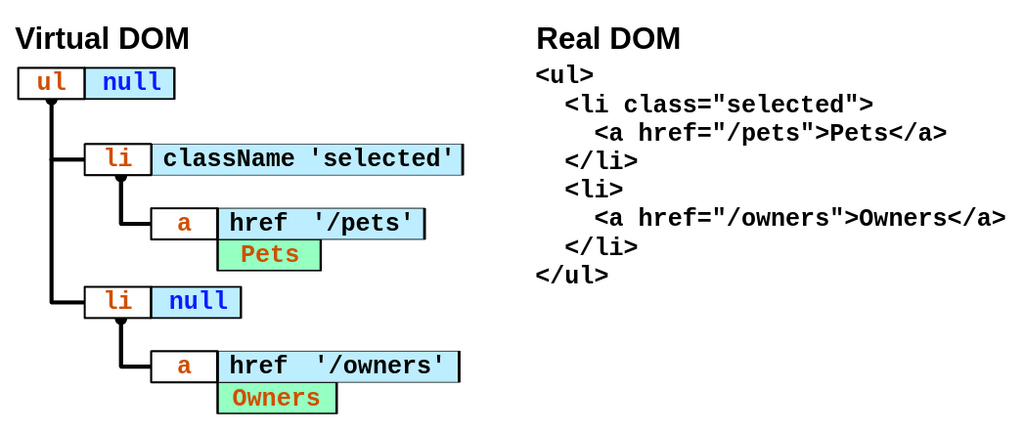
JavaScript has the power to access any of these objects and change them. It can find an element, alter its text, change its style, add new elements, or remove existing ones. This is the core of web interactivity. Every time you see a notification pop up, an image gallery cycle, or a form give you instant feedback, the DOM is being manipulated by JavaScript behind the scenes.
Listening for Action
JavaScript doesn't just change things randomly. It responds to user actions, which are called 'events'. An event could be a mouse click, a key press, the mouse moving over an element, or the page finishing loading.
We can write code that 'listens' for these events on specific HTML elements. When the event happens, our JavaScript code runs. Let's look at a simple example. Here's a basic HTML page with a button and a paragraph.
<!-- index.html -->
<!DOCTYPE html>
<html>
<body>

  <p id="message">Hello there!</p>
  <button id="myButton">Click Me</button>

  <script src="script.js"></script>
</body>
</html>
Now, let's add some JavaScript to make that button do something. This code will find the button and the paragraph using their id attributes. Then, it will add an 'event listener' that waits for a click on the button. When the button is clicked, it will change the text inside the paragraph.
// script.js

// 1. Find the elements on the page
const messageParagraph = document.getElementById('message');
const myButton = document.getElementById('myButton');

// 2. Add a 'click' event listener to the button
myButton.addEventListener('click', function() {
  // 3. When clicked, change the paragraph's text
  messageParagraph.textContent = 'The button was clicked!';
});
This pattern—selecting an element, listening for an event, and changing the DOM in response—is the foundation of all interactive web applications.
With these simple tools, you can create drop-down menus, interactive forms, games, and complex user interfaces. It all starts with understanding how JavaScript connects to the HTML structure through the DOM.
Now, let's test what you've learned.
In the analogy of a website as a person, if HTML is the skeleton and CSS is the clothing, what is JavaScript?
What is the Document Object Model (DOM)?
By mastering these basics, you've taken the first step toward creating dynamic and engaging websites.