JavaScript Essentials
Introduction to JavaScript
The Language of the Web
If a website were a house, HTML would be the frame and walls, the fundamental structure. CSS would be the paint, furniture, and decorations, making it look good. But JavaScript? JavaScript is the electricity, the plumbing, and all the appliances. It’s what makes the house functional and interactive.
JavaScript (often shortened to JS) is a programming language that lets you implement complex features on web pages. Every time a page does more than just sit there and display static information, JavaScript is probably involved. Think of content updates, interactive maps, animated 2D/3D graphics, or scrolling video jukeboxes.
It’s the language that brings a website to life, allowing users to interact with the page without needing to reload it every time.
A Brief History
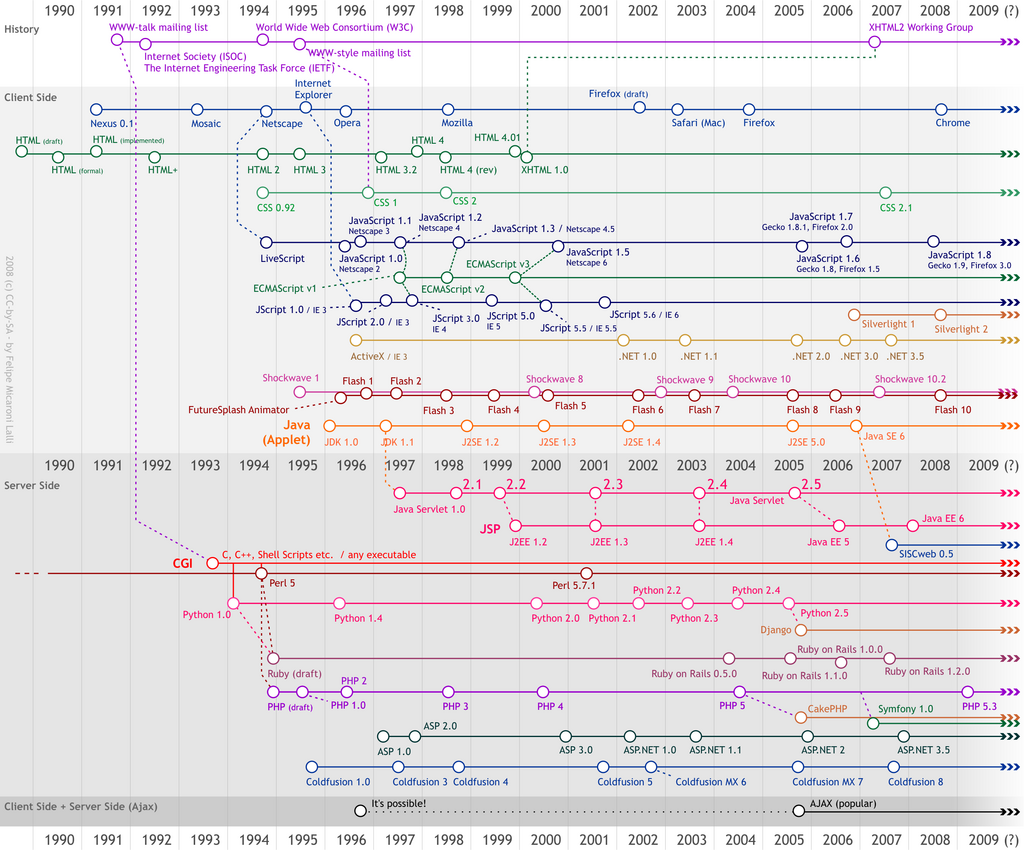
Back in 1995, a developer at Netscape named Brendan Eich was tasked with creating a scripting language for the Netscape Navigator browser. He created the first version in just ten days. It was originally called Mocha, then LiveScript, and finally renamed JavaScript in a marketing move to piggyback on the popularity of another language, Java. Despite the similar names, JavaScript and Java are completely different languages.
In the early days of the web, different browsers started creating their own versions of JavaScript. This was a problem. A script written for Netscape Navigator might not work in Microsoft's Internet Explorer. To solve this, the language was standardized under the name ECMAScript. Now, when you hear about new versions like ES6, ES2020, etc., they are referring to new releases of the ECMAScript standard that all modern browsers follow.
Setting Up Your Workspace
To start writing JavaScript, you only need two things: a text editor and a web browser. That's it. You don't need to install any complex software.
1. A Code Editor You can write code in any plain text editor, but a dedicated code editor makes life much easier. They offer features like syntax highlighting (coloring your code to make it readable), auto-completion, and error checking. Great free options include:
- Visual Studio Code (VS Code)
- Sublime Text
- Atom
2. A Web Browser Any modern web browser like Google Chrome, Mozilla Firefox, Microsoft Edge, or Apple Safari will work. All of them have a built-in JavaScript engine that reads and executes your code. They also come with developer tools that are essential for testing and debugging.
You can open the developer console in most browsers by right-clicking anywhere on a webpage and selecting "Inspect," then navigating to the "Console" tab. This is where you can test small snippets of code and see error messages.
Connecting JavaScript to Your Webpage
JavaScript code lives inside an HTML document. You can add it in two main ways.
First, you can place your code directly inside the HTML file using <script> tags. This is fine for very small scripts.
<!DOCTYPE html>
<html>
<head>
  <title>My Page</title>
</head>
<body>
  <h1>Welcome!</h1>

  <script>
    // JavaScript goes here
    console.log("Hello from inside the HTML!");
  </script>

</body>
</html>
The second, and more common, method is to put your JavaScript in its own file (with a .js extension). You then link to that file from your HTML. This is better practice because it keeps your code organized and separate from your content and styling.
Imagine you have a file named app.js:
// This is app.js
console.log("Hello from an external file!");
You would link to it in your HTML like this:
<!DOCTYPE html>
<html>
<head>
  <title>My Page</title>
</head>
<body>
  <h1>Welcome!</h1>

  <script src="app.js"></script>
</body>
</html>
Notice the src attribute in the <script> tag points to our file. It's common to place the script tag just before the closing </body> tag. This ensures that the HTML content is loaded and ready before the script tries to interact with it.
If a website were a house, with HTML as the frame and CSS as the paint, what part would JavaScript represent?
True or False: JavaScript was originally named JavaScript when it was created in 1995.
Now you have a basic understanding of what JavaScript is, where it came from, and how to set up a simple development environment. Next, we'll dive into the fundamental building blocks of the language.