Java Virtual Threads Explained
Introduction to Java Concurrency
Concurrency vs Parallelism
In everyday language, we often use "concurrent" and "parallel" interchangeably. In programming, they mean different things. Understanding the distinction is the first step into the world of multi-threaded applications.
Concurrency is about dealing with multiple tasks at once. Imagine a chef in a kitchen. They might start boiling water for pasta, then chop vegetables while the water heats up, and then stir a sauce. They are making progress on multiple dishes in the same period, but they are only doing one specific action at any given instant. The tasks are interleaved.
Parallelism is about doing multiple tasks at the same time. Now imagine our chef has an assistant. While the head chef chops vegetables, the assistant can simultaneously stir the sauce. Two tasks are happening at the exact same moment because there are two workers (or in a computer's case, two or more CPU cores).
Concurrency is the composition of independently executing processes, while parallelism is the simultaneous execution of (possibly related) computations. Concurrency is about dealing with lots of things at once. Parallelism is about doing lots of things at once.
A program can be concurrent without being parallel. On a computer with a single CPU core, the operating system can switch between different tasks so quickly that it appears they are running at the same time. This is concurrency. To achieve true parallelism, you need hardware with multiple cores.
Java provides tools to build concurrent applications that can take advantage of parallel execution on multi-core hardware. The fundamental unit for this is the thread.
Threads and Processes
When you run an application, like a web browser or a text editor, the operating system creates a process. A process is an instance of a computer program that is being executed. It has its own dedicated memory space, which other processes can't access directly. This isolation is a security feature—it prevents a bug in your music player from crashing your entire system.
Within a single process, we can have multiple threads. A thread is the smallest sequence of programmed instructions that can be managed independently by a scheduler. Think of it as a lightweight process. Multiple threads within the same process share the same memory space. This is powerful because it allows them to communicate and share data easily, but it also introduces new challenges.
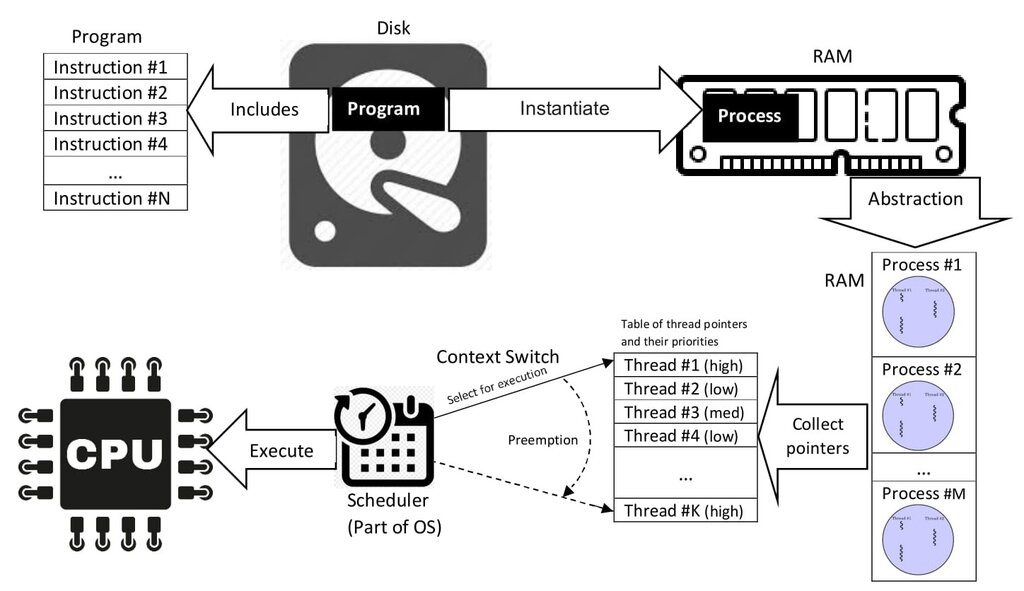
A simple Java program runs in a single thread, often called the "main" thread. However, Java's built-in support for multithreading allows you to create and manage many additional threads to perform tasks concurrently. For example, in a word processor, one thread might handle user input from the keyboard while another thread automatically saves the document in the background.
The Lifecycle of a Thread
A thread isn't always running. It moves through several states from the moment it's created until it's terminated. Understanding this lifecycle is key to managing threads effectively.
- NEW: The thread has been created but hasn't started running yet.
- RUNNABLE: The thread is ready to run and is waiting for its turn on the CPU. The thread scheduler, part of the Java Virtual Machine (JVM), determines which runnable thread gets to run.
- BLOCKED: The thread is temporarily inactive because it's waiting to acquire a lock, which we'll discuss shortly.
- WAITING: The thread is waiting indefinitely for another thread to perform a particular action. It can stay in this state forever unless explicitly woken up.
- TIMED_WAITING: Similar to WAITING, but the thread will only wait for a specified amount of time.
- TERMINATED: The thread has completed its execution or has otherwise been terminated.
The Challenge of Shared Resources
Because threads in a Java application share memory, they can read and write to the same variables. This is efficient, but it's also where things get tricky. If multiple threads try to modify the same piece of data at the same time, you can get unexpected and incorrect results. These problems are notoriously difficult to debug because they often depend on the precise timing of thread execution, which can vary from run to run.
Race Condition
noun
A situation where the behavior of a system depends on the sequence or timing of uncontrollable events. It occurs when two or more threads can access shared data and they try to change it at the same time.
Imagine two threads both trying to increment a shared counter variable, which starts at 0.
- Thread A reads the value of the counter (0).
- Thread B reads the value of the counter (0).
- Thread A calculates the new value (0 + 1 = 1) and writes it back.
- Thread B calculates its new value (0 + 1 = 1) and writes it back.
The counter should be 2, but it's 1. To prevent this, we need a way to ensure that only one thread can access a shared resource at a time. This is called synchronization.
One way to avoid many concurrency issues is to design your system to share less data between threads.
Java provides the synchronized keyword as a simple but powerful tool. You can apply it to a method or a block of code. When a thread enters a synchronized block, it acquires a "lock." No other thread can enter that block until the first thread exits and releases the lock. This ensures that the code within the block is executed by only one thread at a time, preventing race conditions.
public class SynchronizedCounter {
    private int count = 0;

    // This method is synchronized
    public synchronized void increment() {
        // Only one thread can execute this code at a time
        count++;
    }

    public int getCount() {
        return count;
    }
}
While synchronization solves race conditions, it introduces its own potential problem: deadlock. A deadlock occurs when two or more threads are blocked forever, each waiting for a lock held by the other. It's like two people who need to cross a narrow hallway, but each is waiting for the other to move first. Neither can make progress.
Managing shared resources, ensuring data consistency with synchronization, and avoiding deadlocks are the central challenges of concurrent programming.
Now, let's test your understanding of these core concurrency concepts.
On a computer with a single CPU core, a word processor allows you to type while it simultaneously checks your spelling. This is an example of:
What is the key difference between a process and a thread?
These foundational ideas—concurrency vs. parallelism, threads, lifecycles, and synchronization—are the building blocks for creating powerful, efficient, and responsive Java applications.