Java Threading Essentials
Introduction to Java Threads
What Are Threads?
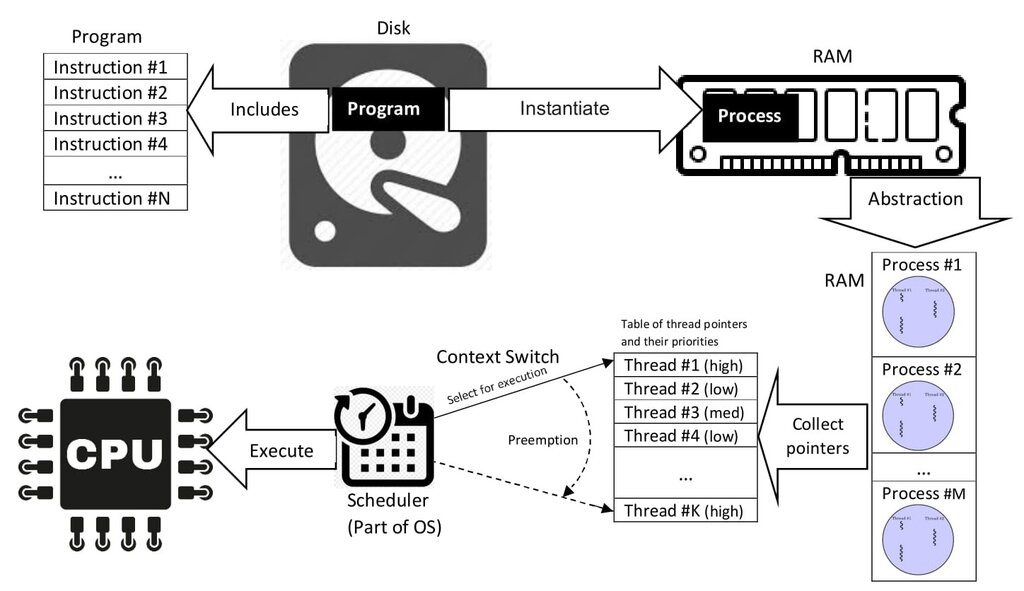
Think of a computer program as a factory. A simple program is like a factory with just one worker. This single worker has to do everything: operate the machinery, package the goods, and load the trucks. If one task takes a long time, everything else has to wait.
This is a single-threaded application. A thread is the smallest unit of execution within a program. It's one of those workers. Most simple programs you write run on a single thread. When you run the program, the Java Virtual Machine (JVM) creates one main thread to execute its instructions from top to bottom.
A thread is like an individual worker on a program's assembly line. More threads mean more workers who can perform tasks simultaneously.
But what if we could hire more workers? With multiple workers, one could operate the machinery while another packages goods. The factory becomes much more efficient. This is the idea behind multithreading. A multithreaded application can perform several tasks concurrently, meaning at the same time. This leads to some significant advantages.
First, it improves application responsiveness. If you have a desktop application with a user interface, a long-running task on the main thread would freeze the entire application. You couldn't click buttons or interact with it until the task finished. By moving that long task to a separate thread, the main thread remains free to handle user input, keeping the application responsive.
Second, it leads to better resource utilization. Modern CPUs have multiple cores, allowing them to execute multiple instruction streams at once. A single-threaded application can only use one core at a time, leaving the others idle. A multithreaded application can use several cores, making better use of the available processing power.
Creating Threads in Java
Java gives you two primary ways to create a new thread of execution. You can either extend the Thread class or implement the Runnable interface. Let's look at both.
The first method involves creating a new class that is a subclass of
Thread. This new class must override therun()method, which is where you'll put the code you want the thread to execute.
class MyThread extends Thread {
    public void run() {
        System.out.println("This thread is running.");
    }
}

public class Main {
    public static void main(String[] args) {
        MyThread t1 = new MyThread();
        t1.start(); // This starts the new thread
    }
}
In the example above, we create an instance of MyThread and call its start() method. The start() method is important; it tells the JVM to create a new thread and then call our run() method within that new thread. If you called t1.run() directly, it would just execute the code on the main thread, not a new one.
The second, and more common, approach is to implement the Runnable interface.
class MyRunnable implements Runnable {
    public void run() {
        System.out.println("This task is running.");
    }
}

public class Main {
    public static void main(String[] args) {
        MyRunnable myTask = new MyRunnable();
        Thread t1 = new Thread(myTask);
        t1.start();
    }
}
Here, our class MyRunnable implements the Runnable interface, which also requires a run() method. To execute it, we create an instance of our class and pass it to the Thread class's constructor. Then we call start() on the Thread object.
So which method should you use? In most cases, implementing the Runnable interface is the better choice. Java does not support multiple inheritance for classes, so if your class needs to extend another class (like JFrame for a GUI application), you can't also extend Thread. By implementing Runnable, you separate the task to be done from the thread that does it, which is a more flexible design.
Challenges of Multithreading
While powerful, multithreading introduces new challenges. The biggest one is managing access to shared resources. When two or more threads try to read and write to the same variable or object at the same time, you can get unexpected and incorrect results. This is known as thread interference or a race condition.
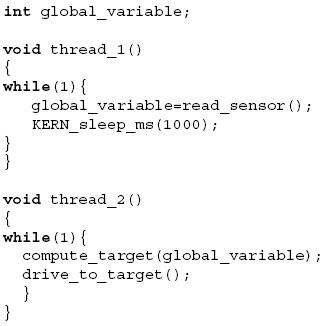
Imagine two threads both trying to increment a shared counter that starts at 0. The operation counter++ isn't a single step. It's actually three: read the value, add one to it, and write the new value back. Here's how things can go wrong:
- Thread A reads the counter value (0).
- Before Thread A can write its new value, the system switches to Thread B.
- Thread B reads the counter value (still 0).
- Thread B adds 1 (new value is 1) and writes it back. The counter is now 1.
- The system switches back to Thread A.
- Thread A, which already calculated its result based on the old value of 0, writes its new value (1) back. The counter is still 1.
After both threads have run, the counter should be 2, but it's 1. This is a classic example of data inconsistency. To prevent this, programmers must carefully control access to shared data using synchronization techniques, ensuring that only one thread can modify a shared resource at a time.
Now, let's test your understanding of these core concepts.
What is the main advantage of using multithreading for an application with a graphical user interface (GUI)?
Why is implementing the Runnable interface generally preferred over extending the Thread class in Java?
You now have a foundational understanding of what threads are, why they are useful, and how to create them in Java. You've also seen the potential pitfalls of multiple threads accessing shared data.