Java Mobile App Development Fundamentals
Java Basics
The Building Blocks of Code
Every program, no matter how complex, is built from simple pieces. The most basic of these are variables. Think of a variable as a labeled box where you can store information. You give it a name and tell it what kind of information it will hold.
In Java, you must declare the type of data a variable will store. This helps prevent errors by ensuring you don't, for example, try to do math with a word. Here are the most common data types you'll encounter:
| Data Type | What it Stores | Example |
|---|---|---|
int | Whole numbers | 10, -5, 0 |
double | Numbers with decimals | 3.14, -0.001 |
boolean | True or false values | true, false |
String | Text, enclosed in quotes | "Hello, World!" |
Declaring and using these variables is straightforward. You state the type, give the variable a name, and assign it a value using the equals sign.
// Storing a whole number
int userAge = 30;

// Storing a decimal number for a price
double price = 19.99;

// Storing a simple yes/no value
boolean isLoggedIn = true;

// Storing a name
String userName = "Alex";
Making Decisions and Repeating Actions
Programs rarely run in a straight line. They need to make decisions and perform repetitive tasks. That's where control structures come in. They control the flow of your code.
The most common way to make a decision is with an if statement. It checks if a condition is true. If it is, a specific block of code runs. You can also provide an else block to run if the condition is false.
int temperature = 25;

if (temperature > 30) {
  System.out.println("It's a hot day!");
} else {
  System.out.println("It's not too hot.");
}
When you have many possible conditions, a switch statement can be cleaner than a series of if-else statements. It checks a variable against a list of possible values (case) and executes the code for the matching one.
int dayOfWeek = 3;
String dayName;

switch (dayOfWeek) {
  case 1: dayName = "Monday"; break;
  case 2: dayName = "Tuesday"; break;
  case 3: dayName = "Wednesday"; break;
  // ... other days
  default: dayName = "Invalid day"; break;
}
For repetitive tasks, we use loops. A for loop is great when you know exactly how many times you want to repeat an action, like counting from 1 to 5.
// This loop will print the numbers 1 through 5
for (int i = 1; i <= 5; i++) {
  System.out.println(i);
}
A while loop is better when you want to repeat an action as long as a certain condition is true, but you don't know how many repetitions it will take.
int batteryLevel = 100;

// Keep using the device as long as the battery is above 10%
while (batteryLevel > 10) {
  System.out.println("Device is on.");
  batteryLevel = batteryLevel - 1; // Battery drains
}
A World of Objects
Java is an object-oriented programming (OOP) language. This might sound complicated, but the core idea is simple: we can model real-world things as objects in our code. This helps organize complex programs into understandable, reusable pieces.
Think of a
classas a blueprint for creating objects. The blueprint for a car defines that it has wheels and an engine. Anobjectis an actual car built from that blueprint.
class
noun
A blueprint or template for creating objects. It defines a set of properties (variables) and behaviors (methods) that the objects will have.
A class combines data (variables) and actions (methods) into a single unit. For example, a Dog class could have variables like name and breed, and methods like bark() and wagTail().
class Dog {
  // Variable (property)
  String name;

  // Method (behavior)
  public void bark() {
    System.out.println("Woof!");
  }
}

// Creating an object (an instance of the Dog class)
Dog myDog = new Dog();
myDog.name = "Buddy";
myDog.bark(); // This will print "Woof!"
OOP has a few key principles that make it powerful. One is inheritance. This allows a new class to take on the properties and methods of an existing class.
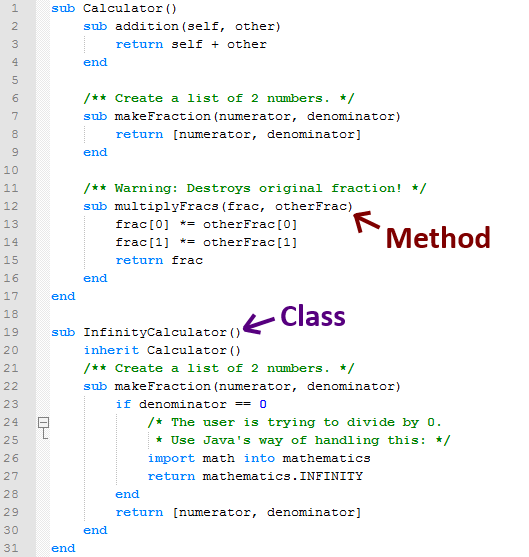
Imagine you have a Vehicle class. You could then create a Car class that inherits from Vehicle. The Car class automatically gets all the features of a Vehicle and can add its own specific ones, like numberOfDoors.
// The parent class
class Vehicle {
  public void drive() {
    System.out.println("The vehicle is moving.");
  }
}

// The child class inherits from Vehicle
class Car extends Vehicle {
  int numberOfDoors = 4;
}
Another core principle is polymorphism, which means "many forms." It allows different objects to respond to the same method call in their own unique ways. For example, if we have Dog and Cat classes, both could have a makeSound() method. Calling that method on a Dog object would produce a bark, while calling it on a Cat object would produce a meow.
class Animal {
    public void makeSound() {
        System.out.println("Some generic animal sound");
    }
}

class Cat extends Animal {
    @Override
    public void makeSound() {
        System.out.println("Meow!");
    }
}

class Dog extends Animal {
    @Override
    public void makeSound() {
        System.out.println("Woof!");
    }
}

// Polymorphism in action
Animal myCat = new Cat();
Animal myDog = new Dog();

myCat.makeSound(); // Prints "Meow!"
myDog.makeSound(); // Prints "Woof!"
These concepts—variables, control structures, and the principles of OOP—are the absolute foundation of programming in Java. Mastering them is the first and most important step toward building applications.
Which data type in Java is most appropriate for storing a whole number, such as a person's age?
What is the primary purpose of an if-else statement in Java?