Java Language Fundamentals
Introduction to Java
What is Java?
Java is a popular and powerful programming language. It was created in the early 1990s by a team at Sun Microsystems with a core principle: "write once, run anywhere." This means a Java program written on one type of computer can run on many different types of computers without needing to be changed. This flexibility is one of its biggest strengths.
Because of its versatility, Java is used everywhere. It powers large-scale web applications, Android mobile apps, and scientific computing tools. Many of the apps and websites you use daily likely have some Java working behind the scenes.
Getting Your Tools Ready
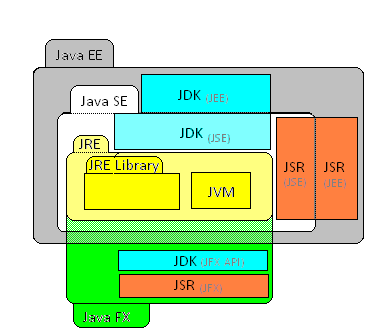
Before you can write and run a Java program, you need two key things: a Java Development Kit (JDK) and an Integrated Development Environment (IDE).
Think of the JDK as your toolbox. It contains all the essential tools for programming in Java, including the compiler, which translates your human-readable code into instructions the computer can understand. You can't build anything without the right tools.
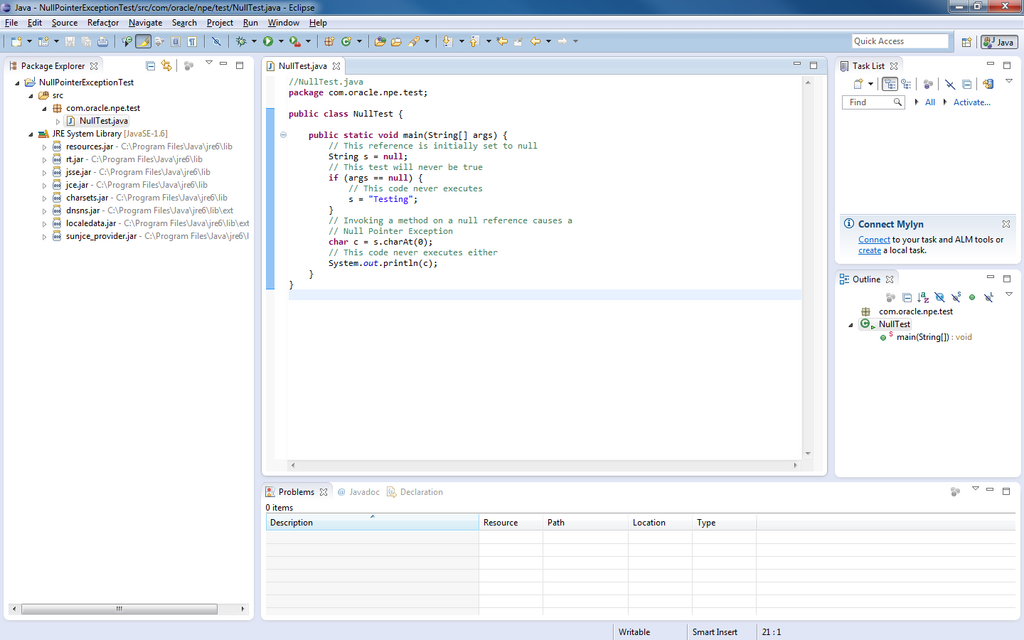
An IDE is your workshop. It’s a software application that provides a complete environment for writing, testing, and debugging your code. It often includes a text editor with features like syntax highlighting and autocompletion, making the coding process much smoother and more efficient. Popular IDEs for Java include Eclipse, IntelliJ IDEA, and Visual Studio Code with Java extensions.
Your First Java Program
It's a tradition for new programmers to start with a program that prints "Hello, World!" to the screen. Let's look at how to do this in Java.
public class HelloWorld {
    public static void main(String[] args) {
        System.out.println("Hello, World!");
    }
}
This might look a little complicated, so let's break it down line by line.
public class HelloWorld { ... }
Every Java program needs at least one class. A class is like a blueprint or a container for your code. Here, we've named our class HelloWorld.
public static void main(String[] args) { ... }
This is the main method. It's the entry point of your program. When you run your code, the Java Virtual Machine (JVM) looks for this exact method and starts executing the code inside it. For now, you can just memorize this line. It's the starting gate for all your Java applications.
System.out.println("Hello, World!");
This is the instruction that does the actual work. It tells the system to print the text inside the parentheses to the console. The ln in println stands for "line," so it also adds a new line after the text, like hitting the Enter key.
Using Comments
As your programs get more complex, you'll want to leave notes for yourself and others who might read your code. These notes are called comments, and the compiler ignores them. They're purely for human readers.
Java has two main types of comments.
A single-line comment starts with
//. Everything from the//to the end of the line is a comment.A multi-line comment starts with
/*and ends with*/. Everything between these two markers is a comment, even if it spans multiple lines.
Here is our HelloWorld program again, this time with comments to explain each part.
/*
  This is a multi-line comment.
  This program prints "Hello, World!" to the console.
*/
public class HelloWorld {
    // This is the main method, the program's entry point.
    public static void main(String[] args) {
        // This line prints the text to the screen.
        System.out.println("Hello, World!");
    }
}
Now that you've got the basics down, let's test your knowledge.
What is the core principle behind Java's design, emphasizing its portability?
What is the primary role of the Java Development Kit (JDK)?
You’ve taken your first steps into the world of Java programming. You've learned what Java is, what tools you need, and how to write and document a simple program. Next, we'll start making our programs do more interesting things.