Java Database Programming
Introduction to JDBC
Connecting to Databases
Most real-world applications need to store and retrieve data. Think about a social media app saving user profiles, an e-commerce site listing products, or a game tracking high scores. This data lives in a database, and the application needs a way to talk to it.
For Java applications, this communication happens through something called JDBC, which stands for Java Database Connectivity. JDBC is a standard API (Application Programming Interface) that acts as a bridge, allowing your Java code to send instructions to a relational database and get results back.
Essentially, JDBC provides a uniform way for a Java program to interact with various databases like MySQL, PostgreSQL, or Oracle without needing to write database-specific code for each one.
The JDBC Architecture
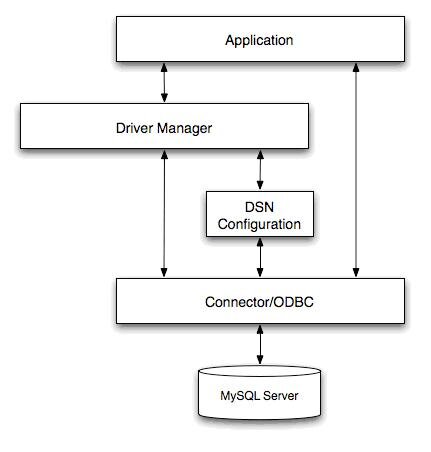
So how does this bridge work? The JDBC architecture is designed to be flexible and abstract away the messy details of each specific database. It consists of two main layers: the JDBC API and the JDBC Driver Manager.
-
JDBC API: This is what you, the developer, interact with. It provides the classes and interfaces (like
Connection,Statement, andResultSet) to connect to a database, run queries, and handle the results. -
JDBC Driver Manager: This component sits behind the scenes. Its main job is to load the correct database driver to handle the communication. Think of it as a switchboard operator connecting your call to the right department.
When your application wants to connect to a database, it tells the Driver Manager which one. The Driver Manager then finds and uses the appropriate JDBC Driver, a specific piece of software that knows how to translate the standard JDBC calls into the native language of that particular database.
Key Components
When you use JDBC, you'll work with a few core components. Understanding their roles is key to understanding the whole process.
| Component | Role |
|---|---|
Driver | A piece of software that translates generic JDBC commands into the specific language of a particular database (e.g., a MySQL driver). |
DriverManager | Manages a list of database drivers. It matches a connection request from the application to the correct driver. |
Connection | Represents an active session with the database. It's the pipeline through which you send commands and receive data. |
Statement | An object used to send a specific SQL command (like SELECT, INSERT, or UPDATE) to the database. |
ResultSet | Holds the data returned from a SELECT query. You can think of it as a temporary table or a spreadsheet living in your application's memory. |
A typical workflow involves getting a Connection from the DriverManager, creating a Statement from that connection, executing a query, and then processing the data that comes back in a ResultSet.
JDBC in Action
Let's walk through the role of JDBC in a simple scenario: fetching a user's name from a users table.
- Load the Driver: First, the application ensures the correct JDBC driver is available. The
DriverManagerfinds this driver. - Establish Connection: The application asks the
DriverManagerfor a connection to a specific database, providing details like the database URL, username, and password. - Create a Statement: Once connected, the application creates a
Statementobject. - Execute Query: The application uses the
Statementobject to send an SQL query, likeSELECT name FROM users WHERE id = 123;, to the database. - Process Results: The database runs the query and sends the data back. JDBC packages this data into a
ResultSetobject. The application can then loop through theResultSetto extract the user's name. - Close Resources: Finally, to free up resources, the application closes the
ResultSet, theStatement, and theConnection.
This cycle is the foundation of all database interactions in a Java application. By providing a standard, universal API, JDBC makes this process consistent and manageable, no matter which database you're working with.
What is the primary role of the JDBC Driver Manager in the JDBC architecture?
In the JDBC API, which object is used to hold the data returned from a database query like SELECT?
With JDBC, you have the fundamental tool for connecting your Java applications to the world of relational databases.