Introduction to SolidWorks
Introduction to SolidWorks
What is SolidWorks?
SolidWorks is a type of software called computer-aided design, or CAD. Think of it as a digital workshop for engineers and designers. Instead of using pencil and paper to draft blueprints, they use SolidWorks to build 3D models of products directly on their computer. These aren't just simple pictures; they're detailed, virtual versions of real-world objects that can be measured, modified, and tested before a single physical part is ever made.
This process of creating 3D models is known as solid modeling. It allows you to design everything from a simple screw to a complex car engine. Because the models are virtual, you can easily change dimensions, test how parts fit together, and see how a product will look from every angle.
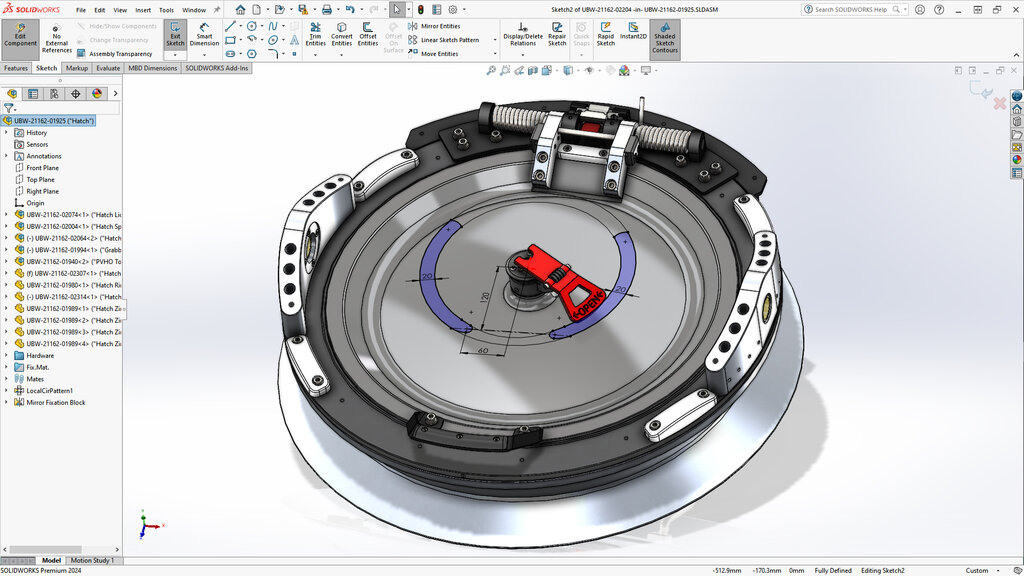
The User Interface
When you first open SolidWorks, the screen is divided into a few key areas. Understanding these areas is the first step to navigating the software.
Here's a breakdown of the main components:
- CommandManager: This is the ribbon of tools and commands that runs across the top of the screen. It's where you'll find everything you need to create sketches, build 3D features, and more.
- FeatureManager Design Tree: Located on the left side, this is like a recipe or history of your design. Every sketch, extrusion, and cut you make is listed here in the order you created it. You can click on any item to edit it.
- Graphics Area: This is the main, large window where you build and view your 3D model. You can rotate, pan, and zoom to see your design from any perspective.
From Sketch to Solid
Creating a model in SolidWorks usually follows a simple, two-step process. First you draw a 2D shape, then you give it depth to make it 3D.
The core workflow is: create a 2D sketch, then use a feature to turn it into a 3D solid.
A sketch is a flat, 2D drawing that forms the foundation of a 3D shape. You use basic sketch tools like Line, Circle, and Rectangle to draw a profile. For example, to make a cylinder, you would start by sketching a circle.
Once your sketch is complete, you use a feature to give it volume. The most common feature is called Extruded Boss/Base. This tool takes your 2D sketch and pulls it into the third dimension, like pushing dough through a cookie cutter. To turn your circle sketch into a cylinder, you would extrude it to a specific height.
Another fundamental tool is the Extruded Cut. It works like the opposite of an extrusion. You sketch a 2D profile on the face of an existing solid part and then use the cut feature to remove material. This is how you create holes, pockets, and other negative features.
Who Uses SolidWorks?
SolidWorks is a versatile tool used across countless industries. Any company that designs and manufactures a physical product can benefit from it. The ability to create detailed, accurate 3D models streamlines the entire product development process, from initial concept to final manufacturing.
| Industry | Example Applications |
|---|---|
| Consumer Products | Designing electronics, furniture, kitchen appliances, and toys. |
| Automotive & Aerospace | Modeling engine components, car bodies, and aircraft structures. |
| Medical | Creating custom implants, surgical tools, and medical devices. |
| Industrial Machinery | Designing factory equipment, automation systems, and heavy machinery. |
By understanding these fundamentals, you have a solid foundation for exploring the world of 3D design. The core process of sketching a shape and then giving it dimension is the basis for nearly every object you'll create.