Introduction to Relational Databases
Introduction to Relational Databases
Organizing Information
Imagine you have a massive collection of CDs from the 90s. If you just tossed them in a giant box, finding a specific album would be a nightmare. You'd have to dig through everything. A better way would be to get a shelf, and organize them alphabetically by artist. Now, finding what you want is simple.
A relational database does the same thing for data. It's a system for storing information in an organized way, making it easy to find, update, and manage. Instead of one giant, messy box, it uses a collection of neat, orderly tables.
The main purpose of a relational database is to store and retrieve data with speed and reliability, ensuring that information is consistent and accurate.
Before this model became popular, data was often stored in hierarchical structures, like a family tree, or as simple files. These systems worked, but they were rigid. If you needed to change how your data was organized, it often required a complete overhaul. Relational databases introduced a more flexible and intuitive way to structure information, based on logic and relationships.
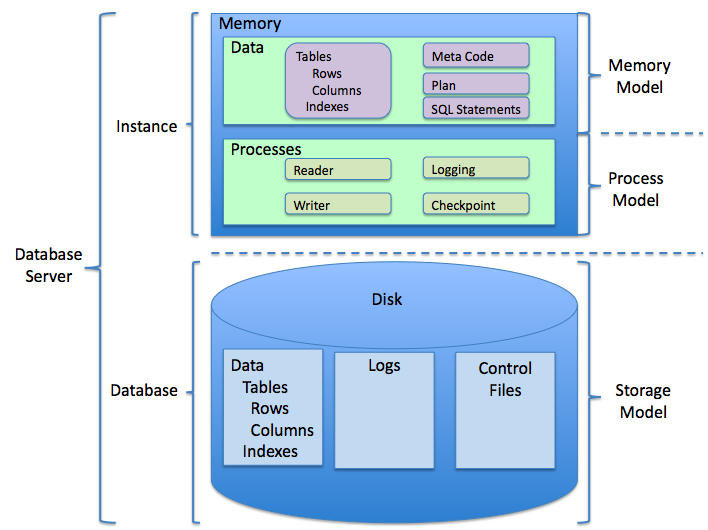
The Building Blocks
The structure of a relational database is simple and powerful. It's built on three core concepts: tables, rows, and columns. If you've ever used a spreadsheet, you're already familiar with the basic idea.
Table
noun
A collection of related data organized in a grid format. In relational database theory, a table is also called a relation.
Row
noun
A single record or entry in a table. Each row represents one complete item. It's also known as a tuple.
Column
noun
A vertical field in a table that contains a specific type of information for each row. A column is also called an attribute.
Let's look at a simple table for storing user information.
| UserID | Name | |
|---|---|---|
| 101 | Alice Johnson | alice.j@example.com |
| 102 | Bob Smith | bobsmith@example.com |
| 103 | Charlie Brown | charlieb@example.com |
Here, the entire grid is the Users table. Each horizontal line is a row, representing one user. Each vertical section (UserID, Name, Email) is a column, describing a piece of information about each user.
Connecting the Dots
The real power of this model comes from the "relational" part. We can create relationships between tables to link data together. This helps us avoid duplicating information and keeps our data clean.
To do this, we use keys.
Primary Key
noun
A column (or set of columns) in a table whose values uniquely identify each row. No two rows can have the same primary key, and the primary key cannot be empty (null).
Now, imagine we also have an Orders table to track purchases. Instead of re-typing the customer's name and email for every order, we can just refer to their UserID. This is where foreign keys come in.
Foreign Key
noun
A column in one table that is used to link to the primary key in another table. It establishes the relationship between the two tables.
Ensuring Data Quality
Using keys helps maintain data integrity, which just means keeping the data in your database accurate and consistent. For example, a foreign key constraint can prevent you from adding an order for a UserID that doesn't exist in the Users table. This prevents "orphan" records that don't link to anything.
Databases enforce integrity through rules called constraints. You can set constraints to ensure a column never has an empty value, that all values in a column are unique, or that a value falls within a certain range (like a product rating from 1 to 5).
Data integrity is crucial because it ensures the information in the database can be trusted for decision-making.
The software that manages all this—creating tables, enforcing constraints, and running queries—is called a Relational Database Management System (RDBMS). Think of it as the librarian for your data library. It handles all the complex operations behind the scenes.
Examples of popular RDBMSs include MySQL, PostgreSQL, SQL Server, and Oracle. They all use a language called SQL (Structured Query Language) to interact with the data.
To recap, relational databases provide a structured, logical, and reliable way to manage information. By organizing data into tables and linking them with keys, they create a powerful foundation for applications of all sizes.