Introduction to Python Programming
Python Basics
Setting Up Your Workspace
Before you can write Python code, you need to install the Python interpreter on your computer. Think of the interpreter as a translator that converts your Python code into instructions the computer can understand. You can download the latest version directly from the official website, python.org.
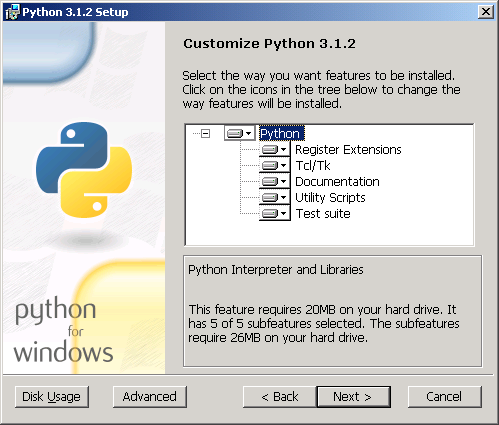
The installation also includes a simple program called IDLE (Integrated Development and Learning Environment). An IDE is basically a text editor with special tools for writing and running code. IDLE is a great place to start, but many other IDEs exist, like VS Code or PyCharm. For now, IDLE has everything you need.
Your First Python Script
It's a tradition for programmers to start with a program that just prints "Hello, World!" to the screen. It's a simple way to confirm everything is working correctly. In Python, this is incredibly straightforward.
print("Hello, World!")
To run this, open IDLE. You'll see a prompt that looks like >>>. Type the code above and press Enter. The text "Hello, World!" will appear on the next line. You've just written and executed your first Python program!
The print() part is a built-in function that tells Python to display whatever you put inside the parentheses.
Python's Rules
Every programming language has rules, just like human languages have grammar. These rules are called syntax. If you break them, the program won't run. Python's syntax is known for being clean and readable.
One of Python's most important and unique syntax rules is its use of indentation. Where other languages might use brackets or keywords to group code, Python uses whitespace. The amount of space at the beginning of a line is meaningful.
You don't need to worry about this for simple, one-line scripts. But as you start writing more complex programs, consistent indentation will be essential. It’s not just for style; it’s a rule the interpreter enforces.
Another key feature is comments. Comments are notes for yourself or other programmers to read. The Python interpreter completely ignores them. They're a way to document your code and make it easier to understand later.
# This is a comment. The interpreter will ignore it.
print("This line, however, will be executed.")
Any line that begins with a hash symbol (#) is a comment. It's good practice to use comments to explain the purpose of your code.
Basic Data Types
In programming, we work with different kinds of data. Python needs to know if you're working with a number, a piece of text, or something else. These categories are called data types. Let's look at the most basic ones.
| Data Type | Description | Example |
|---|---|---|
Integer (int) | A whole number, positive or negative. | 42, -15 |
Float (float) | A number with a decimal point. | 3.14, -0.001 |
String (str) | A sequence of characters, like text. | "Hello", 'Python' |
Boolean (bool) | Represents one of two values: True or False. | True, False |
Notice that strings are enclosed in either double quotes (") or single quotes ('). You can use either, but it's best to be consistent. Booleans are used for logical operations and always start with a capital letter.
Let's see them in action. You can assign these values to variables. A variable is just a name you give to a piece of data so you can refer to it later.
# An integer
my_age = 30

# A float
pi_value = 3.14159

# A string
greeting = "Welcome to Python!"

# A boolean
is_learning = True

# We can print them to see their values
print(my_age)
print(greeting)
Here, my_age, pi_value, greeting, and is_learning are variables. The equals sign (=) is the assignment operator; it assigns the value on the right to the variable on the left.
What is the primary role of the Python interpreter?
Which line of code will correctly print the text "Hello, World!" to the screen?
You now have the fundamental building blocks for writing Python. You've set up your environment, written a script, and learned about Python's syntax and basic data types. This foundation is the key to everything that comes next.