Introduction to Python Programming
Introduction to Python
What is Python?
Python is a programming language, which is a way for humans to give instructions to computers. It was created in the late 1980s by Guido van Rossum, who wanted to build a language that was powerful but also easy to read and write. He named it after the British comedy troupe Monty Python.
The core philosophy behind Python is simplicity and readability. Its syntax is clean and straightforward, which means you can spend more time solving problems and less time wrestling with complicated code. Think of it like the difference between assembling furniture with clear, step-by-step instructions versus a single, confusing diagram.
Because it’s so versatile, Python is used almost everywhere. It powers parts of Instagram and Spotify, helps scientists analyze data from space telescopes, and allows developers to build artificial intelligence tools.

Getting Set Up
To start writing Python, you need two things: the Python interpreter and a code editor. The interpreter is a program that reads your Python code and translates it into instructions the computer can understand. A code editor is a program where you'll write and save your code.
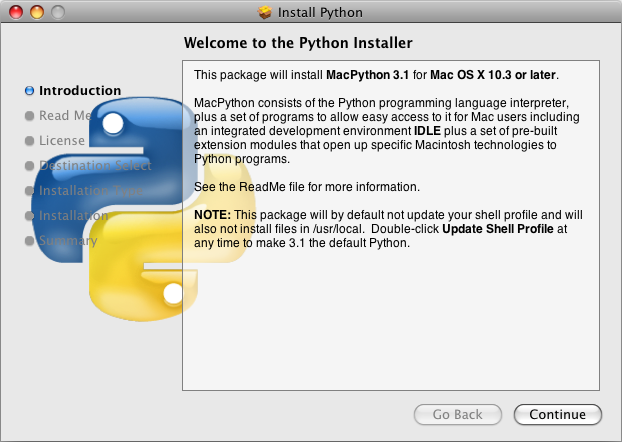
First, you'll need to install Python. The best place to get it is from the official website, python.org. You should download the latest stable version recommended for your operating system (like Windows, macOS, or Linux). During installation, you'll see a screen similar to the one below. On Windows, it's very important to check the box that says "Add Python to PATH." This makes it much easier to run your code from anywhere on your computer.
Next, you need a place to write code. While you could use a simple text editor, most programmers use an Integrated Development Environment (IDE). An IDE is a code editor with extra features that make programming easier, like syntax highlighting (coloring your code to make it more readable) and debugging tools (to help you find and fix errors).
A great, free, and popular IDE for beginners and professionals alike is Visual Studio Code (VS Code). After installing it, you'll want to add the official Python extension, which gives you all the tools you need to write and run Python code right inside the editor.

Your First Script
It's a tradition in programming to make your first program display the message "Hello, World!" on the screen. Let's do that in Python.
Open your IDE, create a new file, and save it as hello.py. The .py extension tells your computer that this is a Python file. Now, type the following line of code into the file:
print("Hello, World!")
That’s it! In this line, print() is a built-in Python function that displays text on the screen. The text you want to display goes inside the parentheses and is wrapped in quotation marks.
To run your script, open a terminal or command prompt. If you're using an IDE like VS Code, it will have a built-in terminal you can open. Navigate to the directory where you saved hello.py and type the following command, then press Enter:
python hello.py
If everything is set up correctly, you'll see this output:
Hello, World!
Congratulations, you've just written and executed your first Python program.
What is the primary philosophy behind Python's design?
Which line of code will correctly print the message Hello, Python! to the screen?
That's the basic process of creating and running a Python script. Now you have a foundation to build on as you learn more about what this powerful language can do.