Introduction to Python Programming
Introduction to Python
What Is Python?
Python is a popular programming language known for its simple, readable syntax. It was created in the late 1980s by Guido van Rossum, who wanted a language that was easy to read and write. The name doesn't come from a snake, but from the British comedy group Monty Python's Flying Circus.

Python's design philosophy emphasizes code readability. This makes it a great language for beginners. It's also incredibly versatile. Programmers use Python for a huge range of tasks, from building websites and analyzing data to creating artificial intelligence and automating repetitive jobs. Its large standard library provides tools for many common tasks, so you don't have to write code from scratch.
Key Features:
- Easy to Learn: Clean syntax that reads like English.
- Versatile: Used in web development, data science, AI, and more.
- Large Community: A massive global community offers support and resources.
Getting Set Up
Before you can write Python code, you need to install the Python interpreter on your computer. The interpreter is a program that reads your Python code and carries out its instructions.
You can download the official Python interpreter from python.org. The site automatically suggests the best version for your operating system, whether it's Windows, macOS, or Linux.
After installing Python, you'll need a place to write your code. While you can use a basic text editor, most programmers use an Integrated Development Environment, or IDE. An IDE is a software application that provides comprehensive facilities to programmers for software development. Think of it as a specialized workshop with all the tools you need, like a smart code editor, a debugger to find errors, and tools to run your code easily.

Two of the most popular IDEs for Python are Visual Studio Code (VS Code) and PyCharm. VS Code is a lightweight but powerful code editor with thousands of extensions that let you customize it for your needs. PyCharm is a more specialized IDE built specifically for Python development, with many powerful features ready out of the box. For now, you can start with any simple text editor or even Python's built-in IDLE, which comes with the standard installation.
Your First Program
It's a long-standing tradition in programming to make your first program display the message "Hello, World!". This simple task confirms that your environment is set up correctly and you're ready to start coding.
In Python, this is incredibly straightforward. You use a built-in function called print(). A function is a named block of code that performs a specific task. The print() function's task is to display whatever you put inside its parentheses on the screen.
print("Hello, World!")
To run this, you can open your computer's terminal or command prompt. Type python (or python3 on some systems) and press Enter. This will start the Python interpreter. Now, type the code above and press Enter again. You should see "Hello, World!" printed back at you.
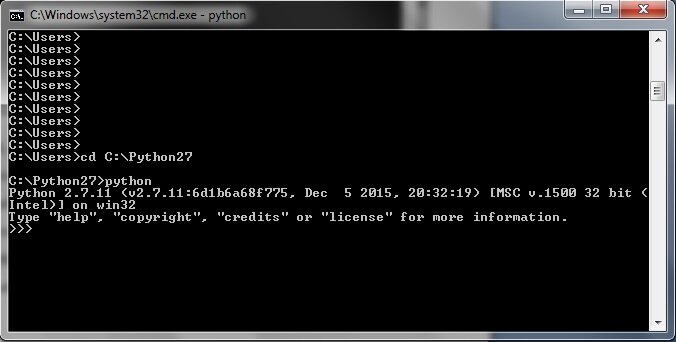
Alternatively, you can save the code in a file, for example, hello.py. Then, in your terminal, navigate to the directory where you saved the file and run the command python hello.py. The result will be the same. Congratulations, you've just written and executed your first Python program!
Where does the name for the Python programming language come from?
What is the primary role of the Python interpreter?
That's your first step into the world of Python. You've learned what it is, set up your environment, and run a simple program. Now you're ready to explore what else this powerful language can do.