Introduction to Python Programming
Setting Up Python
Getting Python on Your Machine
Before you can write Python code, you need to install it on your computer. Think of it like setting up a workshop before you start building. The first step is to download the official installer from the Python website, python.org. It's free and maintained by the Python Software Foundation, a non-profit dedicated to the language.
Head to the downloads page. The website will usually detect your operating system and suggest the best version for you. You'll see options for Windows, macOS, and Linux.
The Installation Process
Once you've downloaded the installer, the steps vary slightly depending on your operating system.
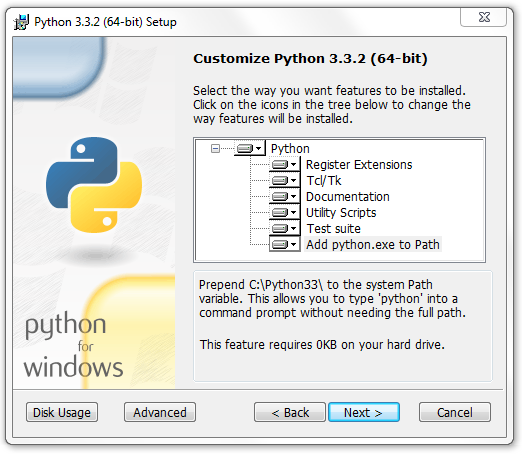
For Windows users, there's one crucial step: On the first screen of the installer, make sure to check the box that says "Add python.exe to PATH". This tells your computer where to find Python, making it much easier to run your code from the command line later on.
For macOS, the process is straightforward. Open the downloaded .pkg file and follow the on-screen instructions. It’s a standard Mac installation that you've likely done before with other applications.
For Linux, you might not need to do anything at all. Many Linux distributions come with Python already installed. To check, open your terminal and type python3 --version. If you see a version number, you're all set. If not, you can install it using your distribution's package manager. For Debian-based systems like Ubuntu, the command is simple.
sudo apt update
sudo apt install python3
Your Coding Workspace
You can write Python code in a simple text editor, but it's much easier to use an Integrated Development Environment, or IDE. An IDE is software that combines a code editor, a debugger, and other helpful tools into one application. It’s like having a smart assistant that helps you write, test, and fix your code.
For beginners, Thonny is an excellent choice. It's designed specifically for learning Python. It has a clean, simple interface and comes with Python built-in, so you don't have to worry about complex configuration. Features like its simple debugger, which lets you see how your variables change as your code runs step-by-step, are incredibly useful when you're just starting out.

To get Thonny, visit its website at thonny.org and download the installer for your operating system. The installation is quick and easy. Once it's set up, you'll have a complete environment ready for you to start writing your first Python programs.