Introduction to n8n Workflow Automation
Introduction to Workflow Automation
What is Workflow Automation?
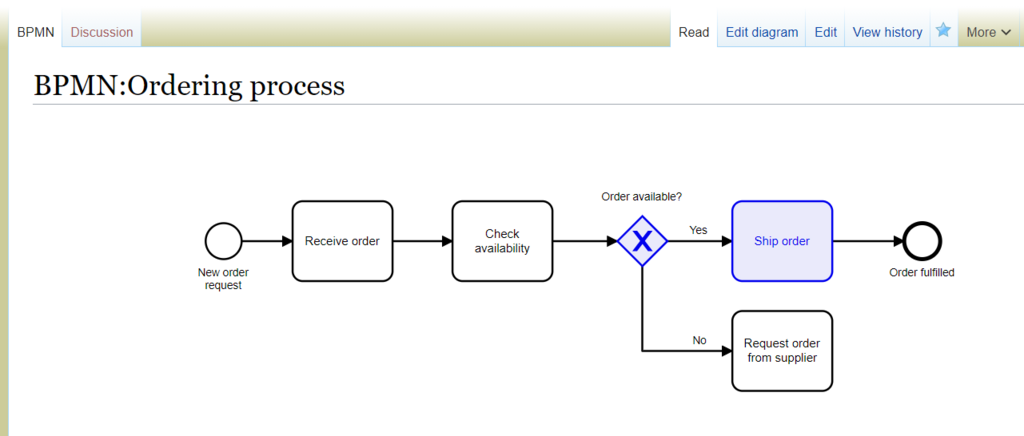
Think about a task you do over and over. Maybe it's sending a weekly report, onboarding a new customer, or just copying information from one app to another. A series of steps like this is called a workflow. Workflow automation is simply using technology to make those steps happen on their own, without you having to manually do each one.
Imagine a digital assembly line. Instead of you moving a part from one station to the next, a system does it for you. It takes an initial trigger, like a new email arriving, and then follows a pre-set list of instructions to complete the job. This could involve saving an attachment to a specific folder, sending a notification to a team chat, and adding a task to your to-do list, all in the blink of an eye.
The Big Wins of Automation
Automating tasks isn't just about convenience; it fundamentally changes how work gets done. The benefits are clear and immediate.
The first big win is saving time. Every minute spent on a repetitive, manual task is a minute not spent on creative problem-solving or strategic thinking. When you automate the busywork, you free up yourself and your team to focus on the things that truly require a human touch.
Next is accuracy. Humans are great at many things, but performing the same boring task perfectly a thousand times isn't one of them. We get tired, distracted, and make small mistakes. An automated system, on the other hand, will execute a task exactly the same way every single time. This drastically reduces manual errors, whether it's typos in data entry or forgetting a step in a process.
When tasks are completed faster and with fewer errors, overall productivity soars. Processes become smoother and more reliable. This allows teams to accomplish more without working longer hours, leading to better results and happier, more engaged employees.
Tools of the Trade
There isn't one single way to automate workflows. A whole ecosystem of tools exists to help you build these digital assembly lines, each with a different approach. Some are designed for simple, straightforward connections, while others offer deep flexibility for complex, multi-step processes.
| Tool | Primary Focus |
|---|---|
| Zapier / Make | User-friendly interfaces for connecting cloud apps. |
| IFTTT | Simple automations for consumer apps and smart devices. |
| Enterprise Platforms | Heavy-duty solutions for large corporate processes. |
| n8n | Flexible, powerful automation for technical users. |
These tools act as the glue between your different applications, allowing them to talk to each other and share data automatically. Understanding the basic concept of triggers and actions is the key to unlocking the power of any of these platforms.
What is workflow automation?
According to the text, what is a primary benefit of automating tasks?