Introduction to Mobile App Development
Introduction to Mobile App Development
The World in Your Pocket
Not long ago, a phone was just for making calls. Maybe it had a simple game like Snake to pass the time. The idea of a phone running complex software seemed like science fiction. Then came the smartphone, and with it, the App Store. This shift changed everything. Suddenly, your phone wasn't just a communication device; it was a customizable tool, a source of entertainment, and a window to the internet.

This evolution was driven by the creation of mobile operating systems, like Apple's iOS and Google's Android. These platforms provided a stable environment for developers to build and distribute their own applications. The result was an explosion of creativity. Developers created apps for everything from tracking your fitness to managing your finances, turning the phone into an indispensable part of modern life.
Platforms and App Types
Today, two major platforms dominate the mobile world: iOS and Android. While they offer similar experiences, they are built differently, which means apps must be developed specifically for them. Think of it like trying to play a PlayStation game on an Xbox. It just doesn't work without the right format.
Because of this, developers have a few ways to build an app. The path they choose depends on their budget, timeline, and what they want the app to do. There are three main types of applications.
- Native Apps: These are built for one specific platform. Apps for iOS are typically written in languages called Swift or Objective-C, while Android apps use Kotlin or Java. Because they're tailored to the device, they offer the best performance and user experience. They can also fully access device features like the camera, GPS, and contact list.
- Web Apps: These aren't really apps in the traditional sense. They are websites that look and behave like native apps, but they run in a mobile browser. They are built using standard web technologies like HTML, CSS, and JavaScript. While they can't be downloaded from an app store, they are accessible on any device with a web browser.
- Hybrid Apps: This is the middle ground. Hybrid apps are built using web technologies, just like web apps, but they are then wrapped in a native shell. This allows them to be downloaded from an app store and access some device features. It's a way to build one app that works on both iOS and Android, which can save time and money.
| Feature | Native App | Hybrid App | Web App |
|---|---|---|---|
| Performance | Fastest | Moderate | Slowest |
| Platform Access | Full access to device features | Limited access | No direct access |
| App Store | Yes | Yes | No |
| Development | Platform-specific code | Single codebase | Single codebase |
| User Experience | Highest quality | Good, but can feel less smooth | Dependent on the browser |
Tools of the Trade
Regardless of the type, every app starts in a development environment. This is the software that provides programmers with the tools they need to write, test, and debug their code. For native development, the two most common Integrated Development Environments (IDEs) are Xcode for iOS apps and Android Studio for Android apps.
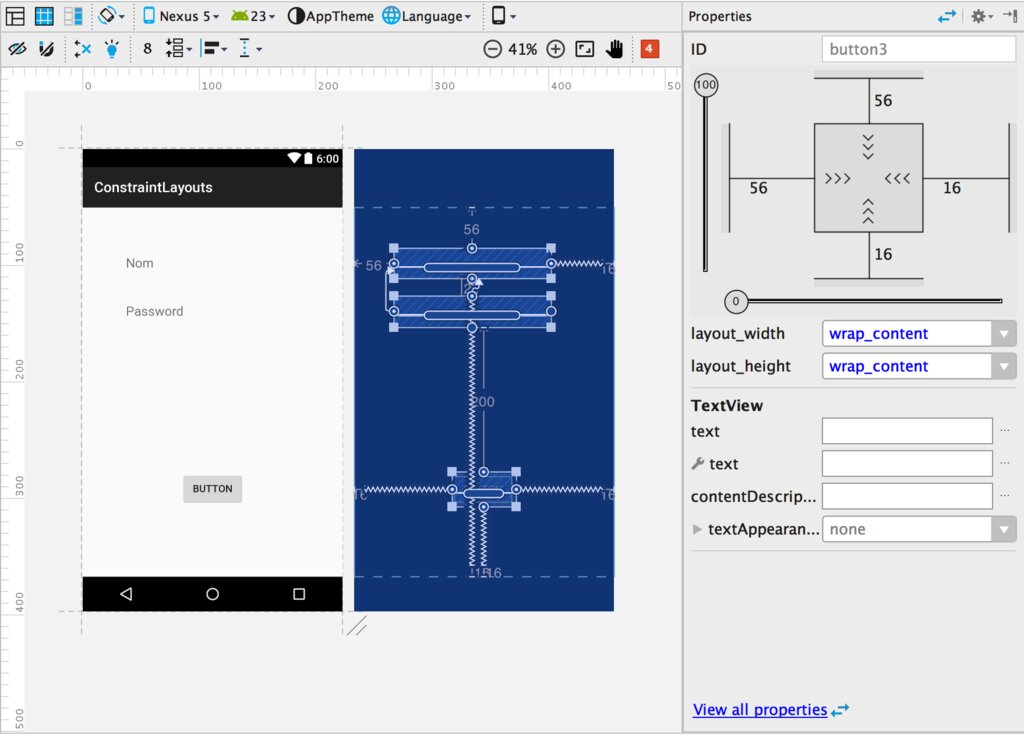
These environments come packed with features like code editors, simulators to test the app on a virtual device, and tools for analyzing performance. Understanding these platforms and tools is the first step in the journey of creating an application from scratch.
Ready to check your understanding?
Why must mobile applications typically be developed separately for iOS and Android?
Which type of application is built using standard web technologies like HTML and CSS but runs inside a mobile browser?
You now have a solid foundation in what mobile apps are, where they came from, and the different ways they can be built. This groundwork is essential for everything that comes next.