Introduction to Linux
Introduction to Linux
What Is Linux?
At its core, Linux is an operating system kernel. The kernel is the central part of an OS; it's the bridge between a computer's hardware and its software. While most people say "Linux" to refer to a whole operating system, they're technically talking about a system that uses the Linux kernel at its heart.
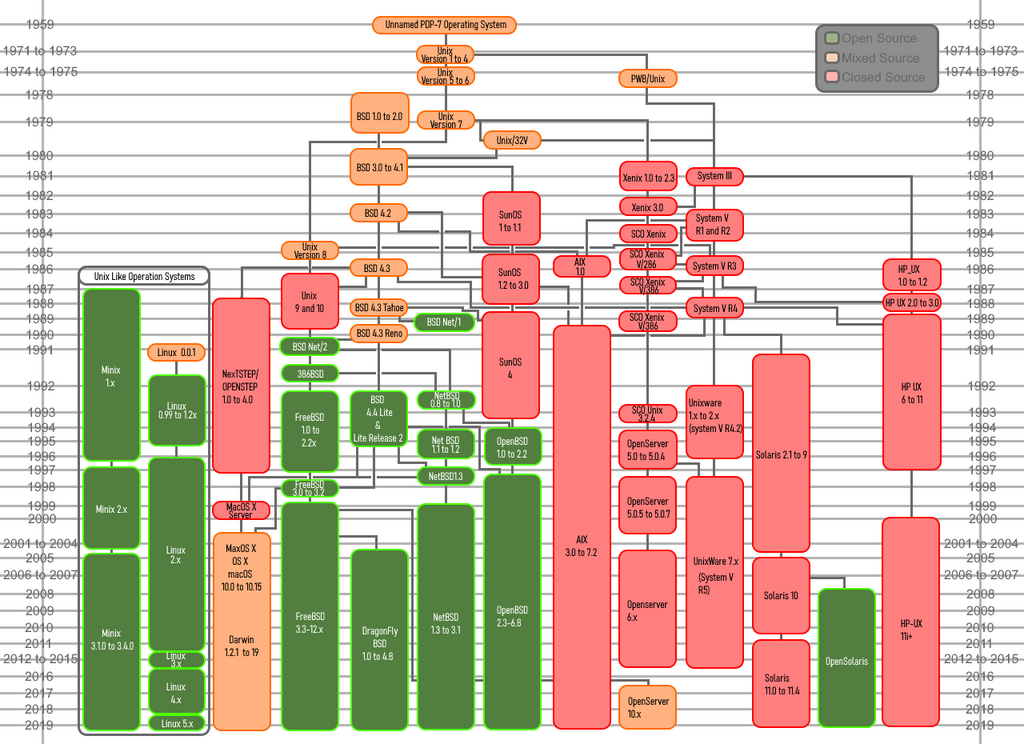
It all started in 1991 with a Finnish student named Linus Torvalds. He wanted to create a free and open-source alternative to MINIX, another Unix-like operating system used in his university courses. He posted about his hobby project online, and a community of developers quickly grew around it.
Interestingly, Torvalds' project was just one piece of the puzzle. At the same time, the GNU Project, led by Richard Stallman, had created a nearly complete set of free software tools for an operating system, but they were missing a kernel. When the Linux kernel was combined with the GNU tools, a complete, free operating system was born.
Why Linux Matters
Today, Linux is everywhere, even if you don't see it. It's the backbone of the internet, running on the majority of web servers. The Android operating system on your phone is built on top of the Linux kernel. It powers the world's fastest supercomputers and countless small devices, from smart TVs to home routers.
Why is it so popular? A few key reasons:
- Open Source: Anyone can view, modify, and distribute the source code. This global collaboration has led to a stable, secure, and constantly improving system.
- Stability: Linux systems are known for their reliability and ability to run for years without needing a reboot.
- Flexibility: It can be customized for almost any task, from running a massive data center to powering a tiny embedded device.
Distributions
You don't just install "Linux." Instead, you choose a Linux distribution, often called a "distro." A distribution is a complete operating system package that includes the Linux kernel, the GNU tools, a graphical user interface, and a selection of pre-installed applications.
There are hundreds of distributions, each with a different focus. Some are designed to be user-friendly for beginners, while others are built for specific tasks like scientific research, multimedia production, or cybersecurity.
Here are a few popular examples:
- Ubuntu: A great starting point for new users. It's known for its ease of installation and use.
- Fedora: A cutting-edge distro that often includes the latest software and technologies.
- Debian: The foundation for many other distributions, including Ubuntu. It's famous for its stability.
- Arch Linux: A minimalist distribution that gives you complete control over your system, but requires more technical knowledge.
Choosing a distribution is about finding the right fit for your needs and experience level. The beauty of Linux is that you have the freedom to choose.
Think of it like choosing a car. All cars have an engine, wheels, and a steering wheel, but a sports car is very different from a minivan. They're all cars, but they are packaged and tuned for different purposes. Linux distributions are similar; they all share the same kernel, but they provide different experiences and tools out of the box.
At its most fundamental level, what is Linux?
Which of the following best describes a Linux 'distribution' or 'distro'?
Now that you have a foundational understanding of what Linux is and where it came from, we can start to explore how to interact with it.