Introduction to iOS App Development
Swift Basics
Getting Started with Swift
Swift is the modern programming language for building apps on Apple platforms. It's designed to be safe, fast, and expressive. Before you can write code, you need the right tool: Xcode. Xcode is the integrated development environment (IDE) for all things Apple. It includes a code editor, a compiler, debugging tools, and a special feature we'll use called Playgrounds.
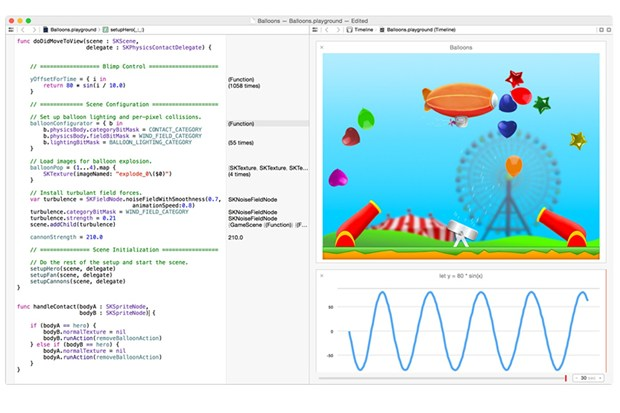
A Playground is an interactive environment in Xcode where you can write Swift code and see the results immediately. It's perfect for learning and experimenting.
To get started, open Xcode and go to File > New > Playground. Choose a blank template, name it whatever you like, and you're ready to go. You'll see a screen split into two parts: a code editor on the left and a results panel on the right.
Variables and Constants
In programming, you need a way to store and manage information. Swift gives you two ways to do this: variables and constants.
Think of them as labeled boxes. You can put something inside the box and give it a name so you can find it later.
constant
noun
A value that cannot be changed once it is set. It's like writing a name on a box with a permanent marker.
You declare a constant using the let keyword. Once you assign a value to it, you can't change it. This is useful for values you know won't change, like a user's birthday or the number of days in a week.
let maxScore = 100
// If you try to change it, Xcode will show an error.
// maxScore = 110  <- This line would not work!
variable
noun
A value that can be changed after it is set. It's like using a pencil on the box's label, so you can erase it and write something new.
You declare a variable using the var keyword. You can update its value anytime you need.
var currentScore = 85
currentScore = 90 // This is perfectly fine.
Good practice in Swift is to prefer
letovervar. Start with constants, and only change them to variables if you know the value needs to change.
Common Data Types
Every variable or constant in Swift has a type. The type tells Swift what kind of data the container can hold. Swift is a type-safe language, which means it helps you be clear about the types of values your code can work with. If you try to put a word into a box meant for a number, Swift will catch the mistake.
Swift can often figure out the type on its own, a feature called type inference. For example, when you write let score = 100, Swift knows score is an integer. But you can also be explicit.
let welcomeMessage: String = "Hello, world!"
let year: Int = 2024
let pi: Double = 3.14159
let isVisible: Bool = true
Here are some of the most basic and common data types you'll use.
| Type | Description | Example |
|---|---|---|
String | A piece of text. | "Hello, Swift!" |
Int | A whole number. | 42, -10 |
Double | A number with a decimal point. | 3.14, 0.5 |
Bool | A true or false value. | true, false |
Controlling the Flow
Programs rarely run from top to bottom without any deviation. Often, you need to make decisions or repeat actions. This is called control flow.
Conditionals let your code make decisions. The most common is the
ifstatement.
An if statement checks whether a condition is true. If it is, it runs a block of code. You can also provide an else block to run if the condition is false.
var temperature = 75

if temperature > 80 {
    print("It's a hot day!")
} else {
    print("It's not too hot.")
}
// Prints: "It's not too hot."
When you need to repeat a task, you use a loop. A for-in loop is great for running a piece of code a specific number of times or for iterating over a collection of items.
// This loop runs 5 times
for i in 1...5 {
    print("This is number \(i)")
}

// Iterating over an array of names
let names = ["Alice", "Bob", "Charlie"]
for name in names {
    print("Hello, \(name)!")
}
The 1...5 syntax creates a range of numbers from 1 to 5, inclusive. The backslash and parentheses, \(i), inside the string is called string interpolation. It's a clean way to insert the value of a variable or constant directly into a string.
Now, let's test your understanding of these core concepts.
What is the primary purpose of Xcode?
You need to store a user's score in a game, which will change frequently. Which keyword should you use to declare the container for the score?
With these building blocks, you have a solid foundation for writing more complex programs in Swift. Experiment in your Playground to see what you can build.