Introduction to Integrated Development Environments
Introduction to IDEs
The Programmer's Workshop
You could write code using a basic text editor, like Notepad on Windows. It's possible, but it’s like trying to build a wooden chair with only a saw. You'd need a separate hammer for the nails, sandpaper for smoothing, and a measuring tape for accuracy. You’d be constantly switching between tools, and it would be slow and prone to errors.
An Integrated Development Environment, or IDE, is like a complete woodshop in a single application. It brings all the essential programming tools together into one cohesive workspace. Instead of juggling separate programs, you have everything you need in one place, designed to work together seamlessly.
An IDE is a self-contained package that allow you to write, compile, execute and debug code in the same place
Inside the Workshop
While features vary, most IDEs contain a few core components that make them so powerful. These are the power tools of the software world.
The Code Editor is the space where you write your code. Unlike a plain text editor, it understands programming languages. It colors different parts of your code (called syntax highlighting) to make it easier to read and spot mistakes. It also offers autocompletion, suggesting code as you type, which saves time and reduces typos.
The Compiler or Interpreter is the translator. It takes the code you wrote in a language like Python or Java and converts it into instructions the computer can actually understand and execute.
A Debugger is an essential tool for troubleshooting. When your program doesn't work as expected, a debugger lets you pause the execution at any point, inspect the state of your variables, and step through the code line by line to pinpoint exactly where things went wrong.
Build Automation Tools handle the repetitive but necessary tasks involved in turning your source code into a final, working application. This can include compiling multiple files, linking them together, and packaging them for distribution.
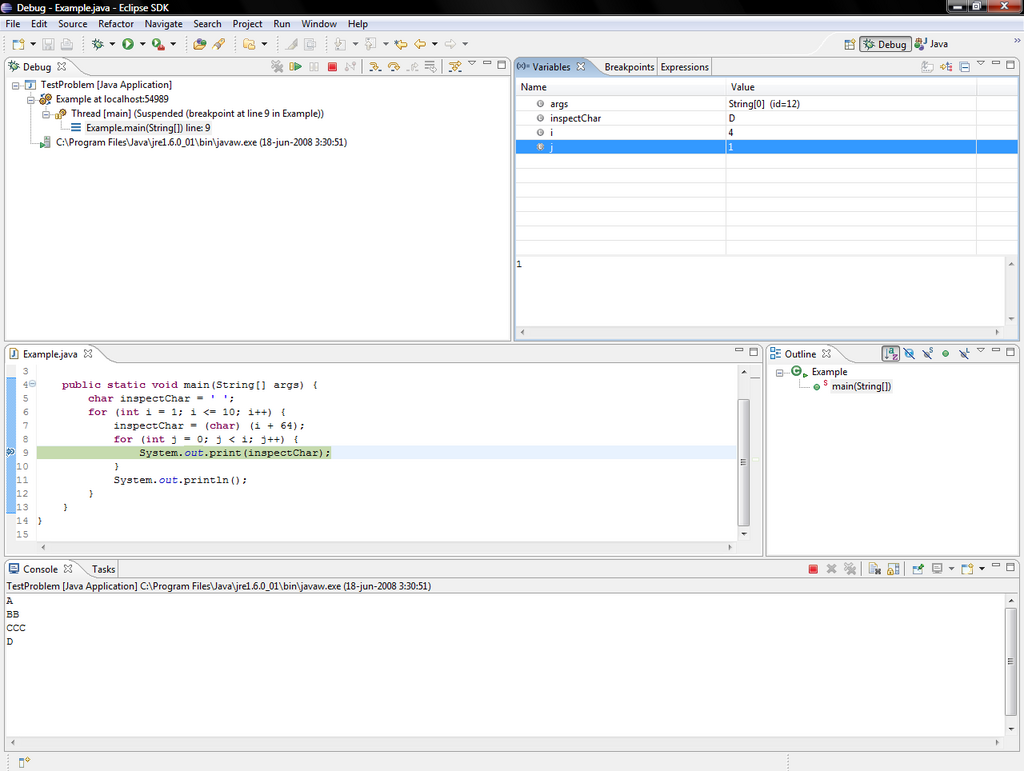
By combining these tools, IDEs create a fluid workflow. You can write, test, and fix your code all within the same window, dramatically speeding up the development cycle.
AI-powered coding assistants handle repetitive tasks such as code completion, documentation, and error detection, which boosts productivity.
Local vs Cloud
IDEs come in two main flavors: local and cloud-based. Each has its own set of trade-offs.
| Type | Pros | Cons |
|---|---|---|
| Local IDE | Runs directly on your computer; fast and responsive. Works offline. Highly customizable. | Requires installation and setup. Uses your computer's resources (CPU, RAM). Can be tricky to ensure team members have identical setups. |
| Cloud-based IDE | Accessible from any device with a web browser. Environments are standardized and easy to share. No installation needed. | Requires a stable internet connection. May have less performance than a local IDE. Can have subscription costs. |
A local IDE is a traditional application you install on your laptop or desktop. Popular examples include Visual Studio Code, PyCharm, and Eclipse. They offer top performance and deep integration with your operating system, making them a solid choice for intensive development.
A cloud-based IDE, like GitHub Codespaces or Replit, runs in your web browser. This means you can start coding on any machine without a lengthy setup process. It's fantastic for collaboration, as every team member can work in an identical, pre-configured environment, which helps eliminate the classic "it works on my machine" problem.
Choosing Your Toolkit
There's no single "best" IDE. The right one for you depends on your specific needs. Here are a few things to consider:
-
Language Support: While some IDEs are general-purpose, many are optimized for specific languages. PyCharm is fantastic for Python, while IntelliJ IDEA is a favorite among Java developers. Make sure the IDE has excellent support for the language you'll be using.
-
Operating System: Most modern IDEs work on Windows, macOS, and Linux, but it's always good to double-check compatibility.
-
Features: Do you need strong database tools? Integration with a specific version control system like Git? A powerful visual designer? Look at the feature set to see if it matches your workflow.
-
Cost: Many excellent IDEs are free and open-source, like VS Code. Others, especially those with specialized enterprise features, require a paid subscription. Often, there are free community editions or student licenses available.
Choosing the right IDE is essential to getting all the features that the Dart programming language provides us with.
Ultimately, an IDE is a tool to make you a more effective programmer. It automates the tedious parts of coding, helps you catch errors early, and lets you focus on the creative work of solving problems.