Introduction to HTML for Web Content
HTML Document Structure
Anatomy of a Webpage
Every webpage, from the simplest to the most complex, is built on a basic skeleton. This structure tells the web browser how to understand and display the content. Think of it like the frame of a house—it’s the essential foundation that everything else is built upon. Without it, you just have a pile of materials.
Let's look at the absolute bare-bones structure of an HTML document. Every single webpage starts with something that looks like this:
<!DOCTYPE html>
<html>
  <head>
    <title>My First Webpage</title>
  </head>
  <body>
    Hello, world!
  </body>
</html>
This might look a little cryptic, but each part has a very specific job. We'll break it down piece by piece.
The Document Declaration
The very first line of any HTML file must be the <!DOCTYPE html>. This isn't actually an HTML tag. It's an instruction, or a declaration, for the web browser.
This line tells the browser, "Hey, the document you are about to read is written in modern HTML (specifically, HTML5)."
By starting with this declaration, you ensure the browser uses the latest standards to render your page, which helps avoid weird bugs and inconsistent layouts. It's a simple line, but a crucial one. Always include it.
The Root and Its Children
Right after the DOCTYPE declaration comes the <html> element. This is the root element of the entire document. Every other element on the page is nested inside it. You'll see an opening <html> tag near the top and a closing </html> tag at the very end. It's the main container.
Inside the <html> element, there are two direct children: <head> and <body>. These two elements divide the document into two distinct sections.
One of HTML's main jobs is to give text structure so that a browser can display an HTML document the way its developer intends.
The Brains and The Body
A good way to think about the <head> and <body> sections is to compare them to a person. The <head> is like the brain, while the <body> is what everyone sees.
| Section | Purpose |
|---|---|
<head> | Contains metadata: information about the webpage. This is not displayed on the page. |
<body> | Contains the actual content: all the text, images, and links that the user sees. |
The <head> section holds things like the page title (which appears in the browser tab), links to stylesheets (CSS), and other behind-the-scenes information. In our example, <title>My First Webpage</title> tells the browser to display "My First Webpage" in the tab at the top of the browser window.
The <body> section is where all the visible content lives. In our simple example, the text "Hello, world!" is placed inside the <body>, so it will appear on the actual webpage.
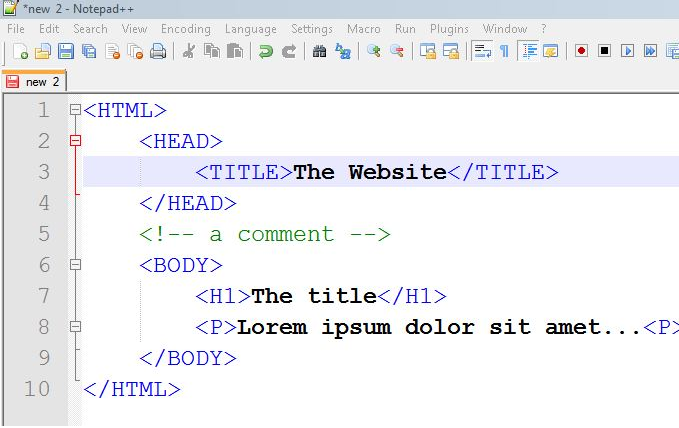
Every element that you want to show to your visitors must be placed between the opening <body> and closing </body> tags.
What is the primary purpose of the <!DOCTYPE html> declaration?
If you want to add a paragraph that users can see on your webpage, inside which pair of tags must it be placed?
And that's it. This fundamental structure—DOCTYPE, html, head, and body—is the starting point for every single page on the web. Understanding this hierarchy is the first step to building anything you can imagine.