Introduction to Full-Stack Development
Introduction to Web Development
The Skeleton and the Style
Every website you visit, from a simple blog to a massive online store, is built on a foundation of two core technologies: HTML and CSS. Think of them as the skeleton and the clothing of a webpage.
HTML, which stands for HyperText Markup Language, provides the basic structure. It's the skeleton. It tells the browser what each piece of content is—a heading, a paragraph, an image, a link. It's all about meaning and structure, not looks.
<!DOCTYPE html>
<html>
<head>
    <title>My First Page</title>
</head>
<body>
    <h1>This is a heading</h1>
    <p>This is a paragraph of text.</p>
</body>
</html>
Let's break that down. The <!DOCTYPE html> tells the browser it's reading an HTML document. The <html> element wraps everything. The <head> contains information about the page, like the title that appears in your browser tab. The <body> is where all the visible content lives.
Inside the body, we use tags like <h1> for the most important heading and <p> for a paragraph. These tags give the content its structure.

Adding Style with CSS
By itself, HTML is pretty plain. That's where CSS, or Cascading Style Sheets, comes in. CSS is the language of design. It tells the browser how to display the HTML elements. You use it to add colors, change fonts, set spacing, and create complex layouts.
CSS works by selecting an HTML element and then applying a set of styling rules to it. For example, you could select all <h1> elements and make them blue, or select all <p> elements and give them a specific font size.
/* This is a CSS comment */

body {
  font-family: sans-serif;
}

h1 {
  color: navy;
  font-size: 32px;
}

p {
  color: #333333; /* A dark gray color */
  line-height: 1.5;
}
In this example, h1 and p are the selectors. They target the HTML elements we want to style. Inside the curly braces {}, we have pairs of properties (like color or font-size) and values (like navy or 32px). This simple combination gives you precise control over the look and feel of your webpage.
HTML provides the structure (what the content is), while CSS provides the presentation (how the content looks).
Structuring the Page
Together, HTML and CSS build the entire visual experience of a website. HTML creates the different sections of a page, like a header, a main content area, a sidebar, and a footer. Then, CSS is used to arrange these sections. You can specify widths, heights, and positions to create anything from a simple one-column blog to a complex multi-column grid layout.
This separation of concerns is powerful. It keeps your content (HTML) clean and your styling (CSS) organized. You can completely change the look of a website just by changing the CSS, without ever touching the underlying HTML.
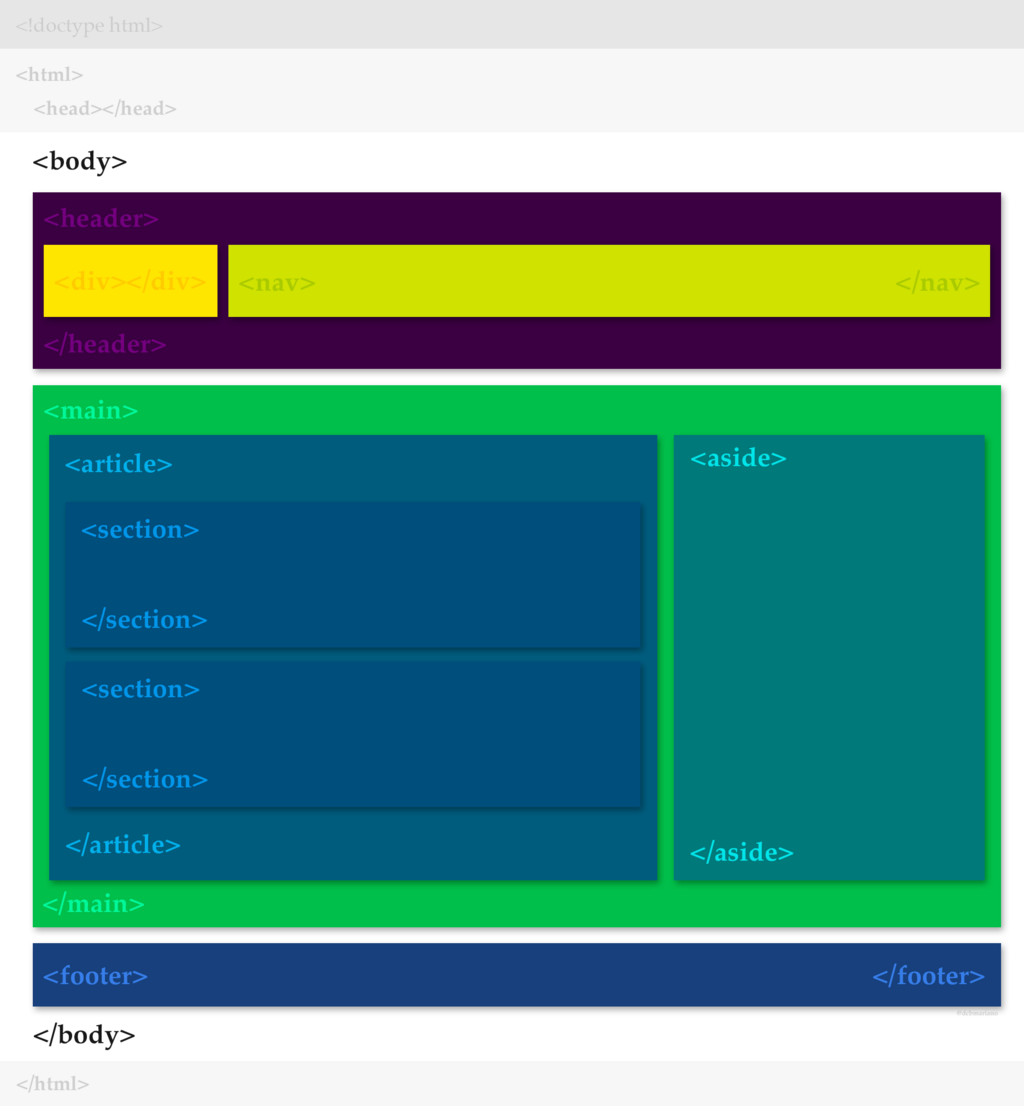
Let's review the key terms we've covered.
Ready to test your knowledge?
What is the primary role of HTML?
In the following CSS code, color is the ______.
h1 {
  color: navy;
}
Understanding these two languages is the first and most important step in web development. With a solid grasp of HTML for structure and CSS for styling, you have the foundation to build any website you can imagine.