Introduction to Computer Graphics
Digital Image Representation
Pixels vs. Paths
Every digital image you see, from a photo on your phone to a company's logo, is created in one of two fundamental ways: as a grid of tiny dots or as a set of mathematical instructions. These two methods are called raster and vector graphics, and understanding the difference is key to working with digital images.
Raster Graphics
Raster images are like mosaics. They are made up of a fixed grid of tiny squares called pixels. Each pixel is assigned a specific color, and when you view them all together, they form a complete picture.
Pixel
noun
Short for 'picture element,' it is the smallest single point or square of color on a digital screen or in a raster image.
Photographs are a perfect example of raster graphics. They capture complex color and light information, which is best represented by a dense grid of pixels. Common raster file types include JPEG, PNG, and GIF.
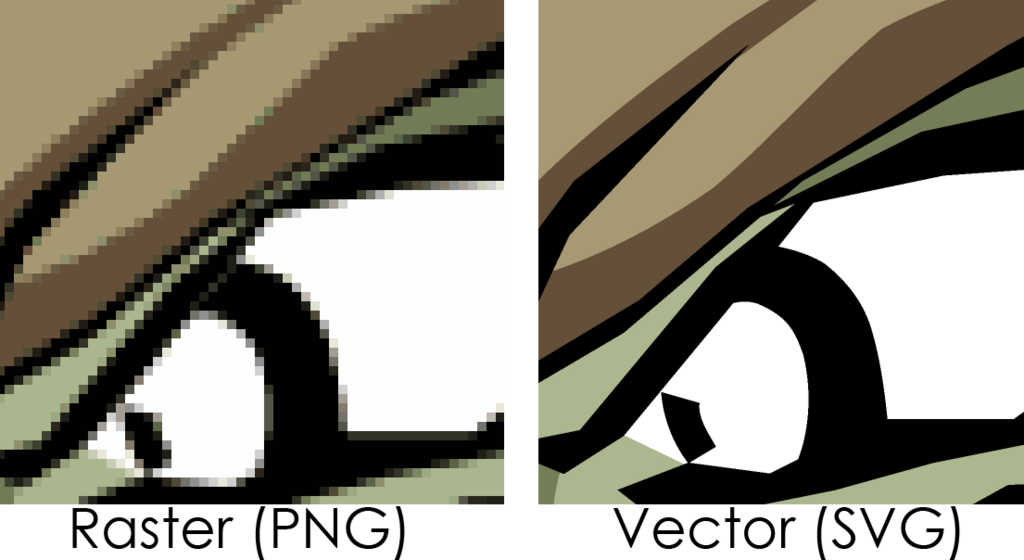
The main characteristic of raster images is that they are resolution-dependent. Their quality is tied to the number of pixels they contain. If you try to enlarge a raster image too much, the grid of pixels becomes visible, making the image look blocky or blurry. This is called pixelation.
Vector Graphics
Instead of using a grid of pixels, vector graphics use mathematical equations to define shapes, lines, and curves. Think of it like a set of instructions: "Draw a line from point A to point B, make it red, and then draw a circle with its center at point C." Because these instructions are mathematical, they can be scaled to any size without losing quality.
A vector image will look just as sharp on a business card as it will on a billboard. This makes it resolution-independent.
This scalability makes vector graphics ideal for logos, icons, and illustrations that need to be used in various sizes. The computer simply recalculates the math each time the image is resized, ensuring crisp, clean lines at any scale. Common vector file types include SVG, AI, and EPS.
Key Differences
Choosing between raster and vector depends entirely on the job at hand. Here’s a quick breakdown of their core differences.
| Feature | Raster Graphics | Vector Graphics |
|---|---|---|
| Made of | Pixels (a grid of dots) | Paths (mathematical equations) |
| Scaling | Loses quality when enlarged | Can be scaled to any size with no quality loss |
| Best For | Photographs, complex digital paintings | Logos, illustrations, icons, typography |
| File Size | Can be large, depending on resolution | Generally smaller, based on complexity |
| Common Types | JPG, PNG, GIF, TIFF | SVG, AI, EPS, PDF |
Time to review what you've learned.
Now, let's test your knowledge.
What are raster images primarily composed of?
If you need a company logo that can be scaled from a tiny business card to a giant billboard without losing quality, which format is the best choice?
Both raster and vector graphics are essential tools in digital design. Knowing when to use each type is the first step toward creating clean, professional-looking visuals.