Introduction to Assembly Language Programming
Computer Architecture
The Computer's Brain
At the heart of every computer is the Central Processing Unit, or CPU. Think of it as the computer's brain. It's responsible for executing commands and running the programs you use every day. Whether you're typing a document, playing a game, or browsing the web, the CPU is doing the heavy lifting, processing vast amounts of information at incredible speeds.

The CPU itself isn't a single entity. It's made up of a few key parts that work together to perform calculations and manage the flow of information. To understand how a computer thinks, we need to look at these core components.
The principal components of a CPU include the arithmetic logic unit (ALU), processor registers, and a control unit.
Let's break these down:
-
The Control Unit (CU): This is the director. It fetches instructions from the computer's memory and tells the other parts of the CPU what to do. It doesn't perform calculations itself, but it manages and coordinates all the computer's operations, like a traffic cop directing cars at a busy intersection.
-
The Arithmetic Logic Unit (ALU): This is the calculator. The ALU handles all the math (addition, subtraction) and logic (like comparing if one number is greater than another). When the control unit decodes an instruction that requires a calculation, it hands the task over to the ALU.
-
Registers: These are small, extremely fast storage locations right inside the CPU. The CPU uses registers as a temporary scratchpad to hold data it's currently working on. Because they're built directly into the processor, accessing data from a register is nearly instantaneous.
The Memory Hierarchy
Computers need a place to store data and instructions, but not all memory is created equal. There's a trade-off between speed, size, and cost. To balance this, computers use a memory hierarchy, a tiered system that organizes storage from the fastest (and smallest) to the slowest (and largest).
The CPU always tries to get data from the fastest available level.
-
Registers: As we mentioned, these are the fastest memory of all, located inside the CPU. They hold only the data the CPU is actively processing.
-
Cache: This is a small amount of very fast memory that's separate from the main memory but still close to the CPU. It acts as a buffer, storing frequently used data and instructions so the CPU doesn't have to wait for the slower main memory. You'll often see different levels of cache (L1, L2, L3), with L1 being the smallest and fastest.
-
RAM (Random Access Memory): This is the computer's main workshop. When you open a program, it's loaded from storage into RAM so the CPU can access it quickly. RAM is much larger than cache but also slower. It's volatile, meaning it forgets everything when the power is turned off.
Getting Information In and Out
The CPU and memory can't do much in isolation. They need to interact with the outside world through input and output (I/O) devices. Input devices get data into the computer, while output devices get data out.
-
Input: Your keyboard, mouse, microphone, and webcam are all input devices. They convert your physical actions or sounds into digital signals the computer can understand.
-
Output: Your monitor, speakers, and printer are output devices. They take the results of the computer's processing and present them in a way you can see or hear.
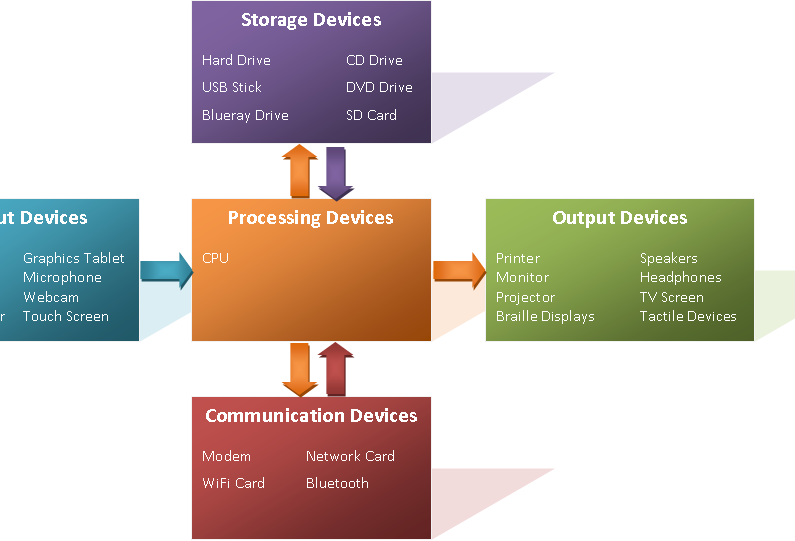
So, how does all this information move around? Data flows between the CPU, memory, and I/O devices along a set of electrical pathways called a bus. You can picture the bus as a highway system connecting all the major components of the computer, allowing them to send and receive data.
When you type on your keyboard, the signal travels along the bus to memory, the CPU fetches it for processing, and the result is sent back along the bus to your screen. This constant, high-speed exchange of data is what makes a computer work.
Which component is often referred to as the "brain" of the computer, responsible for executing commands and running programs?
What is the primary function of the Arithmetic Logic Unit (ALU)?
Understanding these fundamental building blocks—the CPU, memory, and I/O—is the first step to seeing how software can command hardware to perform amazing tasks.