Introduction to App Development
Introduction to App Development
What's in an App?
Think about the apps you use every day. You tap an icon, and a whole world opens up—a game, a social network, a tool for work. But what actually is an app? At its core, an app is just software designed to run on a mobile device, like a smartphone or tablet.
Today, the app world is dominated by two major platforms: Apple's iOS (for iPhones and iPads) and Google's Android. While they look and feel different, the fundamental building blocks of the apps running on them are surprisingly similar. You can think of an app like a restaurant. There's the part you experience—the dining room, the menu, the waiter—and the part you don't see, like the kitchen, that makes everything happen.
The Front End: What You See
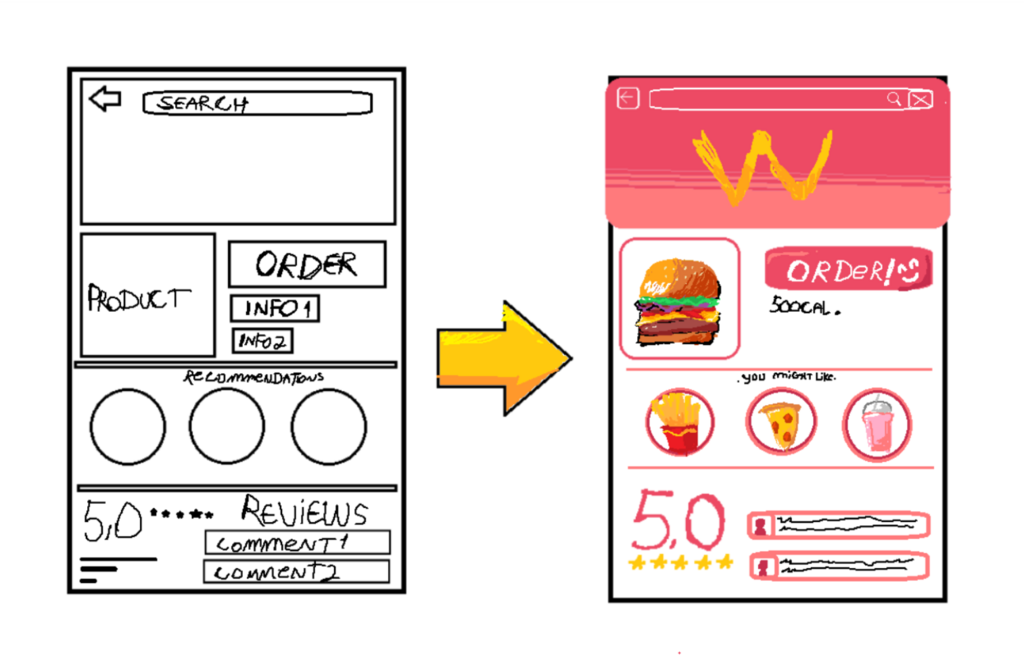
The part of the app you interact with is called the front end. This includes all the visual elements: buttons, text, images, and menus. It’s the layout, the colors, and the way things move when you touch the screen. The front end is responsible for the User Interface (UI), which is how the app looks, and the User Experience (UX), which is how it feels to use.
In our restaurant analogy, the front end is the entire dining experience. It's the decor, the lighting, the comfortable chairs, and the easy-to-read menu. A well-designed front end makes an app intuitive and enjoyable, just like a great restaurant atmosphere makes a meal more pleasant.
The Back End: The Engine Room
Behind every great front end is a powerful back end. This is the part of the app you don't see. It runs on servers, which are powerful computers that can be accessed over the internet. The back end does all the heavy lifting: it processes your requests, saves your information, and performs calculations.
When you post a photo, the front end sends the picture to the back end. The back end then stores it and makes sure your friends can see it in their feeds. In our restaurant, the back end is the kitchen. It takes your order (the request), cooks the food (processes the data), and sends it back out to your table (the response). You never see the kitchen chaos, only the delicious result.
This three-part structure—front end, back end, and database—is the foundation for most modern apps, from simple to-do lists to complex social networks.
Data Management and Hosting
So where does all this back-end code and data actually live? It can't stay on the developer's laptop forever. This is where hosting comes in.
Data management is the process of storing, organizing, and retrieving an app's information. This is usually handled by a database, which is a structured system for storing data. Think of it as a massive, hyper-organized digital filing cabinet.
Hosting is the service that provides the physical or virtual space to run the back end and store the data. When an app is hosted in "the cloud," it means it's running on a network of servers managed by a company like Amazon (AWS), Google (Google Cloud), or Microsoft (Azure). These companies rent out their computing power, so developers don't have to buy and maintain their own physical servers.
This setup ensures the app is always available, secure, and can handle a large number of users at once. It's the invisible infrastructure that makes the entire digital world run smoothly.
Now that you understand the basic parts, let's test your knowledge.
In the context of an app, what does the 'front end' refer to?
Which of the following tasks is primarily handled by an app's back end?
Understanding these core components is the first step in the journey of app development. It's the blueprint that helps turn a simple idea into a functional application in someone's hands.