Introduction to App Development
Introduction to Application Development
The Blueprint for an App
Every app, from a simple game on your phone to a complex business tool, starts not with a line of code, but with a plan. In the world of software, this plan is called the Software Development Life Cycle, or SDLC. Think of it as a recipe for building software. It breaks down the massive task of creating an application into a series of manageable steps, ensuring that the final product is well-made and actually does what people need it to do.
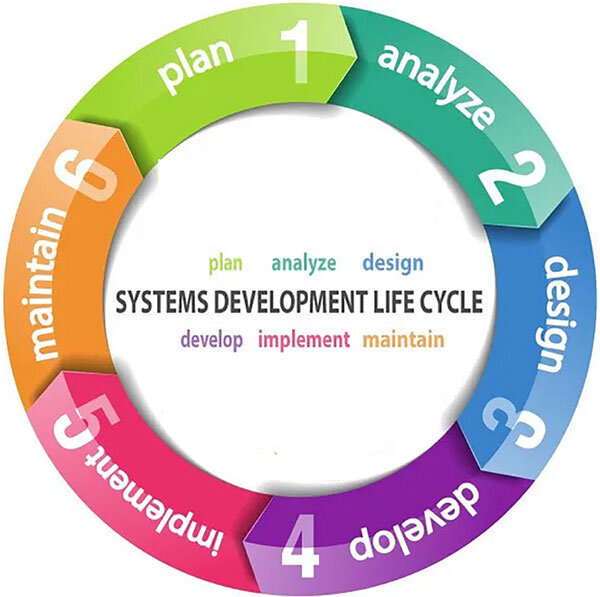
While there are many variations of the SDLC, they generally follow a similar pattern:
- Planning: Figuring out what the app should do, who it's for, and what resources are needed.
- Design: Creating the blueprint. This includes mapping out how the app will look (the user interface, or UI) and how it will feel to use (the user experience, or UX).
- Development: This is where developers write the actual code that brings the design to life.
- Testing: The app is put through its paces to find and fix bugs. Testers try everything they can to break it, so users don't have to.
- Deployment: The app is released to the public or the intended users. It's launched!
- Maintenance: The work isn't over. This phase involves fixing new bugs, adding features, and keeping the app running smoothly.
Following a life cycle like the SDLC turns a chaotic creative process into an organized, predictable one. It's the difference between building a house with a blueprint and just piling up bricks.
Where Will Your App Live?
Not all apps are created equal. One of the first decisions in the planning phase is determining what kind of application to build. They generally fall into three categories, based on where and how they run.
| Type | How You Access It | Where It Runs | Best For... |
|---|---|---|---|
| Web App | Through a web browser (like Chrome or Safari) | On a remote server | Accessibility from any device with internet |
| Mobile App | By downloading from an app store | Directly on a smartphone or tablet | On-the-go use and leveraging device features (like the camera) |
| Desktop App | By installing it directly on your computer | On your computer's operating system (like Windows or macOS) | Heavy-duty tasks that need lots of processing power |
For example, Google Docs is a web app; you access it through your browser without installing anything. Instagram is a mobile app, designed specifically for your phone. A program like Adobe Photoshop is a classic desktop app, installed on your computer to handle complex image editing.
The Team Behind the Screen
Building an application is a team sport. While one person can sometimes wear multiple hats, most professional projects involve a few key roles working together.
Here’s a breakdown of the core players:
Designers are the architects. They focus on the look and feel of the app. A User Interface (UI) Designer decides on the colors, fonts, and layout. A User Experience (UX) Designer focuses on how the app flows and whether it’s easy and enjoyable to use.
Developers, also known as software engineers or programmers, are the builders. They take the designers' blueprints and write the code that makes the application function. Some specialize in the front end (what you see and interact with), while others work on the back end (the servers, databases, and logic that work behind the scenes).
Testers, often called Quality Assurance (QA) Analysts, are the inspectors. Their job is to rigorously test the application to find bugs, glitches, or design flaws. They ensure the app is stable, secure, and works as expected before it reaches the user.
Now, let's test your understanding of these fundamental concepts.
What is the primary purpose of the Software Development Life Cycle (SDLC)?
A team member who focuses on how an application flows and whether it's easy and enjoyable to use is known as a:
Understanding this structure—the life cycle, the types of apps, and the people who build them—is the first step in turning a great idea into a real application.