Introduction to 3D Modeling
Introduction to 3D Modeling
What Is 3D Modeling?
3D modeling is the process of creating a digital, three-dimensional representation of any object or surface. Think of it as digital sculpting. Instead of clay or stone, you use software to build an object on your computer. This object, called a 3D model, has height, width, and depth, just like objects in the real world.
These models are everywhere. The characters in your favorite video games, the stunning special effects in movies, the architectural previews of new buildings, and even the product designs for new phones all start as 3D models. They are used in medicine to visualize organs, in engineering to prototype new parts, and in advertising to create eye-catching visuals.
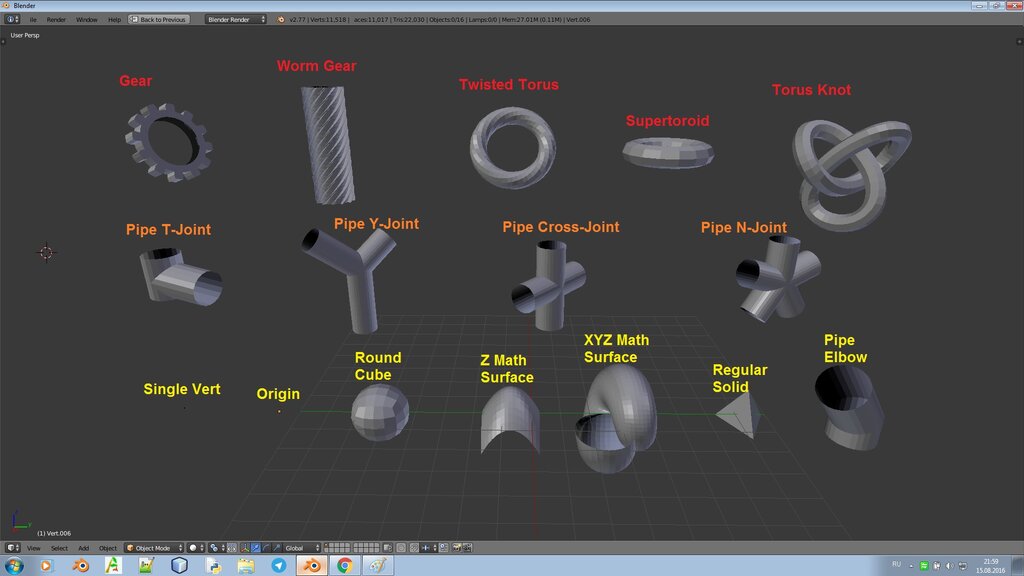
Essentially, if you can imagine it, you can probably model it in 3D. The process allows creators to build, view, and modify objects from any angle before they ever become physical things.
The Language of 3D
Every 3D model, no matter how complex, is built from a few simple components. Understanding these basic terms is the first step to understanding how 3D modeling works.
Vertex
noun
A single point in 3D space. It's the most basic building block of a 3D model.
Once you have points, you can connect them.
Edge
noun
A straight line that connects two vertices.
When you connect enough edges to form a closed loop, you create a surface.
Face
noun
A flat surface enclosed by three or more edges. Faces are what make a model look solid.
Together, all the vertices, edges, and faces of a model form a mesh. This mesh is the digital skeleton of your 3D object.
Three Ways to Build
Just as there are different ways to build a house, there are different methods for creating 3D models. The technique you choose often depends on what you're trying to create. Let's look at the three most common approaches.
Polygonal Modeling This is the most common technique. It involves building your model out of flat shapes (polygons), usually triangles or quadrilaterals. It's like creating a sculpture by connecting hundreds of tiny, flat tiles. This method gives artists precise control over the model's shape and is widely used in video games, films, and animation to create characters and environments.
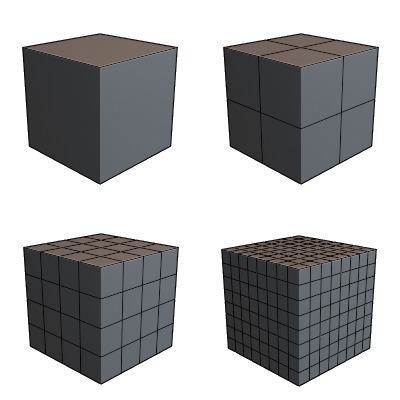
While great for detailed and organic shapes, polygonal modeling can struggle with creating perfectly smooth, curved surfaces.
NURBS Modeling NURBS stands for Non-Uniform Rational B-Splines. Instead of using flat polygons, this method uses flexible mathematical curves to create surfaces. Imagine stretching a rubber sheet over a wireframe. By moving the points on the frame (called control points), you can create complex, perfectly smooth curves. NURBS modeling is ideal for industrial design, such as creating car bodies, product casings, and other mechanical parts that require precision and smooth surfaces.
Subdivision Surface Modeling Often called 'SubD,' this technique is a hybrid of the first two. You start with a low-detail polygonal mesh and then apply a smoothing algorithm. This algorithm subdivides the faces into smaller ones, averaging their positions to create a smooth, high-detail surface. It offers the best of both worlds: the direct control of polygonal modeling and the smooth, organic finish of NURBS. It's a favorite for character animation and creating detailed organic shapes.
| Technique | Best For | Common Uses |
|---|---|---|
| Polygonal | Detailed, complex shapes | Video games, characters, visual effects |
| NURBS | Perfectly smooth, curved surfaces | Car design, industrial products, architecture |
| Subdivision | Organic, high-detail models | Character animation, detailed sculpting |
Choosing Your Tools
There are many 3D modeling software options available, each with its own strengths. For a beginner, the choices can feel overwhelming. Here are a few popular programs that are great starting points.
The best Blender tutorials for beginners often cover fundamental topics like modeling, texturing, and animation.
- Blender: This is a fantastic place to start. Blender is a professional-grade tool that is completely free and open-source. It can do everything from modeling and sculpting to animation and video editing. Because it's so popular, there's a massive community and countless tutorials online to help you learn.
- Tinkercad: If you want something even simpler, Tinkercad is a browser-based tool designed for absolute beginners. It's very intuitive, using simple shapes that you combine to create models, almost like playing with digital building blocks. It's a great way to grasp the core concepts of 3D space.
- SketchUp: Widely used in architecture and interior design, SketchUp is known for its user-friendly interface. There's a free version that's powerful enough to create detailed models of buildings, furniture, and more.
When choosing software, consider what you want to create. Look for a program with a strong community and plenty of learning resources. Don't be afraid to try a few different options to see which one clicks with you.
What is the primary purpose of 3D modeling?
The complete digital skeleton of a 3D object, composed of all its vertices, edges, and faces, is called a...
With these fundamentals, you're ready to start exploring the world of 3D creation. The key is to start simple, be patient, and have fun with the process.