Intermediate SQL Data Manipulation
Advanced Join Operations
Beyond the Inner Join
You're already familiar with how INNER JOIN works. It's the workhorse for combining rows from different tables that have matching values. But what happens when you need to see the data that doesn't match? This is where outer joins come in, allowing you to keep records from one or both tables, even when there's no corresponding entry in the other.
Let's start with LEFT JOIN. This join returns all records from the left table (the first one you mention) and the matched records from the right table. If there's no match for a row in the left table, the columns from the right table will simply be filled with NULL.
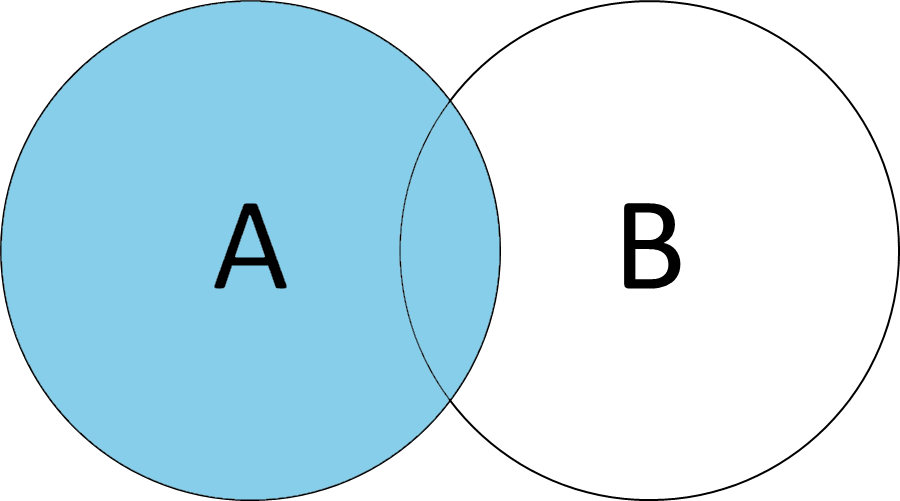
Imagine you have a Customers table and an Orders table. You want a list of all customers, along with any orders they've placed. Some customers might not have any orders yet. An INNER JOIN would exclude them, but a LEFT JOIN keeps them in the result.
SELECT
  c.CustomerName,
  o.OrderID
FROM Customers AS c
LEFT JOIN Orders AS o
  ON c.CustomerID = o.CustomerID;
In this output, customers who have never ordered will appear with a NULL in the OrderID column. This is incredibly useful for finding incomplete data or identifying entities without a specific related activity. A RIGHT JOIN is the mirror opposite. It returns all records from the right table and any matched records from the left. In practice, RIGHT JOIN is used less frequently because any RIGHT JOIN can be rewritten as a LEFT JOIN by simply swapping the order of the tables, which many developers find more intuitive to read.
The Complete Picture
Sometimes you need to see everything from both tables, matched or not. For this, you use a FULL OUTER JOIN. It combines the functionality of both LEFT and RIGHT joins. The result set will contain all rows from both tables. Where a match exists, the data is combined. Where it doesn't, the missing side's columns are filled with NULL.
Think of it as a master list. It's perfect for tasks like reconciling inventories between two different systems or comparing two sets of user data to find who is in one list, who is in the other, and who is in both.
SELECT
  p.ProductName,
  s.SupplierName
FROM Products AS p
FULL OUTER JOIN Suppliers AS s
  ON p.SupplierID = s.SupplierID;
This query would show all products and their suppliers. If a product has no supplier or a supplier has no products in the list, they will still appear in the results, with NULL values in the columns from the other table. This gives you a complete audit of both datasets in a single view.
When Tables Talk to Themselves
A SELF JOIN is a regular join, but the table is joined with itself. This technique is essential for querying hierarchical data that's stored in a single table. A classic example is an Employees table where one of the columns, like ManagerID, refers back to another employee's ID within the same table.
To make this work, you must use aliases for the table to treat it as two separate entities in the query. For instance, you could join Employees AS e with Employees AS m to link an employee to their manager.
SELECT
  e.EmployeeName AS Employee,
  m.EmployeeName AS Manager
FROM Employees AS e
LEFT JOIN Employees AS m
  ON e.ManagerID = m.EmployeeID;
Here, we use a LEFT JOIN instead of an INNER JOIN to ensure that even the top-level employee (who has no manager and thus a NULL ManagerID) is included in the results. This gives us a complete organizational chart.
A Word on Cross Joins
Finally, there's the CROSS JOIN. This join returns a of the two tables. That means every row from the first table is combined with every row from the second table. If you have a table with 100 rows and another with 1,000 rows, the CROSS JOIN will produce 100,000 rows. There's no ON clause.
SELECT
  s.Size,
  c.Color
FROM Sizes AS s
CROSS JOIN Colors AS c;
This can be useful for generating all possible combinations of items, like all sizes and colors for a product line. However, use CROSS JOIN with caution. Applying it to large tables can create massive result sets that strain your database.
Now you're ready to tackle some more complex data retrieval challenges. Let's see what you've learned.
You have a Customers table and an Orders table. You want to generate a list of ALL customers, including those who have not yet placed an order. Which type of join should you use?
What is the primary characteristic of the result set from a FULL OUTER JOIN?