Intermediate Raspberry Pi Mastery
Hardware Selection Guide
Choosing Your Pi
Moving from microcontrollers to a single-board computer like a Raspberry Pi opens up a world of possibilities. Instead of just one tool, you have a lineup, each with its own strengths. The choice between the Raspberry Pi 4, Pi 5, and Zero 2 W isn't about which is "best," but which is right for your project's balance of performance, size, and power.
| Model | CPU (ARM Cortex) | RAM Options | Key I/O | Form Factor |
|---|---|---|---|---|
| Pi Zero 2 W | A53 (4-core @ 1GHz) | 512MB | Mini HDMI, 2x Micro-USB, Wi-Fi | Tiny (65x30mm) |
| Pi 4 Model B | A72 (4-core @ 1.5GHz) | 1, 2, 4, 8GB | 2x Micro HDMI, 2x USB 3, GbE, Wi-Fi | Standard (85x56mm) |
| Pi 5 | A76 (4-core @ 2.4GHz) | 4, 8GB | 2x Micro HDMI, 2x USB 3, GbE, Wi-Fi 6, PCIe | Standard (85x56mm) |
The Zero 2 W is your go-to for small, low-power applications where space is tight and computational needs are modest—think remote sensors or simple controllers. The Pi 4 remains a powerful, versatile workhorse for countless projects, from media centers to robotics. The Pi 5, however, represents a significant leap forward, pushing into territory once reserved for low-end desktop PCs.
Architecture and Performance
The jump from the Pi 4 to the Pi 5 is more than just a faster CPU. The Pi 5 introduces a fundamentally new architecture. For the first time, the main Broadcom chip isn't handling everything. Instead, peripheral input/output (I/O) tasks are offloaded to a dedicated, in-house designed chip: the RP1 I/O controller. This frees up the main CPU and dramatically improves the performance of USB ports, networking, and camera interfaces. It's a key reason why the Pi 5 feels so much snappier.
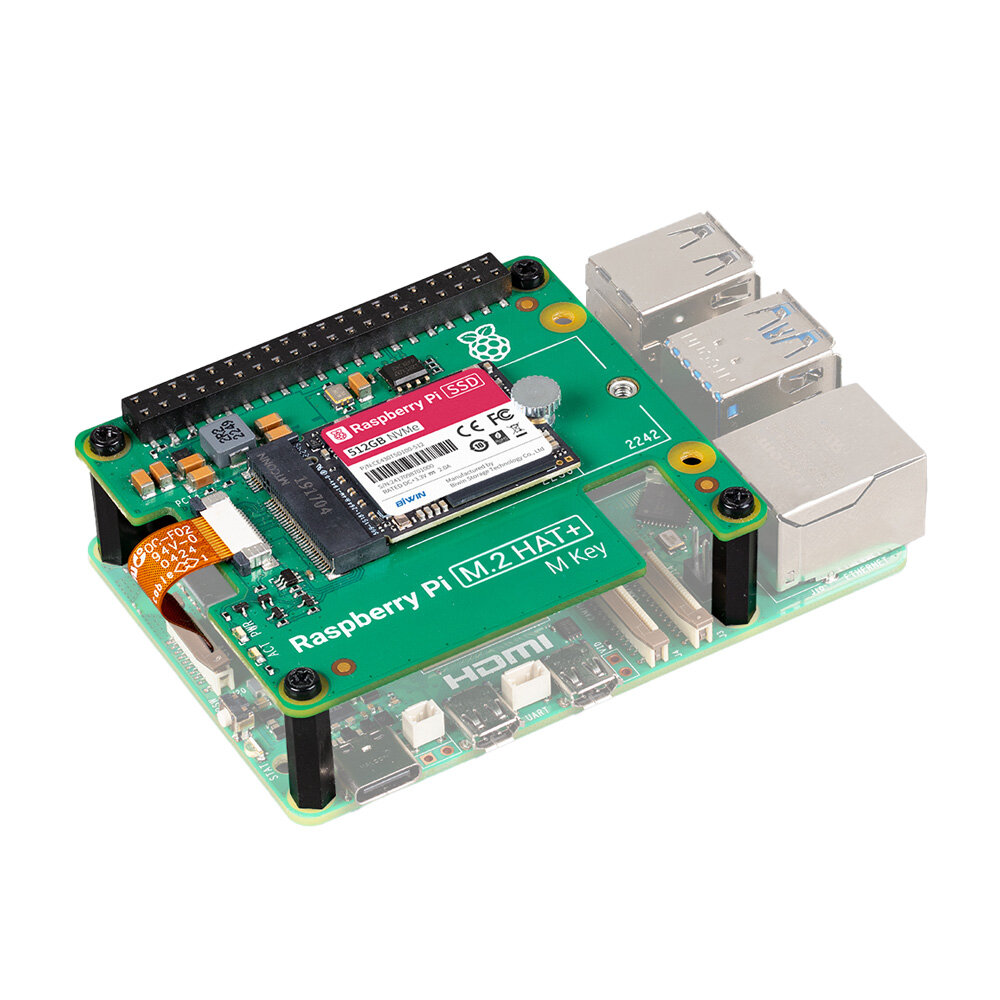
This new architecture also exposes a PCIe 2.0 lane. While it's just a single lane, it opens the door for high-speed peripherals that were previously impossible, most notably .
Your choice of boot media heavily impacts overall performance:
- microSD Card: The classic option. It's convenient but slow and has a limited lifespan for write-heavy tasks. Good for getting started or for projects that mostly read data.
- USB SSD: A huge step up in speed and reliability from an SD card. This has been the preferred method for performance-critical Pi 4 projects.
- NVMe SSD (Pi 5 only): The fastest option by far. Using a compatible M.2 HAT, you can boot from an NVMe drive and get storage speeds that rival a modern laptop. This makes the Pi 5 a legitimate server or light desktop replacement.
Power and Heat
With great power comes great power consumption. The Pi 5's performance requires a more robust power delivery system. While a Pi 4 runs comfortably on a quality 5V/3A USB-C supply, the Pi 5 officially requires a 5V/5A supply to run without limitations.
Using an underpowered supply on a Pi 5 will work, but the firmware will automatically limit the current to USB ports to protect the system. This can cause connected devices like SSDs to fail unexpectedly.
The official 27W power supply uses the standard to negotiate this higher current. This is also crucial for managing heat. The Pi 5 runs hotter than its predecessors and will aggressively throttle its CPU speed to avoid overheating. While you can run it without cooling for very light tasks, any sustained load requires thermal management.
Your options range from simple to complex:
- Passive Heatsink: A simple piece of aluminum that sticks to the CPU. It's silent and sufficient for light to moderate workloads.
- Active Cooler: The official solution for the Pi 5 is a small heatsink and fan combo that screws onto the board. It's highly effective and allows the Pi to run at full speed indefinitely.
- Third-Party Cases: Many cases incorporate large passive heatsinks (where the entire case is the heatsink) or larger, quieter fans for more demanding or noise-sensitive environments.
Now that you understand the key trade-offs between these models, let's test your knowledge.
You are building a compact, battery-powered remote sensor for a garden. Which Raspberry Pi model is the most suitable choice due to its balance of small size and low power consumption?
What is the key architectural change in the Raspberry Pi 5 that offloads peripheral I/O tasks from the main processor, improving performance for things like USB and camera interfaces?
Ultimately, selecting the right hardware is the first step in building a successful project. By matching the board's capabilities to your project's needs, you set yourself up for a smoother development process.