Intermediate Ethical Hacking and Penetration Testing
Advanced Network Discovery
Beyond Open or Closed
Knowing a port is open is just the first step. To understand a target's attack surface, you need to know exactly what's listening on that port. A simple port scan might tell you port 80 is open, but is it running Apache 2.4, Nginx, or Microsoft IIS? Each has different vulnerabilities.
This is where service version detection comes in. By sending a series of specific probes to an open port, Nmap can often coax the service into revealing its name and version number. This is a crucial piece of the puzzle for a penetration tester.
# The -sV flag tells Nmap to perform version detection.
nmap -sV 192.168.1.1
The output will change from just 80/tcp open http to something more specific, like 80/tcp open http Apache httpd 2.4.41. Now you have a specific software version you can look up in vulnerability databases.
Knowing the software version allows you to search for known exploits, dramatically narrowing your focus from thousands of potential attacks to a handful of highly relevant ones.
What Is It Running?
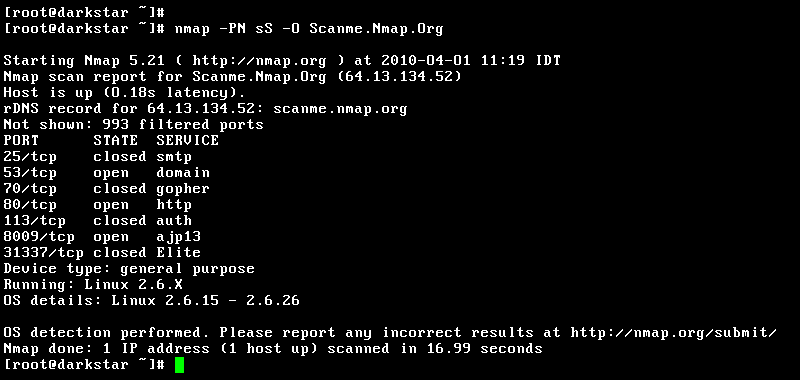
Just as important as the service is the operating system it runs on. Exploits are often OS-specific. An attack that works on Windows Server 2012 will fail against a Linux machine.
Nmap uses a technique called to make an educated guess about the target's operating system. It works by sending a series of specially crafted, and sometimes non-standard, TCP and UDP packets to the target. It then analyzes the responses, comparing subtle differences in the TCP/IP stack implementation—like TCP initial sequence numbers or window sizes—to a large database of known OS fingerprints.
# The -O flag enables OS detection.
nmap -O 192.168.1.1
The results will often include the vendor (e.g., Linux, Windows, Cisco), the underlying OS kernel version, and even the device type (e.g., router, printer, general purpose). This information helps you tailor your next steps and select the right tools for the job.
Speed vs. Stealth
Aggressive scanning can be fast, but it's also noisy. A fast scan can trigger intrusion detection systems (IDS) and alert system administrators. In penetration testing, you often need to balance speed with stealth.
One key way to be stealthier is to use a TCP SYN scan (-sS) instead of a full TCP Connect scan (-sT). A Connect scan completes the full three-way handshake, which is easily logged. A is a "half-open" scan. It sends a SYN packet, and if it receives a SYN/ACK, it knows the port is open and immediately sends a RST (reset) packet, tearing down the connection before it's fully established. Many older logging systems would not record this incomplete connection.
Nmap also offers timing templates using the -T flag, from -T0 (paranoid) to -T5 (insane). These templates adjust settings like the delay between probes and timeout values.
- -T0, -T1: Very slow. Used to evade modern intrusion detection systems, but can take hours or days.
- -T2, -T3: Slower and considered safer for fragile networks.
-T3is the default. - -T4, -T5: Aggressive and fast. Great for when you're not worried about being detected or overwhelming the target.
A good middle ground for many situations is -T4, which offers a significant speed boost over the default without being recklessly fast.
Choosing the right scan type and timing template is a strategic decision based on the engagement's rules and the target's likely defenses.
Automating Discovery
The real power of Nmap is unlocked with its (NSE). The NSE allows Nmap to run scripts that can perform a vast range of tasks, from advanced discovery to vulnerability detection.
Instead of just listing an open port, an NSE script can try to log in with default credentials, check if it's vulnerable to a specific famous exploit like Heartbleed, or pull banner information. This moves you from simple mapping to active reconnaissance.
# Run the default set of safe scripts
nmap -sC 192.168.1.1

# Or, run all scripts in the 'vuln' category
nmap --script vuln 192.168.1.1
Finally, pay attention to port states. open means the port is accessible and a service is listening. closed means the port is accessible, but no service is listening. The most interesting state is often filtered. This means a firewall, filter, or other network device is blocking the port, so Nmap can't tell if it's open or closed. A large number of filtered ports is a strong indicator of a firewall, which is valuable information in itself.
Ready to test your knowledge?
Why is service version detection a crucial step after discovering an open port?
Which Nmap scan type is known as a "half-open" scan and is generally stealthier than a full TCP connect scan?
By combining these techniques, you can build a comprehensive map of a target network that goes far beyond a simple list of IP addresses and open ports.