Intermediate Enterprise Networking and Infrastructure
OSI Layer Interaction
How Data Travels Through the Network
When you send an email or load a webpage, the data doesn't just zap from your computer to the destination in one piece. Instead, it undergoes a process of being wrapped in several layers of information, much like putting a letter inside an envelope, which then goes into a shipping box. This process is called , and it's fundamental to how networks function.
The journey begins at the Transport Layer (Layer 4), where your data is broken into manageable chunks called segments. A header is added containing information like the source and destination port numbers. This ensures the data reaches the correct application (e.g., your web browser vs. your email client) on the destination machine. The choice of protocol here, like TCP or UDP, also dictates how communication is handled—whether it's reliable and ordered (TCP) or fast and lightweight (UDP). This choice directly affects throughput; TCP's error-checking adds overhead, which can slow things down compared to UDP's fire-and-forget approach.
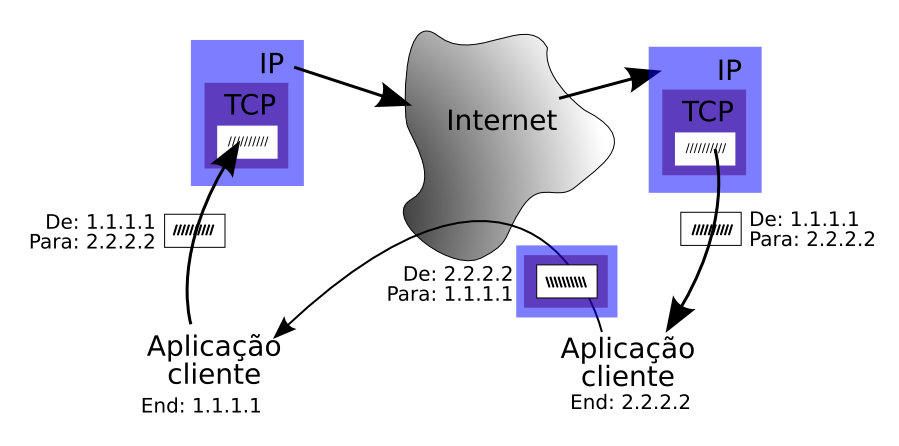
Next, the segment is passed down to the Network Layer (Layer 3). Here, it's encapsulated into a packet. An IP header is added, containing the source and destination IP addresses. This is like putting the full street address on our shipping box. It provides the end-to-end global address needed to route the packet across different networks, from your local network to a server halfway across the world.
Finally, the packet arrives at the Data Link Layer (Layer 2). It's wrapped yet again, this time into a frame. The Layer 2 header includes the source and destination MAC addresses—the unique hardware addresses of the network cards. Think of this as the specific name of the person at the street address. This address is only used for the next direct hop on the local network, like from your computer to your Wi-Fi router.
The Journey Across Networks
As the frame travels, each device it encounters plays a specific role. A switch, operating at Layer 2, only looks at the MAC address. It uses this to forward the frame to the next device on the same local network. It doesn't need to know or care about the final destination IP address inside the packet.
A router, however, operates at Layer 3. When a frame arrives at a router, the router performs decapsulation. It strips off the Layer 2 MAC header to inspect the Layer 3 IP header. It reads the destination IP address, consults its routing table to determine the next hop towards the final destination, and then creates a brand new Layer 2 frame. This new frame has the router's own MAC address as the source and the next router's (or the final destination's) MAC address as the destination. This process of stripping and re-wrapping happens at every router along the path.
IP addresses (Layer 3) are for the entire journey. MAC addresses (Layer 2) are only for the next single step in that journey.
This constant header manipulation is a key source of processing overhead. Switches are fast because their job is simple: look up a MAC address in a table and forward. Routers have a more complex task. They must perform decapsulation, a routing table lookup (which can be computationally intensive), and re-encapsulation. This is why a high-performance router is more complex and expensive than a switch. Every hop a packet takes adds latency due to this processing.
Putting It All Together
Let's trace a packet's life. When your computer sends data to a web server:
- Layers 4, 3, 2 (Your PC): The data is segmented (TCP header), then made into a packet (IP header), then a frame (MAC header). The destination MAC is your local router.
- Layer 2/3 (Router): Your router receives the frame. It strips the Layer 2 header, inspects the Layer 3 IP header, and sees the final destination is on another network. It looks up the best path, creates a new Layer 2 frame with the MAC address of the next router, and sends it on its way.
- ...Repeat: This process repeats across multiple routers. At each hop, the Layer 2 MAC header is stripped and replaced, but the Layer 3 IP header remains untouched. The source and destination IP addresses never change during the journey.
- Layers 2, 3, 4 (Web Server): Finally, the frame arrives at the destination network's router, which forwards it to the server. The server performs the full process: it strips the Layer 2 header, then the Layer 3 header, and finally the Layer 4 header to extract the original data and pass it to the web server application.
Understanding this flow is crucial for troubleshooting. If you can ping a device on your local network but can't reach Google, the problem likely isn't at Layer 2. The issue is probably at Layer 3 or higher, perhaps with a router's configuration or a DNS problem. By isolating the issue to a specific layer, network engineers can diagnose and fix problems much more efficiently.
Time to test your knowledge of how these layers work together.
What is the process of wrapping data in successive layers of headers before it is sent over a network called?
When a data packet travels across multiple routers to reach its final destination, which piece of information in the headers is constantly changed at every hop?
This interplay between layers, from local MAC-based switching to global IP-based routing, is the engine that drives all network communication.