Integer Fundamentals and Applications
Integer Representations
How Computers Count
We think in tens. Our number system, decimal or base-10, uses ten digits (0-9). Each position in a number is a power of ten. The number 345 is just .
Computers, however, operate on a much simpler system. At their core, they only understand two states: on or off, true or false, high voltage or low voltage. This binary nature makes base-2 the natural language of computing. In this system, each digit, or bit, is either a 0 or a 1. Each position in a binary number represents a power of two.
For example, the decimal number 5 is represented in binary as 101. This translates to , which equals , or 5.
While binary is perfect for machines, it gets long and unwieldy for humans. A single byte, which is 8 bits, can represent the number 255 as 11111111. Reading long strings of ones and zeros is tedious and error-prone.
To bridge this gap, we often use the hexadecimal system, or base-16. It's a compact way to represent binary data. Hexadecimal uses 16 symbols: the digits 0-9 and the letters A-F to represent values 10 through 15. The key is that one hexadecimal digit can represent exactly four binary digits (a nibble).
| Decimal | Binary | Hexadecimal |
|---|---|---|
| 0 | 0000 | 0 |
| 1 | 0001 | 1 |
| 2 | 0010 | 2 |
| 9 | 1001 | 9 |
| 10 | 1010 | A |
| 11 | 1011 | B |
| 15 | 1111 | F |
| 16 | 00010000 | 10 |
So, our binary 11111111 can be split into two 4-bit chunks: 1111 and 1111. Each 1111 is 15 in decimal, which is F in hexadecimal. Thus, 11111111 in binary is simply FF in hexadecimal. It's much easier to read and write.
Handling Negative Numbers
So far, we've only dealt with positive numbers. These are called unsigned integers. An 8-bit unsigned integer can represent numbers from 0 (00000000) to 255 (11111111).
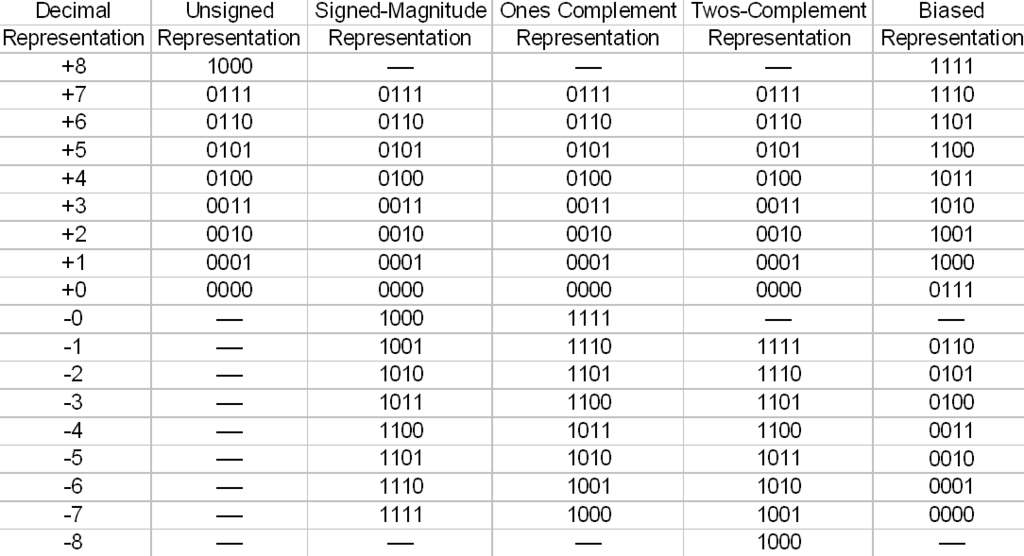
But what about negative numbers? For this, we need signed integers. A common approach is to reserve the most significant bit (the leftmost one) as a sign indicator. If it's 0, the number is positive. If it's 1, the number is negative. This is called the sign-and-magnitude method. However, it has a major flaw: it results in two different representations for zero (00000000 for +0 and 10000000 for -0), which complicates computer hardware.
To solve this, modern computers almost universally use a clever system called Two's Complement.
Two's complement provides a single representation for zero and makes arithmetic operations like addition and subtraction work seamlessly for both positive and negative numbers.
Let's find the 8-bit two's complement representation for -5.
- Start with the positive binary value. The number 5 in 8-bit binary is
00000101. - Invert all the bits. Flip every 0 to a 1 and every 1 to a 0. This gives us
11111010. This step is also known as the one's complement. - Add one.
11111010 + 1 = 11111011.
So, -5 is represented as 11111011 in 8-bit two's complement. An 8-bit signed integer can represent values from -128 to +127.
Representation Matters
Understanding these representations is critical in computing. The number of bits used to store an integer determines its range. If you try to store a number that's too large, an integer overflow occurs. For an 8-bit unsigned integer, adding 1 to 255 (11111111) doesn't give you 256. Instead, it results in 100000000. Since we only have 8 bits, the leading 1 is dropped, and the value wraps around to 00000000, or 0. This can lead to silent bugs and major security vulnerabilities in software.
In programming, you choose specific data types like int, short, long, or their unsigned versions based on the range of numbers you expect. Choosing a long when a short would suffice wastes memory. Choosing a short when the value might exceed its limit risks an overflow. This trade-off between memory efficiency and correctness is a fundamental part of software engineering.
Ultimately, every piece of data in a computer, from numbers to text to images, is stored as a sequence of bits. Knowing how integers are encoded is the first step to understanding how computers manipulate data at the most fundamental level.
Time to check your understanding.
What is the primary reason for using the hexadecimal (base-16) system in computing?
What is the 8-bit binary number 10110101 represented in hexadecimal?
Understanding how numbers are represented is a key skill. It bridges the gap between how we think and how machines compute, revealing why certain errors happen and how to write more efficient code.