Instagram Following Growth
Understanding Instagram Basics
Your Instagram Home Base
When you first open Instagram, you land on your Home feed. This is where you'll see a scrolling collection of photos, videos, and Reels from the accounts you follow. It's a mix of content from friends, family, and creators you're interested in.
Along the bottom of the screen is your main navigation bar. It's your command center for getting around the app.
| Icon | Name | What It Does |
|---|---|---|
| 🏠 | Home | Takes you back to your main feed. |
| 🔍 | Explore | Discover new accounts and content based on your interests. |
| Reels | Reels | A dedicated feed for short, entertaining videos. |
| 🛍️ | Shop | Browse and buy products from brands on Instagram. |
| 👤 | Profile | Your personal page, showing your bio, photos, and videos. |
Getting comfortable with these five buttons is the first step. The Home feed is what you see, but the Profile tab is what others see when they find you.
Crafting Your Profile
Your profile is your digital handshake. It’s often the first thing people see, so making it clear and compelling is crucial. Think of it as your personal or business storefront.
Your Instagram profile is the digital face of your business.
A strong profile has a few key parts:
- Profile Picture: This should be a clear, high-quality image. For a personal brand, use a good headshot. For a business, your logo is usually the best choice. Remember, it appears as a small circle, so it needs to be recognizable.
- Username: This is your unique @handle. It's how people tag you. Make it easy to remember and spell.
- Name: This appears in bold on your profile. Unlike your username, you can change this more freely. It's also searchable, so you can include keywords here, like "Jane Doe | Fitness Coach."
- Bio: You have 150 characters to tell people who you are and what you do. Be direct and show some personality. You can also add a call to action, like telling people to check out your website.
- Link: This is the only place on your main profile where you can put a clickable link. Use it to direct followers to your website, a product page, or a blog post.
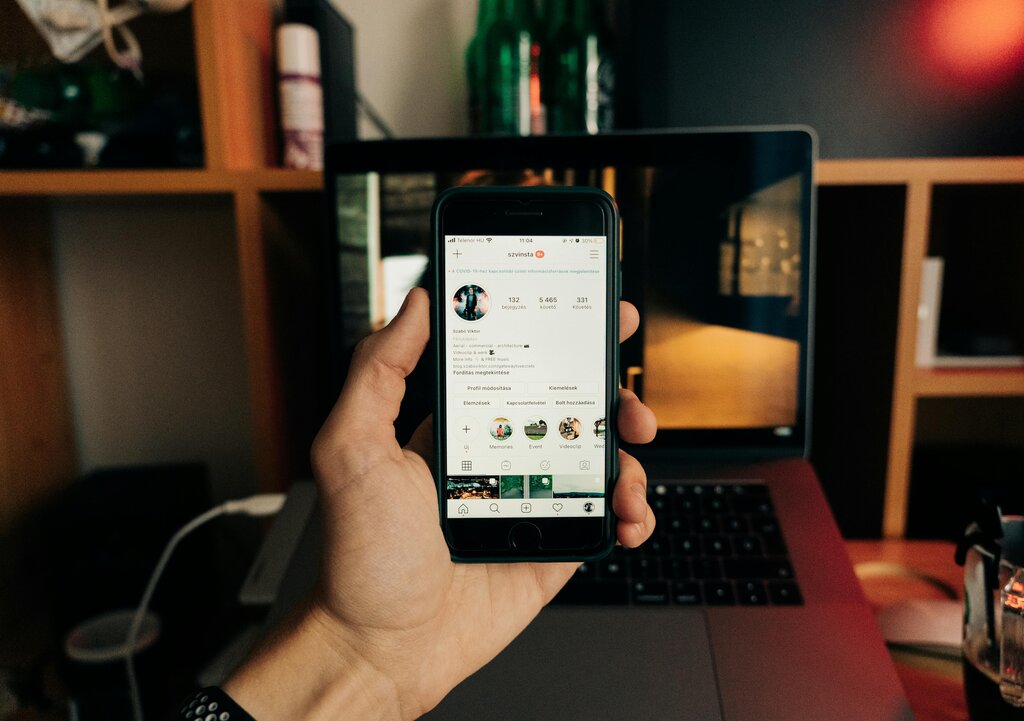
A complete profile looks professional and helps new visitors quickly understand what your account is all about.
Ways to Share Content
Instagram isn't just about posting photos anymore. It offers several different ways to share content, each with its own purpose and audience. Understanding these formats helps you connect with your followers in different ways.
Feed
noun
The main grid of photos and videos on your profile. These posts are permanent unless you delete them.
Posts are the classic Instagram format. You can share a single photo, a video, or a carousel of up to 10 photos and videos in one post. Posts are perfect for high-quality, evergreen content that you want people to see when they visit your profile.
Stories are temporary photos and videos that disappear after 24 hours. They appear at the top of the Home feed. Because they're short-lived, Stories are great for more casual, behind-the-scenes content. You can also add interactive elements like polls, quizzes, and question stickers to engage your audience directly.
Instagram stories are one of the most powerful features of the platforms.
Reels are short, fun videos set to music or other audio, usually up to 90 seconds long. They have their own dedicated tab and are designed for discoverability. If you want to reach people who don't follow you yet, Reels are one of the best ways to do it.
Instagram Video combines what used to be IGTV and feed videos into one format. These are longer-form videos that can be great for tutorials, in-depth discussions, or showcasing a product.
Each format serves a different purpose. A good strategy often involves using a mix of all of them to keep your content fresh and engaging. Now that you know the basics, let's test your knowledge.
What is the primary purpose of your Instagram Home feed?
Which part of your profile is also your unique @handle used for tagging?