Inside the Router Packet Journey
Network Packet Basics
What is a Network Packet?
Think about sending a large book through the mail. You probably wouldn't send it as one massive, unwieldy package. Instead, you might break it down, sending one chapter at a time in separate envelopes. This makes the process more manageable and reliable. If one envelope gets lost, you only need to resend that single chapter, not the entire book.
Data travels across the internet in a similar way. Large chunks of information, like a webpage, video, or email, are broken down into smaller, more manageable pieces called network packets.
A network packet is a small unit of data grouped together for transmission over a network. It's the fundamental building block of all communication on the internet.
This method of breaking data into packets makes networks efficient. It allows multiple devices to share the same network connections without one device monopolizing the line. It also improves reliability. If a packet is corrupted or lost in transit, only that small piece needs to be re-sent, which is much faster than re-sending the entire file.
The Anatomy of a Packet
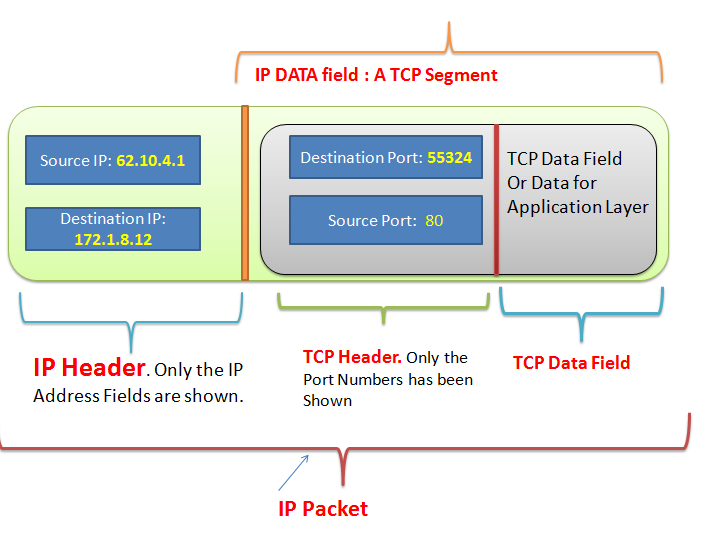
Each packet is like a carefully addressed envelope. It contains not just a piece of the data, but also crucial information that helps it get to its destination and be reassembled correctly. A typical packet has two main parts: the header and the payload.
Header
noun
Contains addressing and control information. It's the 'envelope' of the packet, telling the network where the packet came from, where it's going, and how to handle it.
The header contains information like the source and destination IP addresses, the protocol being used (like TCP or UDP), and the packet's sequence number, which helps put all the packets back in the right order at the destination.
Payload
noun
The actual data being transported. This is the 'letter' inside the envelope—the piece of the email, website, or video you are accessing.
Some packets also include a third component called a trailer. The trailer follows the payload and often contains error-checking information, like a checksum. This allows the receiving device to verify that the data in the payload hasn't been corrupted during its journey.
Building a Packet
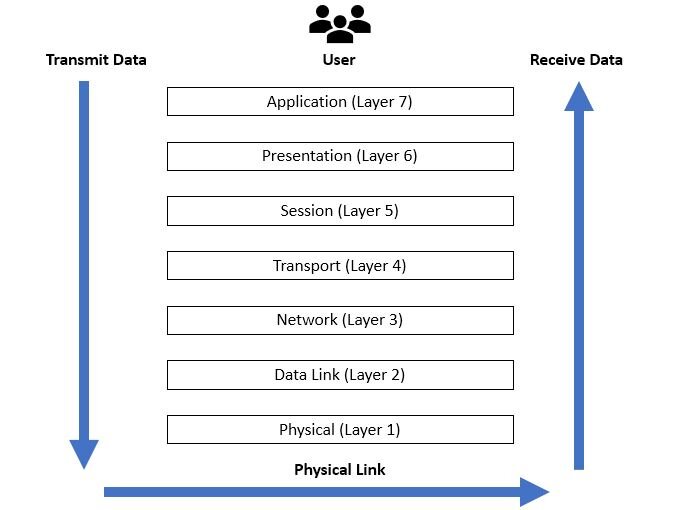
Packets aren't just created in one step. They're built through a process called encapsulation, which follows a standardized framework like the OSI (Open Systems Interconnection) model. This model organizes network communication into seven distinct layers, each with a specific job.
As your data travels down from the application you're using (like a web browser) through the layers of the OSI model, each layer adds its own header information. It's like putting a letter into an envelope, then putting that envelope into a slightly larger one with new instructions.
Here’s a quick look at the journey:
- Application, Presentation, Session Layers: Your data is created (e.g., you write an email).
- Transport Layer: The data is broken into segments, and a TCP or UDP header is added. This header includes port numbers to direct the data to the correct application on the destination device.
- Network Layer: An IP header is added, containing the source and destination IP addresses. At this point, the data segment officially becomes a packet.
- Data Link Layer: A final header and a trailer are added to create a frame. This includes MAC addresses for directing the frame on the local network.
- Physical Layer: The frame is converted into electrical signals, radio waves, or pulses of light and sent across the physical network medium.
When the data arrives at its destination, the process is reversed. Each layer strips off its corresponding header, passing the payload up to the next layer until the original data is reassembled and delivered to the receiving application.
Time to check your understanding of these core concepts.
Why is data broken down into smaller pieces called packets to be sent over a network?
If a single packet from a large video stream fails to arrive at its destination, what is the most likely outcome?
Understanding this structure is the first step in seeing how data magically flies across the internet. Next, we'll see exactly what a router does when one of these packets arrives at its doorstep.