Inner Workings of Linux Systems
Kernel Initialization Sequence
From Power On to Prompt
When you press the power button, your computer doesn't instantly load your operating system. It begins a carefully choreographed sequence, starting with the firmware on the motherboard. This firmware, either the older BIOS or the modern UEFI, wakes up the hardware.
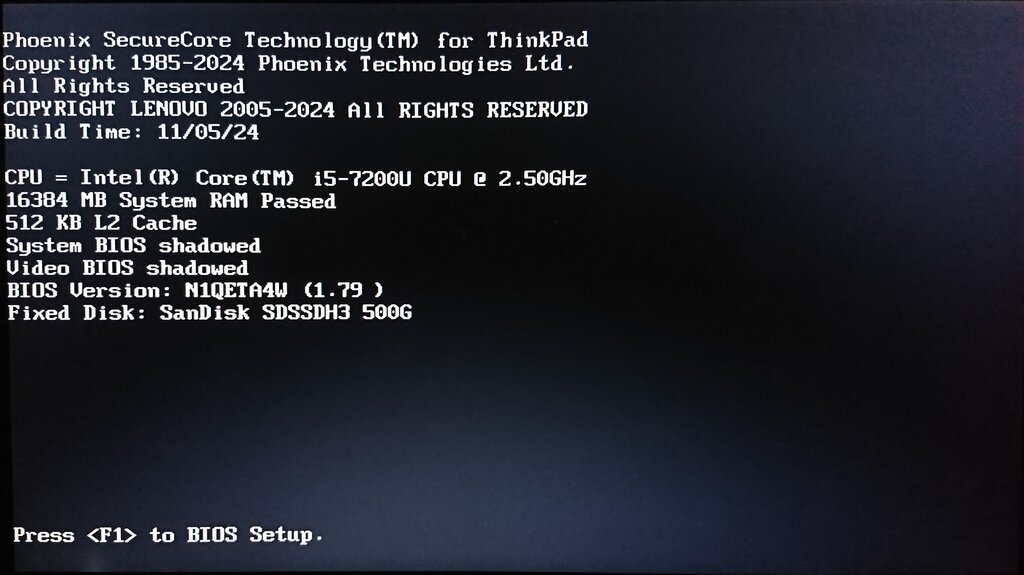
Its first job is to run the Power-On Self-Test (POST), a quick check to ensure essential components like the CPU, memory, and storage are working. Once POST completes successfully, the firmware's next task is critical: find something to boot. It scans storage devices according to a predefined order, looking for a special program called a bootloader. In the Linux world, this is almost always GRUB.
| Feature | BIOS (Basic Input/Output System) | UEFI (Unified Extensible Firmware Interface) |
|---|---|---|
| Age | Legacy (1980s) | Modern Standard |
| Mode | 16-bit | 32-bit or 64-bit |
| Boot Drive Limit | ~2.1 TB (with MBR partitioning) | Virtually unlimited (with GPT partitioning) |
| Interface | Text-based menu | Graphical interface with mouse support |
| Security | Limited | Supports Secure Boot to prevent malware |
| Extensibility | Fixed | Can run its own applications and drivers |
The firmware finds the first stage of the GRUB bootloader in the Master Boot Record (MBR) or a dedicated EFI partition and hands over control. This initial part of GRUB is tiny, just big enough to find and load the second, more capable stage. This second stage is what you see as the familiar GRUB menu, where you can select which operating system to boot.
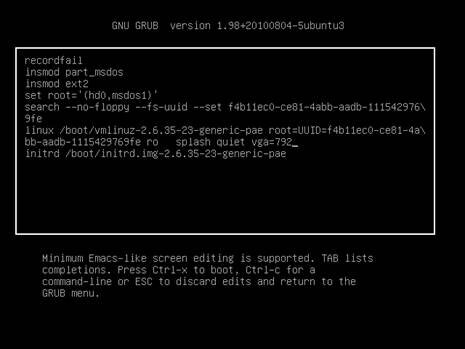
Unpacking the Kernel
Once you select a Linux entry from the GRUB menu, GRUB's job is to load two essential files into memory: the Linux kernel image and the initial RAM disk. The kernel image is usually a compressed file, often named something like vmlinuz or bzImage.
The name stands for "big zImage." It's a self-extracting executable. Once GRUB loads it into memory and jumps to its entry point, the first thing the kernel code does is decompress itself into a known, high-memory location. This is a clever trick to save disk space and reduce load times. The small, uncompressed part of the kernel contains just enough logic to handle the decompression of the rest.
After decompressing, the real kernel initialization begins. The processor, which started in a basic real mode, is switched into the more powerful protected mode. This allows for features like virtual memory and multitasking. Then, the architecture-specific setup code calls the main, architecture-independent C function: start_kernel().
The
start_kernel()function is the true beginning of the Linux kernel as a unified piece of software. Everything before this point was just about getting it loaded and running.
Building the Foundation
The start_kernel() function is the nerve centre of the boot process. It has a long list of tasks to perform before the system is ready for user applications. It's like the site foreman preparing a construction site before the workers arrive. It sets up memory management, initializes the scheduler to manage processes, configures interrupt handlers, and starts timers.
// A simplified look at some tasks in start_kernel()

void start_kernel(void) {
    // Initialize process scheduling
    sched_init();

    // Set up memory zones and management
    mm_init();

    // Initialize the kernel's internal timers
    time_init();

    // Set up interrupt descriptor table
    trap_init();

    // Initialize the virtual file system (VFS)
    vfs_caches_init();

    // ... and many more initializations ...

    // Finally, attempt to run the first user process
    if (ramdisk_execute_command) {
        run_init_process(ramdisk_execute_command);
    }
}
But there's a chicken-and-egg problem. To access the main root filesystem on a hard drive, the kernel needs drivers for the storage controller (like SATA or NVMe). But those drivers are files located on that very filesystem. How can the kernel read the drivers it needs to read the disk?
The solution is the (initrd) or its more modern successor, initramfs. This is a small, temporary root filesystem loaded into memory by GRUB alongside the kernel. It contains the essential modules needed to access the real storage devices. The kernel first mounts this temporary filesystem, loads the necessary drivers, and then can see the actual hard drive.
Once the real root filesystem is mounted, the kernel's last major job in the boot sequence is to find and execute the very first user-space program. This program is called init (or systemd on modern systems) and is always assigned Process ID 1 (PID 1). This process is the ancestor of all other user processes. It's responsible for starting services, mounting other filesystems, and presenting you with a login prompt.
At this point, the kernel's initialization is complete. It recedes into the background, managing hardware and system resources, while the user-space environment takes over.
Time to check your understanding of the boot process.
What is the very first software that runs when a computer is powered on?
What is the primary purpose of the initial RAM disk (initrd or initramfs)?
This journey from power-on to a usable system is a complex but logical sequence. Each stage builds upon the last, transforming a dormant piece of hardware into a fully functional computer, with the kernel acting as the central orchestrator.