IEEE 754 Floating-Point Numbers
Introduction to Floating-Point Arithmetic
Beyond Whole Numbers
Computers are great with integers, like 5, -12, or 3,000. But what about numbers that aren't whole? Think about measurements like 98.6 degrees, financial calculations like $29.99, or scientific values like the speed of light, which is about 299,792.458 kilometers per second. These are all real numbers, and computers need a way to handle them.
This is where floating-point arithmetic comes in. It's the method computers use to represent and work with real numbers, both the very large and the very small. Instead of storing every digit of a number, which would be impossible for numbers with infinite decimals (like ), floating-point representation stores an approximation.
Floating point numbers are how computers represent real numbers.
The Parts of a Floating Point Number
The name “floating-point” comes from the fact that the decimal point can “float” to any position in the number. This is similar to scientific notation, which you might remember from science class. For example, the number 1,234.56 can be written as . Notice how the decimal point moved.
A floating-point number has three key parts that work together to represent a value:
| Component | What it does |
|---|---|
| Sign | A single bit that tells you if the number is positive (0) or negative (1). |
| Significand | Also called the mantissa, this part contains the number's significant digits. It’s the base of the number, like the 1.23456 in our example. |
| Exponent | This determines how far to shift the decimal point (or binary point) to the left or right. It’s the “power of” part, like the 3 in . |
Combining these three parts allows computers to represent a huge range of numbers in a compact way. The general formula looks like this, where is the base (usually 2 for computers):
The Trouble with Binary Fractions
Here’s a tricky problem: computers work in binary (base-2), while we usually think in decimal (base-10). Converting whole numbers between these systems is straightforward. But for fractions, it gets complicated.
Some simple decimal fractions can't be represented perfectly in binary. Take the number 0.1. In decimal, it’s a clean, simple value. In binary, it’s an infinitely repeating sequence: and so on. Since a computer has finite memory, it has to cut this sequence off at some point.
This forced cutoff is the source of all kinds of small inaccuracies. It's like trying to write one-third (1/3) as a decimal. You can write 0.33333, but you'll never be perfectly accurate no matter how many 3s you add.
Because of this, the number you store in a computer might not be the exact number you intended. The difference is usually tiny, but it's always there for certain values. This leads to the most important limitation of floating-point arithmetic: precision errors.
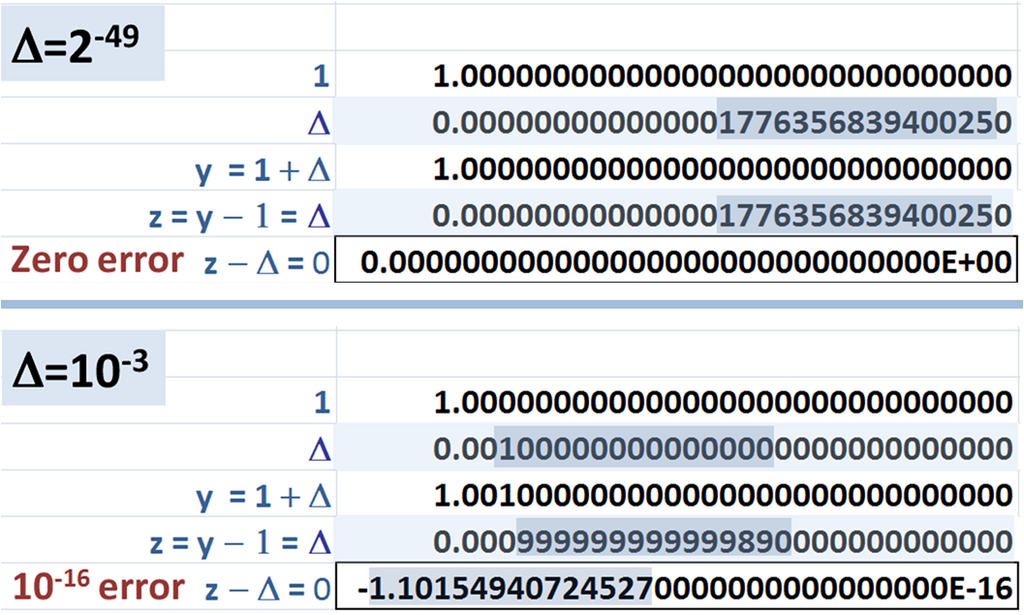
These are not mistakes or bugs. They are a fundamental consequence of trying to represent an infinite range of real numbers with a finite number of bits. For most everyday tasks, these rounding errors are so small they don't matter. But in scientific computing, financial analysis, or complex simulations, these tiny errors can add up and lead to significant, unexpected results if not handled carefully.