Identifying and Reporting Suspicious Emails
Understanding Email Threats
The Unwanted Mail
Your inbox is a battleground. Every day, countless automated systems send out a flood of emails, and not all of them have your best interests at heart. The most common type of unwanted email is spam.
Spam is the digital equivalent of junk mail. It's unsolicited, sent in bulk, and often serves a commercial purpose. Think of advertisements for products you've never heard of, questionable financial opportunities, or promotions for online pharmacies. While most spam is just annoying, it can sometimes be the first step in a more serious attack.
Spam
noun
Unsolicited digital communication, typically email, sent in bulk to a large list of recipients.
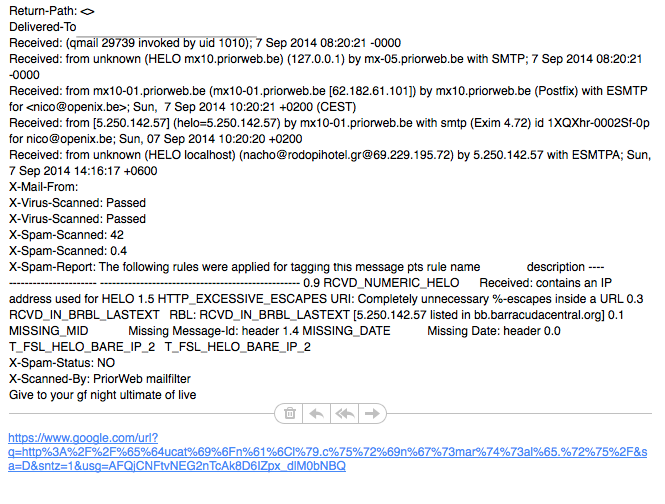
These emails clog up your inbox and waste your time. Modern email services have gotten quite good at filtering spam out, but some always slips through. That's why it's important to recognize it when you see it.
Fishing for Information
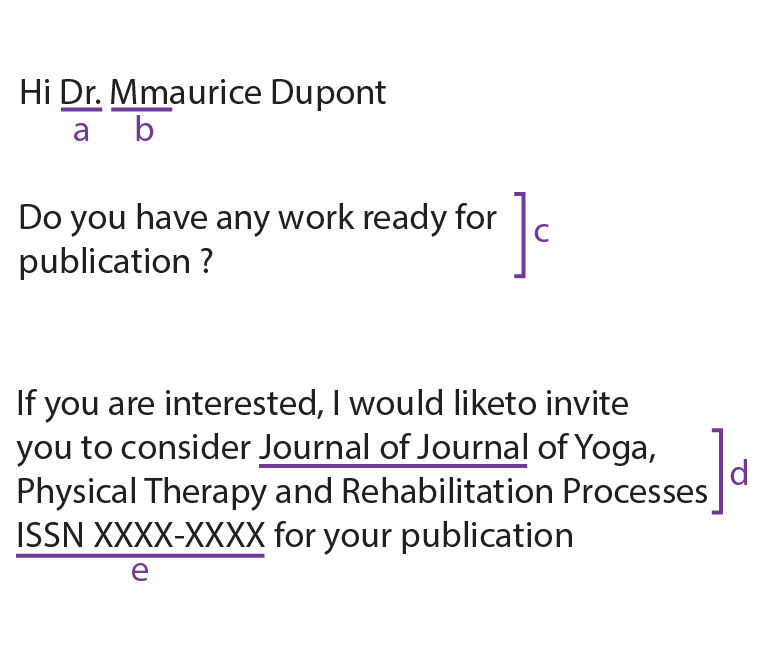
Some malicious emails are far more deceptive than simple spam. They are designed to trick you into giving away sensitive information. This is called phishing.
The name says it all. Attackers go "fishing" for your personal data, using a convincing email as bait. The email might look like it's from a trusted source, such as your bank, a social media site, or even your own company. It will often ask you to click a link to verify your account, update your password, or claim a prize.
Phishing
noun
A fraudulent attempt to obtain sensitive information such as usernames, passwords, and credit card details by disguising as a trustworthy entity in an electronic communication.
The link, however, takes you to a fake website that looks just like the real one. When you enter your login credentials or personal details, you're handing them directly to the attacker. The goal is often financial fraud or identity theft.
Malicious Deliveries
Beyond spam and phishing, emails can also be used to deliver malware directly to your device. Malware, short for malicious software, is any program or file that is intentionally harmful to a computer, network, or server.
Malware
noun
Software specifically designed to disrupt, damage, or gain unauthorized access to a computer system.
This is usually done through attachments. The email might contain an invoice, a shipping notification, or a document that seems important. But the attached file, whether it's a ZIP file, a PDF, or even a Word document, contains hidden malicious code.
Once opened, the malware can install itself on your system. It might be ransomware, which encrypts your files and demands payment for their release. It could be spyware, which secretly records your keystrokes to steal passwords. Or it could be a virus that corrupts your files and spreads to other computers.
Never open an attachment from an unknown or untrusted source. Even if the sender appears to be someone you know, be cautious if the email is unexpected.
Spotting the Red Flags
Learning to identify suspicious emails is a critical skill for staying safe online. Attackers rely on you being busy or distracted. By taking a moment to look for common red flags, you can avoid most threats.
| Red Flag | What to Look For |
|---|---|
| Mismatched Sender Address | The sender's name says "PayPal," but the email address is support@secure-paypaI.com. |
| Urgent or Threatening Language | Phrases like "Your account will be suspended" or "Immediate action required." |
| Generic Greetings | "Dear Valued Customer" instead of your actual name. Legitimate companies usually use your name. |
| Spelling and Grammar Mistakes | Emails from professional organizations are usually well-written. Obvious errors are a major warning sign. |
| Unexpected Attachments | You receive an invoice for a product you didn't buy or a document from someone you don't know. |
| Suspicious Links | Hover your mouse over a link (without clicking!) to see the actual web address. If it looks strange or doesn't match the text, don't click it. |
These clues can help you quickly assess whether an email is legitimate or a potential threat. The risks of ignoring them are significant, ranging from financial loss and identity theft to compromising your entire organization's network security.
What is the main purpose of a phishing email?
An email arrives with a subject line "Urgent: Invoice Attached" from an unknown sender. The attachment is a Word document. Opening this attachment could risk installing what on your device?
Staying vigilant is your best defense. By treating unexpected emails with a healthy dose of skepticism, you can protect yourself from the most common digital threats.