IchigoJam BASIC Programming
Introduction to IchigoJam
Meet IchigoJam
IchigoJam is a tiny computer designed specifically for learning how to code. It's simple, affordable, and boots up instantly into a programming environment. The language it uses is called BASIC, which stands for "Beginner's All-purpose Symbolic Instruction Code." It was created to be one of the easiest programming languages to learn, making it perfect for your first steps into coding.
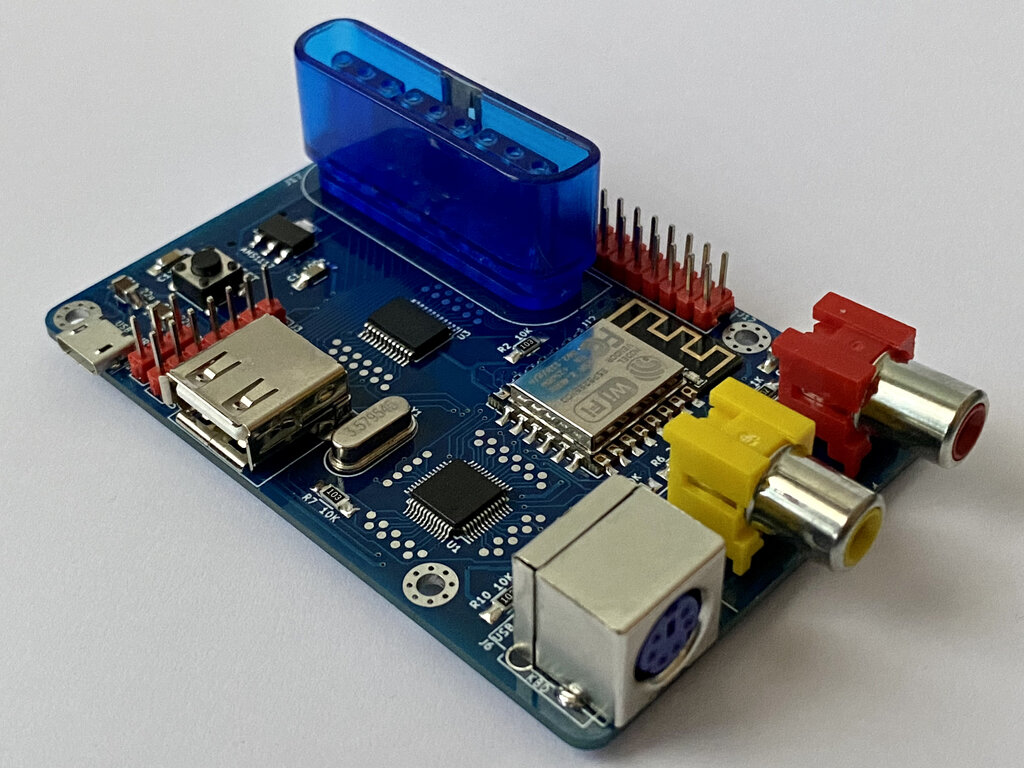
The heart of IchigoJam is a single circuit board. It holds the main processor, which is the computer's brain, along with several ports to connect other devices. You'll see a slot for a keyboard, an output for a video display, and a port for power. There's also a small LED light on the board that you can control with your code.
Getting Set Up
To get your IchigoJam running, you only need a few common items. You'll need a standard keyboard with a PS/2 connector (or a USB keyboard with an adapter), a television or monitor with a composite video input (the yellow RCA jack), and a micro USB power supply, like the one used for many smartphones.
Connecting everything is straightforward. The ports on the board are clearly marked, making it hard to go wrong.
Here’s the order to connect everything:
- Plug your keyboard into the PS/2 port.
- Connect the video cable from your display to the video out port on the IchigoJam.
- Finally, plug in the micro USB power cable. Power should always be the last thing you connect.
Once powered on, your display will flicker to life. You'll see some text appear, followed by a simple prompt.
The BASIC Interface
IchigoJam doesn't have a graphical desktop like a typical computer. Instead, it boots directly into a command-line interface for the BASIC programming language. This is where you'll write and run all your code. The screen will look something like this:
IchigoJam BASIC 1.4.3
Ok
_
The Ok message means the computer is ready for a command. The blinking cursor (_) shows you where you'll be typing. You can give the computer instructions by typing a command and pressing the Enter key.
Let's try a simple command. Type the following and press Enter:
PRINT "HELLO, WORLD!"
The computer will immediately respond by printing HELLO, WORLD! on the screen. The PRINT command tells IchigoJam to display whatever text you put in the quotation marks.
Now, let's try controlling a piece of hardware. Find the small LED on the IchigoJam board. Type this command and press Enter:
LED 1
The LED should turn on. The LED command controls that light, and the number 1 means "on." To turn it off, you can probably guess the command:
LED 0
Press Enter, and the light will turn off. You've just written your first pieces of code that interact with both software and hardware. From this simple starting point, you can begin to explore more complex commands and build your own programs.