Hypothesis Annotation Client Integration
Introduction to Hypothesis
Annotation for Everyone
Imagine reading an article online and being able to highlight a sentence, add a note, or even start a discussion right there on the page. That's the core idea behind web annotation, and a powerful open-source tool called Hypothesis makes it possible.
Hypothesis is a client that can be added to any website or web application. It creates a layer over the existing content, allowing users to select text and attach their thoughts. Think of it as digital sticky notes and a highlighter pen for the entire internet. You can use it for personal notes, collaborative research, or public discussions.
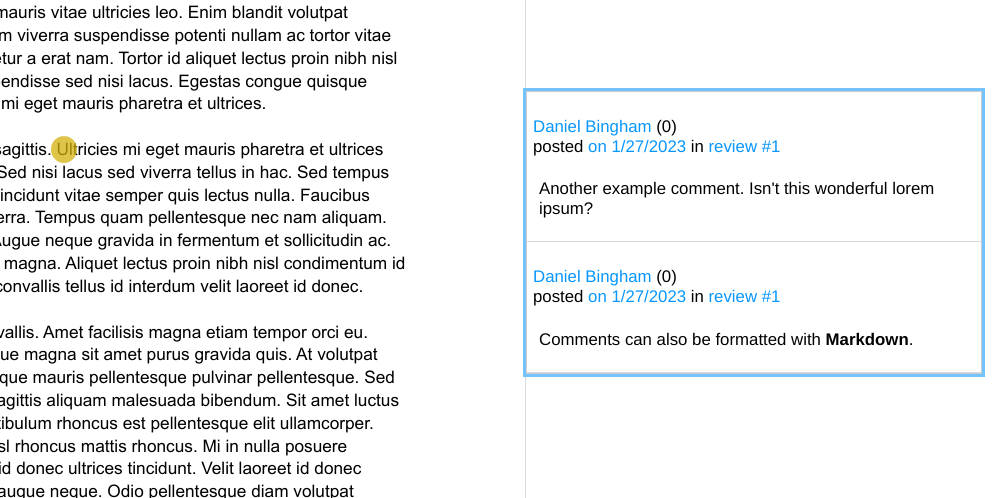
How It Works
Using Hypothesis is straightforward. A user selects a piece of text on a webpage. A small pop-up then gives them the option to either highlight it or annotate it. Highlighting simply adds a colored background to the text, much like a physical highlighter. Annotating opens a small editor where the user can write notes, add links, or use tags to categorize their thoughts.
These annotations can be public, private, or shared within a specific group. This flexibility is what makes the tool so versatile.
A key feature is the ability to reply to existing annotations. This turns a simple note into a conversation, threaded right alongside the original source material. Users can see what others are saying about a particular passage and contribute their own perspectives. This is incredibly useful for classroom discussions, peer reviews, and collaborative fact-checking.
| Feature | Description |
|---|---|
| Highlight | Mark important text for personal reference, just like using a highlighter on paper. |
| Annotate | Add comments, notes, or questions to any selected text. |
| Reply | Respond to existing annotations to create threaded conversations. |
| Tag | Organize your annotations with keywords for easy filtering and searching. |
Public, Private, or Group
Every annotation made with Hypothesis can have a different level of visibility, which is controlled by the user. This is managed through user roles and permissions.
Public: Anyone using Hypothesis on that webpage can see and reply to the annotation. This creates a global conversation layer on top of the web.
Private: The annotation is visible only to the person who created it. This is perfect for personal study notes, reminders, or saving passages for later.
Group: Annotations can also be shared within a private group. A teacher could create a group for their class, or a research team could create one for a specific project. Only members of that group can view and interact with the annotations.

The Benefits of Annotation
Integrating a tool like Hypothesis can transform a static webpage into an interactive space. It encourages active reading rather than passive consumption. For educational platforms, it allows students to ask questions directly on course materials and learn from the insights of their peers. For news organizations, it can be a powerful way to engage with readers and add context or corrections to articles.
Capture 'aha' immediately: write a note, i.e. marginal notes or drop sticky inlays while interacting with information, especially the things that make you understand what is being written: the 'aha'.
By enabling conversation right on the content itself, web annotation fosters a deeper level of engagement and understanding. It makes the web a more social and collaborative environment.
What is the primary function of the Hypothesis tool?
A student wants to use Hypothesis to take personal study notes on a research paper that only they can see. Which visibility setting should they use?