HTTP Protocol Essentials
Introduction to HTTP
The Language of the Web
When you type an address into your web browser and hit Enter, a conversation starts. It's not a conversation you can hear, but it's happening instantly between your computer and another computer, possibly thousands of miles away. This conversation follows a strict set of rules, a language that both sides have agreed to use. This language is called the Hypertext Transfer Protocol, or HTTP.
HTTP
noun
Stands for Hypertext Transfer Protocol. It's the set of rules that governs how data, like web pages and images, is transferred over the internet.
Think of it like this: your web browser is a customer at a massive digital library, and HTTP is the language you use to ask the librarian for a specific book. You make a request, and the librarian brings you what you asked for. This is known as the client-server model.
The Client and the Server
In this model, your device (running a web browser like Chrome or Firefox) is the client. It's the one making the requests. The powerful computer that stores the website's files and information is the server. It listens for requests, finds the right information, and sends it back to the client.
When you want to visit a website, your browser (the client) sends an HTTP request to the website's server. The server receives this request, processes it, and sends back an HTTP response containing the data for the page, which your browser then displays.
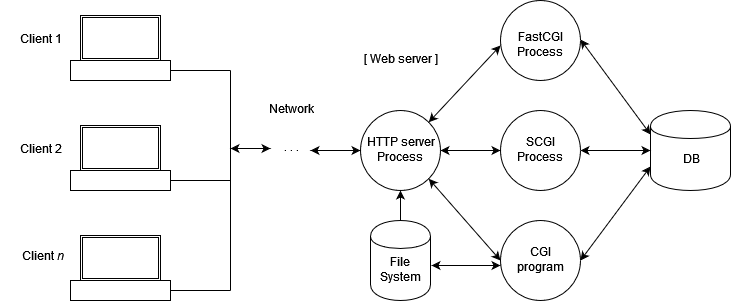
But how does the client know what to ask for? Every single item on the web, whether it's a webpage, an image, a video, or a PDF, is considered a resource. To get a resource, the client needs its specific address.
This address is the URL, or Uniform Resource Locator. It's the unique address for every resource on the web.
A Forgetful Conversation
One of the most important things to know about HTTP is that it's stateless. This means the server doesn't remember anything about past requests. Every request a client makes is treated as a completely new, independent event.
Imagine talking to a person with no short-term memory. You say, "Hello, my name is Alex." They reply, "Nice to meet you, Alex." If you immediately ask, "What's my name?" they wouldn't know. You'd have to tell them your name again with every single question you ask. That's how a stateless protocol works.
The server doesn't keep track of who you are or what you've asked for before. Each request from your browser has to contain all the information the server needs to fulfill it.
This stateless design keeps things simple. It means servers don't need to store a lot of information about ongoing conversations, which makes the web faster and more scalable. Of course, we often need websites to remember us, like when we log in or add items to a shopping cart. More advanced techniques are built on top of HTTP to handle that, but the core protocol remains simple and stateless.
In the client-server model, what is the role of your web browser (e.g., Chrome, Firefox)?
The core protocol of HTTP is described as "stateless." What does this mean?