HTTP Essentials
Introduction to HTTP
The Web's Messenger
Every time you visit a website, a conversation happens. Your web browser talks to a powerful computer somewhere else in the world, asking for the page you want to see. That computer, called a server, understands the request and sends the page back to your browser. This entire back-and-forth conversation happens using a specific language, or protocol.
HTTP
noun
The set of rules for transferring files, such as text, images, sound, video, and other multimedia files, on the World Wide Web. As soon as a web user opens their web browser, they are indirectly making use of HTTP.
HTTP stands for Hypertext Transfer Protocol. It’s the foundation of all data communication on the web. Think of it as the postal service for the internet. It doesn't care what’s in the package, whether it’s a webpage, a picture, or a video. Its only job is to make sure the request from your browser gets to the right server, and the server’s response gets back to your browser.
Clients and Servers
The web runs on a simple but powerful idea called the client-server model. In this relationship, the client is the one asking for things. Your web browser (like Chrome, Firefox, or Safari) is a client. When you type a website address and hit enter, your browser is making a request.
The server is the one that has the things. It’s a computer that stores website files and waits for clients to ask for them. When a server receives a request, it finds the correct file and sends it back. This is called the response.
This model is efficient because servers can handle requests from many different clients at once, allowing millions of people to browse the same website simultaneously.
Anatomy of a Message
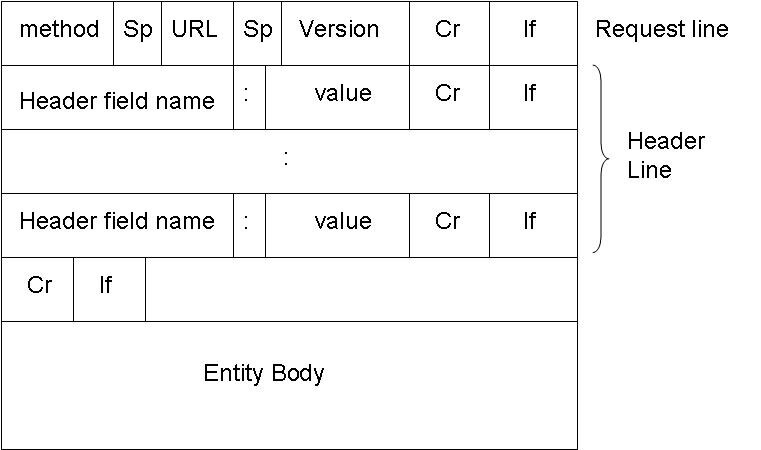
So what do these HTTP messages actually look like? Every interaction consists of two parts: the request sent by the client and the response sent by the server. They are just blocks of text, but they have a very specific structure so that both sides can understand each other perfectly.
An HTTP request asks for a resource. An HTTP response delivers that resource (or explains why it can't).
A request message tells the server what the client wants and provides some context. It includes things like:
- What action to take (like 'get me this page').
- The specific resource it wants (like '/products/shoes.html').
- Additional information, called headers, such as the browser being used or the languages it accepts.
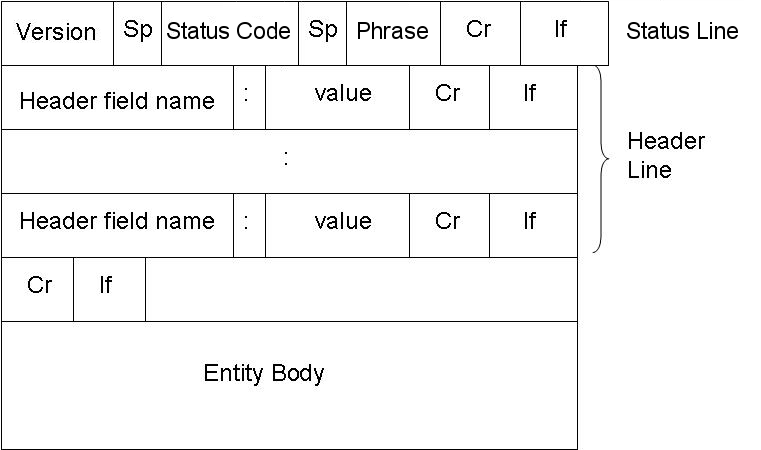
A response message from the server contains:
- A status line telling the client if the request was successful.
- Headers with more information, like the type of content being sent back (e.g., HTML, JPEG).
- The actual resource requested, like the HTML code for the webpage, in what's called the message body.
The response from the server follows a similar, predictable format.
This simple, structured conversation is what makes the web work. Every single webpage, image, and video you see online is delivered through this request-and-response cycle, all governed by the rules of HTTP.
Ready to check your understanding?
In the client-server model, which component is responsible for initiating a request for a webpage?
What does HTTP stand for?
Now that you understand the basics of how browsers and servers communicate, you're ready to learn about the specific types of requests a client can make.