HTML5 Fundamentals
Introduction to HTML5
The Blueprint of the Web
Every webpage you visit, from a simple blog to a complex social media site, is built on a foundation of HTML. Think of HTML as the skeleton of a webpage. It provides the essential structure and organizes the content, telling the browser what's a heading, what's a paragraph, and where an image should go. Without it, the web would be a jumble of unformatted text.
HTML stands for HyperText Markup Language. It's not a programming language, but a 'markup' language used to structure content with elements and tags.
From HTML to HTML5
The web is always changing. As technology evolved, the old versions of HTML started to show their age. They weren't designed for a world of smartphones, interactive web applications, and high-definition video. To handle these new demands, a new standard was created: HTML5.
HTML5 introduced elements that make websites more meaningful and organized. Before, developers often used generic <div> tags for everything: headers, footers, navigation bars, and main content. This worked, but it didn't tell the browser or search engines anything about what that content actually was.
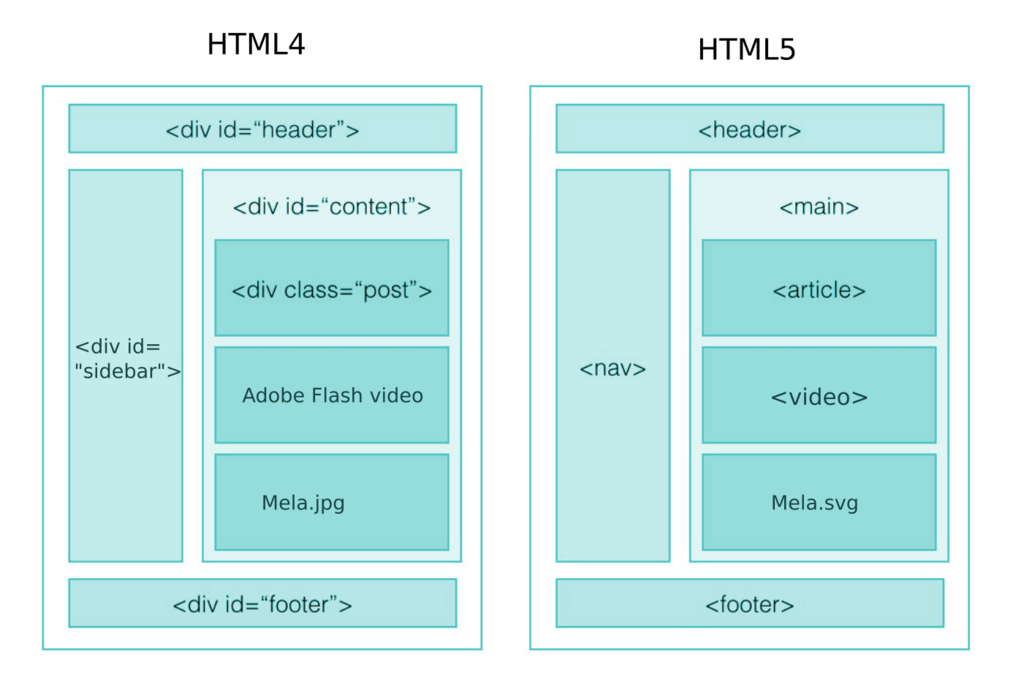
HTML5 introduced semantic elements like <header>, <nav>, <article>, and <footer>. These tags describe their content more clearly. Using <nav> for navigation links, for example, is much more descriptive than <div id="nav">. This makes the code easier for developers to read and better for search engines and accessibility tools to understand.
Anatomy of a Webpage
Every HTML5 document follows a basic structure. It's like a formal letter with a specific format. Let's look at the essential parts.
<!DOCTYPE html>
<html>
  <head>
    <title>Page Title</title>
  </head>
  <body>
    <h1>My First Heading</h1>
    <p>My first paragraph.</p>
  </body>
</html>
Here’s a breakdown of that code:
-
<!DOCTYPE html>: This is the very first thing in your document. It tells the browser, "Hey, this is an HTML5 page." -
<html>: This is the root element that wraps all the content on the entire page. -
<head>: This element contains meta-information about the page that isn't displayed directly on the page itself. This includes things like the page title (which appears in the browser tab), character set, and links to stylesheets. -
<body>: This is where the magic happens. All the visible content of your webpage—headings, paragraphs, images, links, and more—goes inside the body tags.
Notice how elements are made of an opening tag (like <p>) and a closing tag (like </p>). The content goes in between them.
The DOM Tree
When a browser loads an HTML document, it doesn't just read it as text. It builds a model of the page's structure in its memory called the Document Object Model, or DOM. The DOM represents the page as a tree of objects.
Think of it like a family tree. The <html> tag is the great-grandparent of everything. It has two children: <head> and <body>. The <body> tag, in turn, might have children like <h1> and <p>. This tree structure allows browsers, and other languages like JavaScript, to access and manipulate any part of the page.
Understanding this structure is key. While HTML sets up the initial blueprint, the DOM is the living, interactive version of your page that can be changed on the fly, creating the dynamic web experiences we're used to today.
Ready to check your understanding? Let's see what you've learned about the building blocks of the web.
What is the primary role of HTML in web development?
Which statement best describes the purpose of the <!DOCTYPE html> declaration?
You now have a solid grasp of what HTML5 is, how it structures a webpage, and how a browser interprets that structure. This is the first and most important step in building anything on the web.