HTML Structure and Forms Essentials
HTML Basics
The Skeleton of the Web
Every website you visit, from a simple blog to a complex online store, is built on a foundation of HTML. HTML stands for HyperText Markup Language, and it's the standard language used to create the structure of web pages.
HTML, or HyperText Markup Language, provides the skeleton for your web content.
Think of it like the framework of a house. It defines the different parts of a page: here’s a heading, this is a paragraph, and that over there is an image. It's not a programming language, because it can't perform logic. Instead, it's a markup language, which means it uses special markers, called tags, to annotate content and give it structure.
Anatomy of an HTML Document
All HTML documents follow a predictable structure. This structure tells the web browser how to interpret and display the content. It starts with a document type declaration, <!DOCTYPE html>, which lets the browser know it's looking at an HTML5 document.
The entire page is then wrapped in an <html> tag. Inside, there are two main sections: the <head> and the <body>.
The <head> contains meta-information that isn't visible on the page itself, like the page title that appears in your browser tab. The <body> contains all the content you actually see, such as text, images, and links.
<!DOCTYPE html>
<html>
  <head>
    <title>My First Web Page</title>
  </head>
  <body>
    <h1>A Big Heading</h1>
    <p>This is a paragraph of text.</p>
  </body>
</html>
This basic structure forms the starting point for every web page.
Tags, Elements, and Attributes
HTML works by using tags to create elements. An element is a complete piece of content, made up of an opening tag, the content itself, and a closing tag.
For example, <p>This is a paragraph.</p> is a paragraph element. <p> is the opening tag that marks the beginning of the paragraph, and </p> is the closing tag, which includes a forward slash to signal the end.
Tags can also have attributes, which provide extra information about an element. Attributes are always included in the opening tag and usually come in name/value pairs, like name="value".
For instance, an anchor tag, <a>, creates a hyperlink. Its href attribute specifies the URL the link should point to.
<a href="https://www.example.com">Visit Example.com</a>
In this case, href is the attribute name, and https://www.example.com is the value.
Nesting Elements
HTML elements can be placed inside other elements, which is called nesting. This creates a hierarchy that helps structure the document. Think of it like Russian nesting dolls; smaller dolls fit inside larger ones.
For proper nesting, an inner element must be closed before its outer element is closed. The browser uses this hierarchy to understand the relationships between different pieces of content.
Correct:
<p>Here is some <strong>important</strong> text.</p>Incorrect:<p>Here is some <strong>important</p></strong> text.
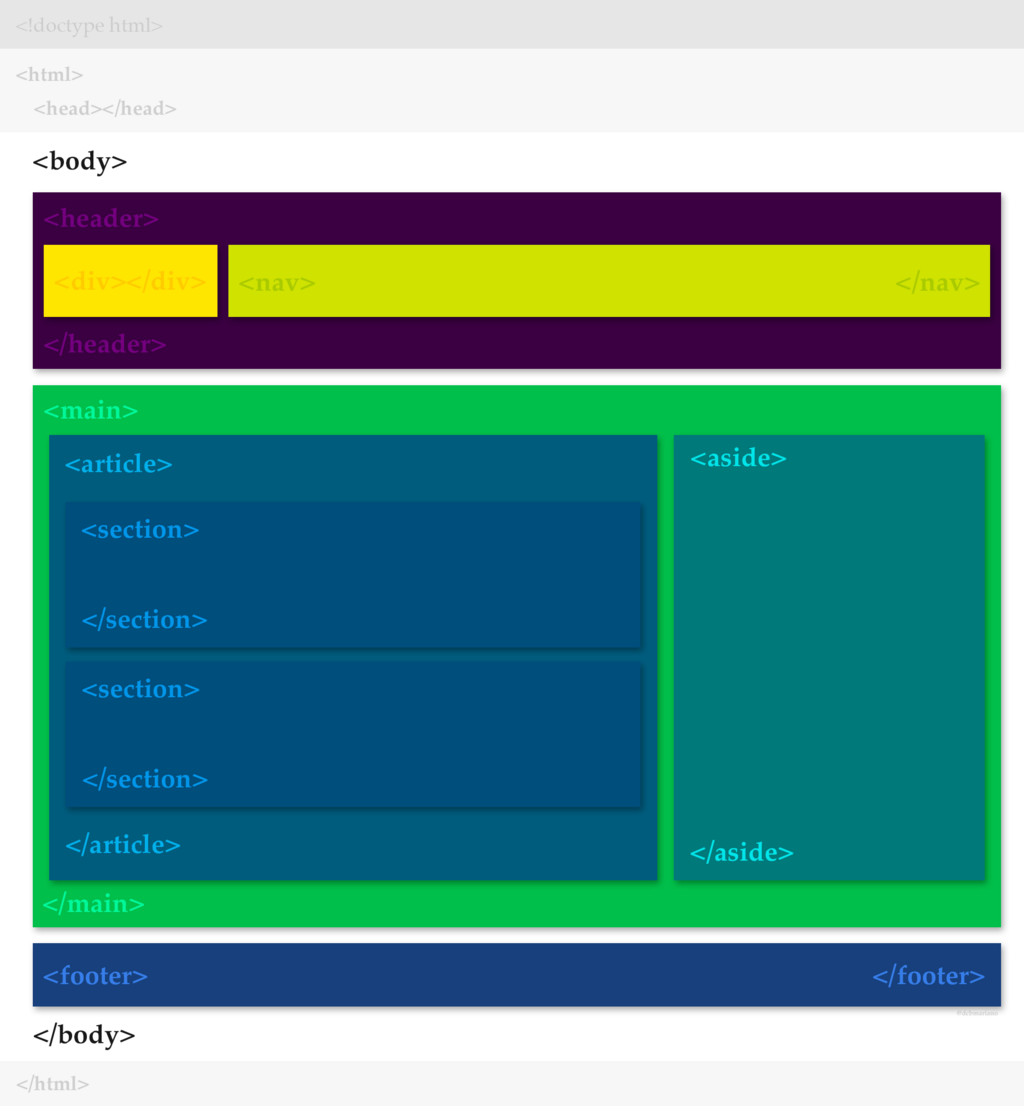
The entire <body> element is a great example of nesting. It contains all the other visible elements, like headings (<h1>, <h2>, etc.), paragraphs (<p>), and links (<a>), creating the page's structure.
Let's check what you've learned.
What does HTML stand for?
Which section of an HTML document contains all the content you actually see on a webpage, like text and images?
With these building blocks, you can structure any web page. Understanding tags, elements, attributes, and nesting is the first step toward creating clear, organized content for the web.