HTML Fundamentals
HTML Basics
The Skeleton of the Web
Every website you visit is built on a foundation of HTML. Think of it as the skeleton that gives a webpage its structure. Just like a house has a frame, a website has HTML to define where the headings, paragraphs, and images go.
HTML, or HyperText Markup Language, provides the skeleton for your web content.
HTML isn't a programming language. It's a markup language. This means it uses a system of tags to annotate text and tell the web browser how to display it. You use tags to mark up your content, turning plain text into a structured document.
Creating Your First Page
To get started, you only need two tools: a simple text editor and a web browser. Any text editor, like Notepad on Windows or TextEdit on Mac, will work. The browser is what will read your HTML file and display it as a webpage.
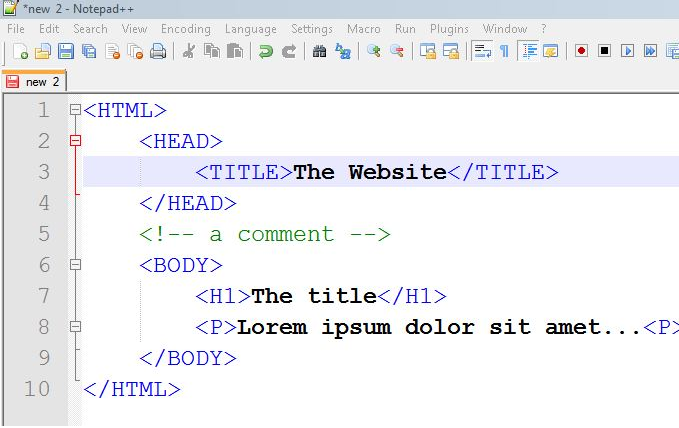
Let's create a very basic HTML document. Open your text editor and type the following code. This is the standard boilerplate for any web page.
<!DOCTYPE html>
<html>
  <head>
    <title>My First Website</title>
  </head>
  <body>
    <h1>Hello, World!</h1>
    <p>This is my very first paragraph.</p>
  </body>
</html>
Save this file as index.html. The .html extension is crucial. Now, find the file on your computer and open it with your web browser. You should see a simple page with a large heading and a line of text.

Understanding the Structure
Let's break down that boilerplate code. The pieces surrounded by angle brackets, like <p>, are called tags.
Most tags come in pairs: an opening tag (<p>) and a closing tag (</p>). The closing tag always has a forward slash. Everything between the opening and closing tag is the content of that element.
| Tag | Purpose |
|---|---|
<!DOCTYPE html> | Tells the browser this is an HTML5 document. |
<html> | The root element that wraps all the content on the page. |
<head> | Contains meta-information, like the page title. This content is not displayed on the page. |
<title> | Sets the title of the browser tab. |
<body> | Contains all the visible content of the page, like headings and paragraphs. |
<h1> | A top-level heading. <h2> through <h6> represent lower-level headings. |
<p> | A paragraph of text. |
Adding Attributes
Tags can also have attributes, which provide extra information about an element. Attributes are always included in the opening tag and usually come in name/value pairs, like name="value".
For example, let's create a link using the anchor tag, <a>. The link's destination is specified with the href attribute.
<a href="https://www.wikipedia.org">Go to Wikipedia</a>
Here, href is the attribute name and "https://www.wikipedia.org" is the attribute value. The text between the opening and closing <a> tags is what becomes the clickable link on the page.
Another common attribute is src, used with the <img> tag to specify the source of an image file.
<img src="images/cat.jpg" alt="A photo of my cat.">
The <img> tag is a special case known as an empty element because it doesn't have a closing tag. It also includes an alt attribute. This provides alternative text for screen readers or if the image fails to load, which is very important for accessibility.
What is the primary function of HTML?
Which pair of tools represents the absolute minimum needed to create and view a basic HTML webpage?
That's the basic anatomy of an HTML document. With just a few tags and attributes, you have the power to structure any content for the web.