HTML and CSS Foundations
Introduction to HTML
The Skeleton of a Web Page
Every website you visit, from a simple blog to a complex news site, is built on a foundation of HTML. Think of HTML, or HyperText Markup Language, as the skeleton of a web page. It provides the basic structure and organizes all the content, like text, images, and links. It doesn't handle the colors, fonts, or layout—that's a job for another language called CSS. For now, we're just focused on building the bones.
One of HTML's main jobs is to give text structure so that a browser can display an HTML document the way its developer intends.
HTML works using a system of tags. Most tags come in pairs: an opening tag and a closing tag. They look like this: <p> and </p>. The letter inside, in this case 'p', tells the browser what kind of content it is. The 'p' stands for paragraph. Whatever you put between these two tags will be treated as a paragraph.
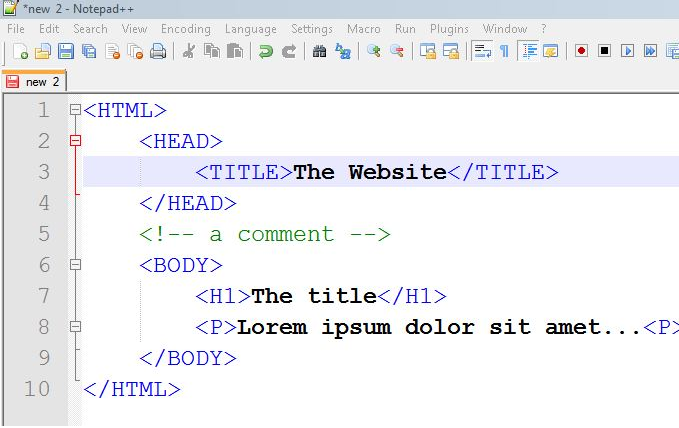
All HTML documents follow a standard structure. It tells the browser, "Hey, this is an HTML page," and sets up the main containers for your content.
<!DOCTYPE html>
<html>
  <head>
    <title>My First Web Page</title>
  </head>
  <body>
    <!-- Content goes here -->
  </body>
</html>
Let's break that down:
<!DOCTYPE html>: This is a required declaration that defines the document type. It's always the very first thing in your file.<html>: This is the root element that wraps everything on the page.<head>: This container holds metadata—data about the page. Things like the page title, which shows up in the browser tab, go here. The content inside the<head>isn't displayed on the main page.<body>: This is where all the visible content goes: text, images, links, everything you see on the website.
Adding Basic Content
Now that we have our skeleton, let's add some flesh and muscle. The most common content elements are headings and paragraphs. They give your text a clear hierarchy and make it easy for people to read.
HTML provides six levels of headings, from <h1> to <h6>. <h1> is the most important, typically used for the main page title. <h2> is a subheading, <h3> is a sub-subheading, and so on. Search engines and screen readers use these headings to understand the structure of your content.

Paragraphs are created with the <p> tag. Any text you place inside <p> and </p> will be displayed as a distinct block of text.
Here’s how you’d add a main heading and a paragraph to the body of our page.
<body>
  <h1>All About My Cat</h1>
  <p>My cat, Whiskers, is a fluffy menace. He enjoys napping in sunbeams and demanding food at 5 AM.</p>
</body>
Another way to organize information is with lists. HTML has two main types: unordered lists, which are bullet points, and ordered lists, which are numbered.
Unordered lists use the <ul> tag, with each list item wrapped in an <li> tag.
Think ul for unordered list and li for list item.
<h2>Whiskers' Favorite Things</h2>
<ul>
  <li>Sunbeams</li>
  <li>Cardboard boxes</li>
  <li>Ignoring me</li>
</ul>
Ordered lists work the same way but use the <ol> tag instead. The browser will automatically number the items for you.
<h2>Daily Routine</h2>
<ol>
  <li>Wake up the human.</li>
  <li>Eat breakfast.</li>
  <li>Nap.</li>
</ol>
Links and Images
What makes the web a web? Links! Hyperlinks connect pages together. You create a link using the anchor tag, <a>.
The anchor tag needs an attribute called href, which stands for "hypertext reference." This attribute tells the browser where the link should go. The text between the opening <a> and closing </a> tags is what the user clicks on.
<p>For more cat pictures, visit <a href="https://www.example.com">this website</a>.</p>
Finally, let's add an image. The image tag, <img>, is a bit different because it's a self-closing tag. It doesn't need a closing tag like </img A>. It requires two attributes: src and alt.
src: This is the source of the image file. It can be a URL or a file path on your server.alt: This is the alternative text. It's a description of the image that appears if the image fails to load. More importantly, it's what screen readers use to describe the image to visually impaired users, so always make it descriptive!
<img src="https://www.example.com/whiskers.jpg" alt="A fluffy orange cat napping on a blue rug.">
With just these few tags, you can structure a complete, readable web page. Now it's time to check what you've learned.
What is the primary role of HTML in web development?
In an HTML document, all visible content, such as text and images, should be placed inside which tag pair?
You now have the foundational skills to build the structure for any web page you can imagine.