Home Networking Essentials
Networking Basics
What is a Network?
At its heart, a computer network is just a group of devices connected together. Think of it like a conversation. For two people to talk, they need to be able to hear each other. For two computers to share information, they need a connection.
The main purpose is to share things. This could be an internet connection, a file, a printer, or access to a streaming service. By connecting devices, we can make them work together and share resources efficiently.
Computer networking is simply connecting computers and devices so they can share information.
Without networks, your phone couldn't get email, your laptop couldn't print wirelessly, and your smart TV couldn't stream movies. Each device would be an isolated island. Networking builds the bridges between them.
Networks Big and Small
Not all networks are the same size. They can range from a few devices in your living room to the billions of devices that make up the internet. We generally group them into two main categories based on their scale.
LAN
noun
A Local Area Network (LAN) connects devices within a limited area, like a home, school, or office building.
Your home network is a perfect example of a LAN. It connects your personal devices—laptops, smartphones, game consoles—allowing them to share a single internet connection and communicate with each other.

On the other end of the spectrum is the Wide Area Network, or WAN. A WAN connects devices over a large geographical area, like a city, country, or even across continents. A WAN is often a network of other networks, linking many LANs together.
The most famous example of a WAN is the internet itself. It connects billions of devices and countless smaller networks all over the globe.
The Rules of Communication
For devices on a network to understand each other, they need a common language. If one device sends information in a format the other can't recognize, communication fails. In networking, this common language is defined by a set of rules called protocols.
A protocol is a set of rules that governs how data is formatted, transmitted, and received between network devices.
Think of it like sending a letter. The postal service has protocols: you need a stamp, a delivery address, and a return address, all in the right places. Networking protocols do something similar for digital data, ensuring it's properly addressed, packaged, and sent to the correct destination.
There isn't just one protocol, but many, each with a specific job. To organize how all these protocols work together, computer scientists developed conceptual frameworks. The most well-known is the OSI model.
The OSI Model
The Open Systems Interconnection (OSI) model is a roadmap that breaks down the complex process of network communication into seven distinct layers. Each layer has a specific responsibility, and they work together in order from top to bottom when sending data, and bottom to top when receiving it.
Imagine building a car. You have different teams: one for the engine, one for the body, one for the electronics. Each team specializes in one part, but they all follow a common blueprint so the parts fit together perfectly. The OSI model provides that blueprint for network communication.
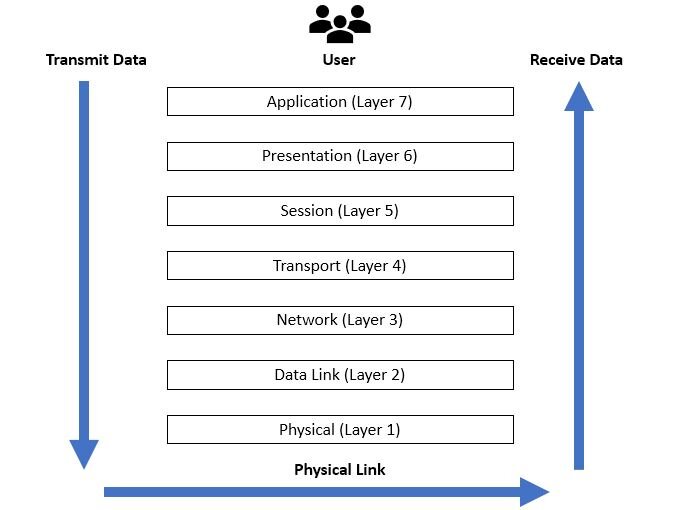
Here’s a quick look at the seven layers, from top to bottom:
| Layer | Name | Function |
|---|---|---|
| 7 | Application | The layer you interact with, like your web browser or email client. |
| 6 | Presentation | Translates data into a standard format, handling things like encryption. |
| 5 | Session | Manages the connection and conversation between two devices. |
| 4 | Transport | Ensures data is sent reliably and in the correct order. |
| 3 | Network | Handles addressing and routing to get data to the right network. |
| 2 | Data Link | Manages communication between devices on the same local network. |
| 1 | Physical | The actual hardware that sends the signals, like cables or radio waves. |
You don't need to memorize every detail of the OSI model right now. The key takeaway is that networking is a layered process. Each layer solves a specific piece of the puzzle, allowing complex communication to happen smoothly and reliably.
Now, let's test your understanding of these foundational concepts.
What is the primary purpose of a computer network?
The network connecting your personal laptop, smartphone, and smart TV within your home is an example of a Wide Area Network (WAN).
With these basics in mind, you're ready to explore the specific devices that make up a home network.