Graphic Design Fundamentals for Digital and Print
Digital Pixels Defined
The Building Blocks of Images
Every digital image you see on a screen, whether it's a photo, an icon, or a website banner, is made of the same basic ingredient: pixels. A pixel is the smallest single point of colour in a digital display. Think of it like a single tile in a giant mosaic.
Pixel
noun
The smallest unit of a digital image or display. It is a tiny square of a single colour.
By itself, one pixel doesn't show much. But when you arrange thousands or millions of them in a grid, each with its own specific colour, they combine to form a complete, detailed picture. Your screen is simply a grid that lights up these tiny squares in the right pattern to show you an image.
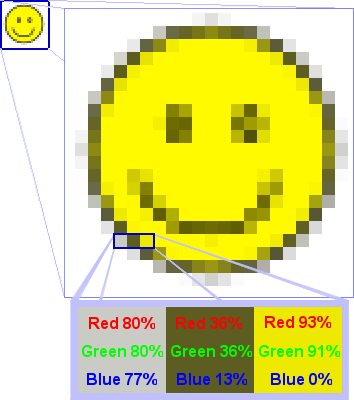
Image Size and Quality
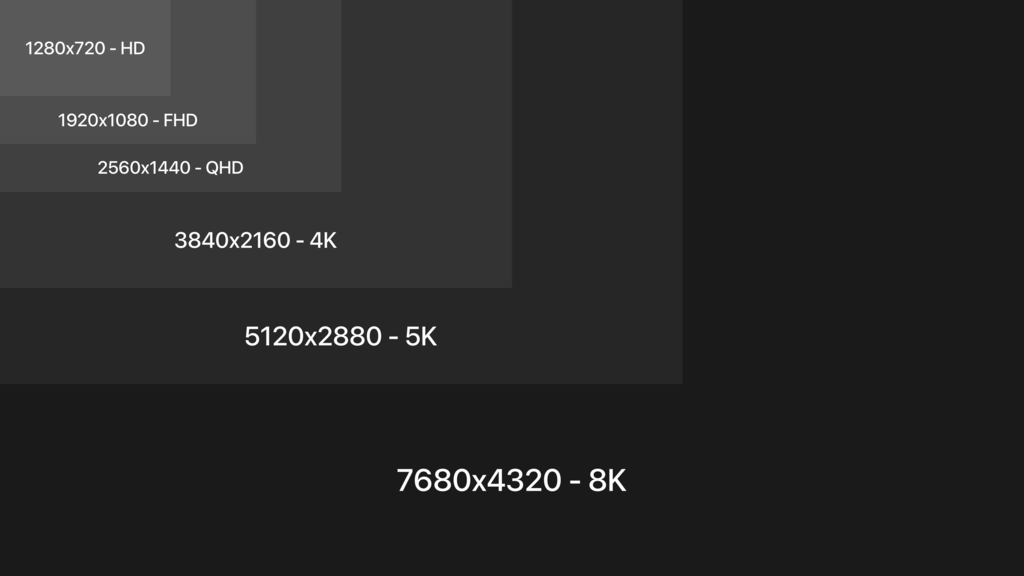
When we talk about the size of a digital image, we're usually referring to its pixel dimensions. This is the number of pixels across its width and height. For example, an image with dimensions of 1920 x 1080 has 1,920 pixels horizontally and 1,080 pixels vertically. If you multiply these numbers, you get the total number of pixels in the image: 2,073,600, or just over two megapixels.
The number of pixels in an image is often called its resolution. Higher resolution means more pixels and, generally, more detail.
Let's go back to the mosaic analogy. Imagine you have a one-metre square frame. If you fill it with 100 large tiles, your picture will look blocky and simple. If you fill that same one-metre frame with 10,000 tiny tiles, you can create a much more intricate and detailed design. The physical size of the frame hasn't changed, but the density of the tiles has.
Digital images work the same way. An image with more pixels can show finer details and sharper edges. This is why a high-resolution photo looks crisp, while a low-resolution one can appear blurry or 'pixelated', especially when viewed on a large screen.
Two Kinds of Graphics
Images made from a grid of pixels are called raster graphics. Photographs are always raster images, and common file types like JPEG, PNG, and GIF are all raster formats. The key thing to remember about raster graphics is that they have a fixed number of pixels.
This creates a limitation. If you try to make a raster image larger than its original dimensions, the computer has to guess how to fill in the new space. It does this by making the existing pixels bigger, which results in a loss of quality. The image becomes blurry and the individual square pixels become visible.
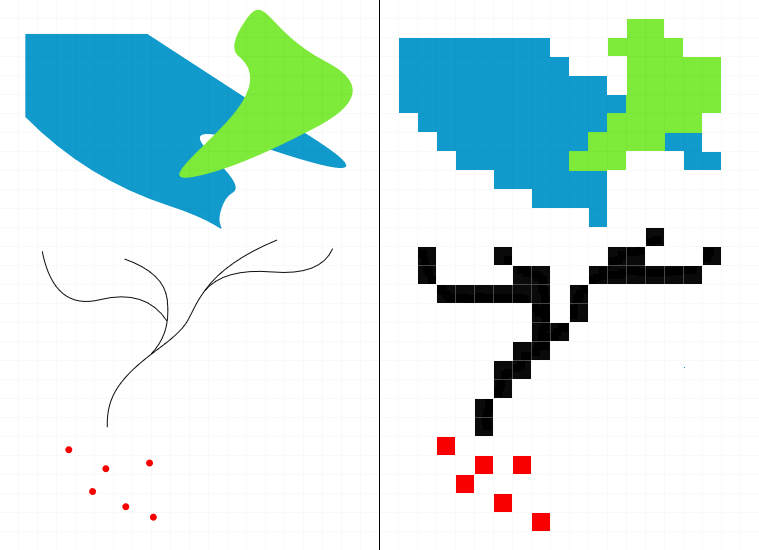
The other type of digital image is a vector graphic. Instead of using a pixel grid, vector graphics are made from mathematical equations that define points, lines, and curves. Because they are based on maths, not a fixed grid, you can scale them to any size, from a tiny icon to a giant billboard, and they will never lose quality. Logos and illustrations are often created as vector graphics for this reason.
For now, just remember that the images you see every day are typically raster graphics, built from a grid of tiny, colourful squares called pixels.
What is the smallest single point of colour in a digital display called?
An image has dimensions of 800 x 600 pixels. How many total pixels does it contain?