Google ML Models in Oracle APEX
Introduction to Oracle APEX
What is Oracle APEX?
Oracle Application Express, or APEX, is a tool for building web applications directly on top of an Oracle Database. Instead of writing thousands of lines of code from scratch, you use a web-based interface to design and build your app.
APEX is a low-code, browser-based development platform that runs on Oracle Database.
The term "low-code" is key here. It means you rely on visual tools, drag-and-drop components, and simple declarations to create most of your application. This approach speeds up development significantly, allowing you to focus on what the app should do, not the complex plumbing behind it.
One of the biggest advantages is that APEX is a feature of the Oracle Database. If your organization already uses an Oracle Database, you have access to APEX at no extra cost. This makes it a popular choice for modernizing older systems and building new, data-driven web applications quickly.
How APEX Works
The architecture of APEX is surprisingly straightforward. Unlike many web frameworks that require separate application servers and complex deployment steps, an APEX application lives entirely inside the Oracle Database.
Everything that defines your application—the pages, buttons, reports, and logic—is stored as metadata in database tables. When a user opens your application in their web browser, a request is sent to the database. The APEX engine then reads the metadata for the requested page, queries the necessary data, and dynamically renders it as HTML, which is sent back to the browser.
This process is managed by a web listener, typically Oracle REST Data Services (ORDS). ORDS is a Java application that maps browser requests to the correct database procedures. It acts as the communication bridge between the web server and the database where the APEX engine runs.
Features and Benefits
APEX comes with a rich set of features that simplify the development process. Because it's a declarative framework, you often tell it what you want, not how to build it.
For example, to create a data-rich report with search and filtering, you can use a wizard that walks you through the process in a few clicks. APEX generates the user interface and the underlying queries for you.
Some of the core benefits include:
- Simplicity: No need to manage complex file-based frameworks. Everything is in the database.
- Productivity: The low-code, component-based approach allows you to build fully functional applications much faster than with traditional coding.
- Security: APEX provides built-in features for authentication, authorization, and session management to help secure your applications from common web threats.
- Scalability: Because it runs within the Oracle Database, APEX applications can leverage the database's proven performance and scalability.
Setting Up Your Workspace
Getting started with APEX is easy because you don't need to install any software on your personal computer. The entire development environment is accessed through your web browser.
The easiest way to begin is by signing up for a free workspace on Oracle's cloud service, apex.oracle.com. This gives you a dedicated area within a shared database to build and test applications.
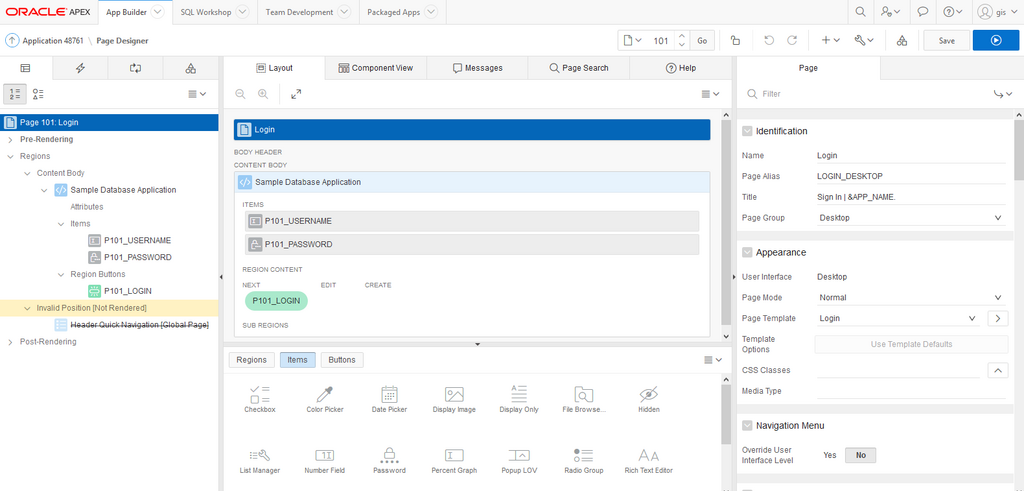
Alternatively, you can install an Oracle Database (such as the free Express Edition, or XE) on your own machine or server and enable APEX. Once set up, you log in to your workspace, which is your private development area. Inside a workspace, you can create database objects like tables and views, and then build one or more applications on top of them.
This workspace model is great for organization. A company might have separate workspaces for development, testing, and production, or different workspaces for different teams.
What is the primary purpose of Oracle Application Express (APEX)?
In the APEX architecture, where are the definitions of application components like pages, reports, and logic stored?
Now that you have an overview of what APEX is and how it works, you're ready to start exploring its components and building your first application.