Google Ads for Business Growth
Google Ads Basics
What Is Google Ads?
Think of Google as the world's biggest marketplace. Millions of people visit every day looking for products, services, and answers. Google Ads is your chance to set up a stall right in the middle of that marketplace, showing your offerings to the people who are actively searching for them.
Google Ads allows you to reach anyone who uses Google to search for information, products and services online.
It’s an online advertising platform where you can display brief advertisements to potential customers. When someone searches for a term related to your business, your ad can appear at the top of the search results page. This puts your business directly in front of people with high intent—they're already looking for what you offer.
How You Pay: The PPC Model
With traditional advertising, like a billboard or a magazine ad, you pay for the space, whether anyone sees it or not. Google Ads works differently. Most campaigns use a model called Pay-Per-Click, or PPC.
Pay-Per-Click (PPC)
noun
An internet advertising model where advertisers pay a fee each time one of their ads is clicked. Essentially, it's a way of buying visits to your site, rather than trying to "earn" those visits organically through search engine optimization (SEO).
This means you only pay when someone is interested enough in your ad to actually click on it and visit your website. You're not paying for your ad to just sit there; you're paying for a potential customer to take action. This makes it a highly efficient way to spend your advertising budget.
Campaign Types
Google Ads isn't just about the text ads you see on the search results page. The platform offers several types of campaigns, each designed for different goals and to appear in different places across Google's network.
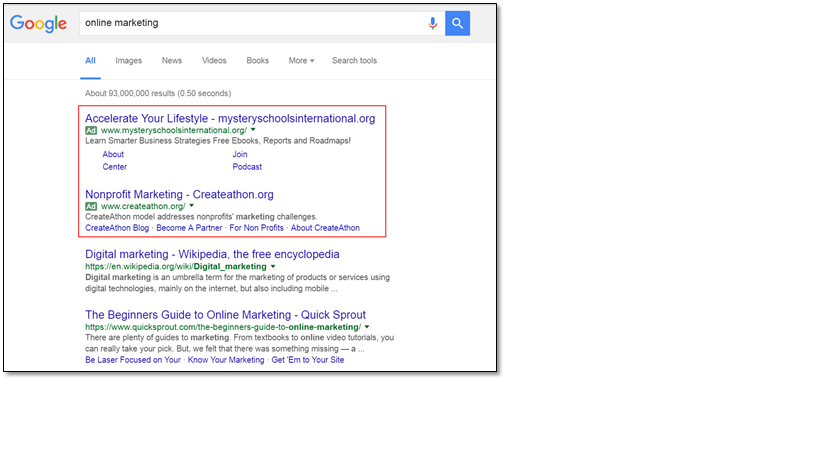
Here are the main types you'll encounter:
| Campaign Type | What It Is | Best For |
|---|---|---|
| Search | Text-based ads that appear on Google search results pages. | Capturing people actively searching for your products or services. |
| Display | Visual, image-based ads that appear on websites, apps, and videos in the Google Display Network. | Building brand awareness and reaching a broad audience. |
| Shopping | Product-focused ads that show an image, title, price, and store name directly in search results. | E-commerce businesses wanting to showcase specific products. |
| Video | Video ads that run before, during, or after YouTube videos. | Telling a story and engaging viewers with visual content. |
Choosing the right campaign type depends entirely on your business goals. If you're running a local service business, a Search campaign is likely your best starting point. If you sell physical products online, Shopping campaigns are essential.
Building Your Campaign
A Google Ads account is organized in a clear hierarchy. Understanding this structure is key to managing your advertising effectively.
Campaigns: This is the highest level. Each campaign has its own budget and settings that determine where your ads appear. You might have one campaign for "Men's Shoes" and another for "Women's Shoes."
Ad Groups: Within each campaign, you have ad groups. Each ad group contains a set of similar keywords and the ads that are triggered by them. For your "Men's Shoes" campaign, you might have ad groups for "running shoes," "dress shoes," and "sandals."
Keywords: These are the words or phrases that people type into Google search. You choose which keywords you want to trigger your ads. In the "running shoes" ad group, your keywords might be "men's running sneakers," "best athletic shoes for men," and so on.
Ads: This is the actual text or image that people see. You'll write specific ads for each ad group that are highly relevant to the keywords within it. An ad in the "running shoes" group should talk about running shoes, not dress shoes.
The Importance of Quality Score
You might think that the advertiser willing to pay the most per click always gets the top spot. That's not quite true. Google has a system called Quality Score that rewards relevance and a good user experience.
Quality Score is a rating from 1 to 10 that Google gives to your keywords. It's based on three main factors:
- Expected Click-Through Rate (CTR): How likely is someone to click your ad when it's shown?
- Ad Relevance: Does your ad make sense for the person who searched for that keyword?
- Landing Page Experience: Is the page people land on after clicking your ad useful and relevant to their search?
A high Quality Score means Google thinks your ad and landing page are relevant and useful to someone looking at your ad. In return, Google rewards you with lower prices and better ad positions.
In short, creating high-quality, relevant ads isn't just good for customers—it's good for your budget, too. It’s the key to making Google Ads work effectively without overspending.
Ready to test your knowledge? Let's see what you've learned about the fundamentals of Google Ads.
What does the Pay-Per-Click (PPC) model mean for an advertiser using Google Ads?
An e-commerce store that sells physical products online wants to show image-based ads with prices directly in Google search results. Which campaign type is best suited for this goal?
Understanding these core components is the first step toward building successful advertising campaigns. By matching the right keywords with relevant ads and sending traffic to a great landing page, you can effectively reach new customers.