Go Terminal User Interfaces
Introduction to Go Programming
What is Go?
Go, often called Golang, is a programming language created at Google. It's designed to be simple, efficient, and reliable. Think of it as having the performance of languages like C++ but with a much cleaner, more modern syntax. Go is compiled, which means your code is converted directly into machine code that your computer's processor can execute. This makes Go programs very fast.
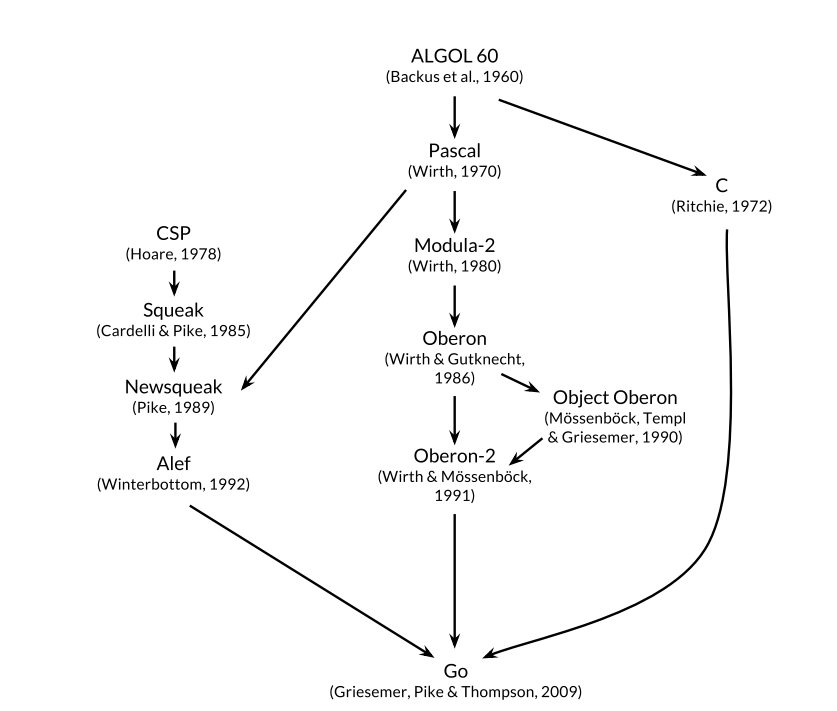
One of Go's strengths is building command-line tools and other system-level software. Its straightforward syntax and powerful standard library make it a great choice for these tasks. Let's start with the classic "Hello, World!" program to see what Go code looks like.
package main

import "fmt"

func main() {
    fmt.Println("Hello, World!")
}
Every Go program is organized into packages. The
mainpackage is special; it tells the Go compiler that the program is executable. Themainfunction within that package is the entry point of the program.
Basic Building Blocks
Like any language, Go has fundamental elements for storing and manipulating data. Variables are used to store values that can change. You can declare a variable using the var keyword, followed by the variable's name and its type.
var score int = 100
Go is a statically typed language, which means you must specify the type of a variable when you declare it. However, Go often lets you use a shorter syntax, :=, which infers the type from the value you assign.
score := 100 // Go infers that score is an int
name := "Alice" // Go infers that name is a string
This shorthand makes the code cleaner and is the most common way to declare variables inside functions. Here are some of the fundamental data types you'll use.
| Type | Description | Example |
|---|---|---|
int | Whole numbers (integers) | 10, -5, 0 |
float64 | Numbers with a decimal point | 3.14, -0.5 |
string | A sequence of characters | "hello" |
bool | A boolean value, true or false | true |
If you need a value that never changes, you can use a constant. Constants are declared with the const keyword.
const pi = 3.14159
// pi cannot be reassigned to a new value
Controlling the Flow
Programs rarely execute from top to bottom without any branching or repetition. Control structures allow you to dictate the flow of execution based on certain conditions.
The most basic control structure is the
if/elsestatement. It executes a block of code if a condition is true, and optionally, another block if it's false. Notice that Go doesn't require parentheses around the condition.
age := 20

if age >= 18 {
    fmt.Println("You can vote.")
} else {
    fmt.Println("You cannot vote yet.")
}
For repetition, Go has a single looping construct: the for loop. It's versatile and can be used in several ways. The most common form has an initializer, a condition, and a post-statement.
// Prints numbers from 0 to 4
for i := 0; i < 5; i++ {
    fmt.Println(i)
}
You can also use for like a while loop in other languages by just providing a condition.
n := 1
for n < 5 {
    fmt.Println(n)
    n *= 2
}
When you need to choose between several options, a switch statement is often cleaner than a series of if/else statements. In Go, a break statement is automatically added at the end of each case, which prevents the code from accidentally "falling through" to the next case.
day := "Tuesday"

switch day {
case "Monday":
    fmt.Println("Start of the work week.")
case "Tuesday":
    fmt.Println("Taco Tuesday!")
case "Friday":
    fmt.Println("Weekend is almost here.")
default:
    fmt.Println("It's another day.")
}
The Standard Library
One of Go's best features is its rich standard library. This is a collection of pre-built packages that provide functions for common tasks, so you don't have to write everything from scratch. You've already used the fmt package, which handles formatted input and output.
Import the popular fmt package, which contains functions for formatting text, including printing to the console. This package is one of the standard library packages you got when you installed Go.
For building command-line tools, a few other packages are especially useful:
os: Provides a platform-independent interface to operating system functionality. You can use it to get command-line arguments, read environment variables, or work with files.strings: Contains a rich set of functions for manipulating strings, like searching, splitting, and joining.strconv: Helps convert strings to basic data types like integers or floats, and vice-versa.
Here’s a small program that uses the os and strings packages to greet a user by name, using an argument from the command line.
package main

import (
	"fmt"
	"os"
	"strings"
)

func main() {
	// os.Args[0] is the program name
	// os.Args[1] is the first argument
	if len(os.Args) > 1 {
		name := strings.Join(os.Args[1:], " ")
		fmt.Println("Hello,", name)
	} else {
		fmt.Println("Hello, World!")
	}
}
If you save this code and run go run yourfile.go Ada Lovelace, it will print Hello, Ada Lovelace. This simple example shows how the standard library empowers you to build useful tools quickly.
Let's check your understanding of these foundational concepts.
Go is described as a compiled language. What does this mean?
What is the most common and concise way to declare and initialize a new variable message with the value "Hello" inside a Go function?
You now have the basic building blocks for writing programs in Go. With variables, control structures, and the standard library, you can start creating your own command-line applications.