GitLab Mastery for Senior Engineers
GitLab Fundamentals
More Than Just a Code Locker
You might think of GitLab as just a place to store your code online. That's part of it, but it's a bit like calling a smartphone just a telephone. GitLab is a complete platform designed to help teams build software together, from the first idea to the final release.
At its heart, GitLab is a web-based Git repository manager. As we've covered, Git is the version control system that tracks changes to your code. GitLab provides a home for those Git repositories, but it builds a whole world of tools around them. Think of it this way: if Git is the detailed logbook for your project's history, GitLab is the workshop, the communication hub, and the project management office all rolled into one.
It’s a single application for the entire software development lifecycle. This “all-in-one” philosophy is what makes GitLab powerful.
An Integrated Workshop
In the past, a development team might use a dozen different tools to manage their work. They’d use one service to plan tasks, another to store code, a third to test it, and yet another to deploy it. Juggling all these separate systems could be complicated and inefficient.
GitLab’s approach is different. It brings all those functions into one integrated platform. This means that every part of the process is connected. A planned feature can be directly linked to the code written for it, which is then linked to the tests that verify it and the final deployment. This tight integration makes it easier to see how everything fits together.
This diagram shows how GitLab acts as a central hub. It connects every stage of development, creating a seamless workflow from planning and coding all the way to monitoring the application in production.
Key Features in Action
Let's look at some of the core features you'll use every day. While GitLab has a vast number of tools, a few are fundamental to the workflow.
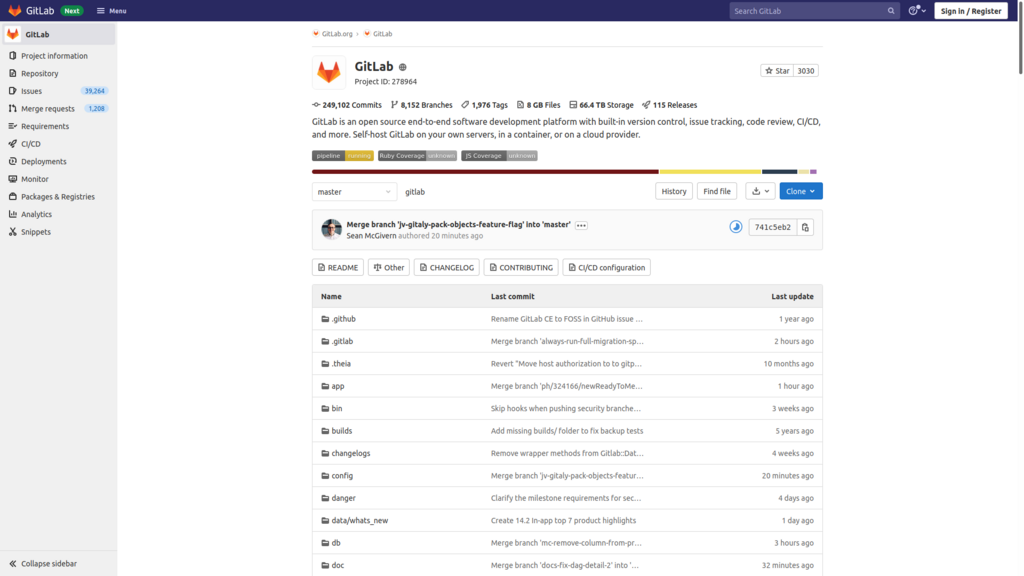
The foundation of any project is its repository. This is where your code lives, managed by Git. GitLab gives you a clean interface to browse files, view the history of changes (commits), and manage different versions (branches).
But a project is more than just code. It involves planning and tracking work. GitLab's issue tracker is where this happens. An issue can be a bug report, a feature request, or any other task. Each issue is a self-contained discussion space where team members can comment, assign work, and track progress.
The magic happens when you connect your code to these issues. When a developer works on a task, they create a branch in Git. Once their code is ready, they open a Merge Request (MR). An MR is a proposal to merge their changes into the main codebase.
This is the heart of collaboration. Within the MR, the team can perform a code review, commenting directly on lines of code, suggesting improvements, and ensuring quality. Because GitLab is integrated, you can see which issue the MR resolves, what tests have been run, and what the impact of the change will be, all in one place.
| Feature | Purpose |
|---|---|
| Repositories | Host and manage your Git codebase. |
| Issue Tracker | Plan features, report bugs, and track tasks. |
| Merge Requests | Propose, review, and merge code changes collaboratively. |
| Wiki | Create and maintain project documentation. |
By using these features together, teams can maintain a clear and organized development process. Everyone has visibility into what's being worked on, why it's being done, and how the changes are being implemented. This transparency and integration are what make GitLab a powerful tool for modern software development.
Time to check your understanding of these core concepts.
Which statement best describes GitLab's core philosophy?
What is the primary function of an "Issue" within a GitLab project?
Understanding these fundamentals provides the foundation you need to start contributing to projects on GitLab effectively.