GitHub Essentials
Introduction to Version Control
What Is Version Control?
Have you ever saved a file as report-draft.doc, then report-final.doc, and finally report-final-REALLY-final.doc? This is a basic, manual form of version control. You're trying to keep a record of changes so you can go back to an older version if you need to.
A version control system (VCS) automates this process, but on a much more powerful scale. It's a tool that tracks and manages changes to a project's files over time. Instead of just saving whole files, it records every specific change, who made it, and why. This creates a detailed history of the project from its first line of code to its latest feature.
A version control system acts like a project's official memory, ensuring no change is ever lost and every past state can be revisited.
Think of it as a safety net. If you introduce a bug, you can look back through the history to see exactly when it appeared and what change caused it. If you need to scrap a new feature that isn't working out, you can instantly revert the project to the version before you started. It removes the fear of breaking things, which encourages experimentation and better code.
Why It's a Game-Changer
For a solo developer, a VCS is an invaluable record-keeper. But in a team setting, it becomes absolutely essential. Without a VCS, developers would have to manually coordinate every change, constantly emailing files back and forth and trying not to overwrite each other's work. It would be chaotic.
A VCS provides a structured way for teams to collaborate. It allows multiple people to work on the same project—even the same files—at the same time. The system helps manage and merge these different changes together, highlighting conflicts when two people have edited the same line of code. This organized workflow is the backbone of modern software development.
Two Flavors of VCS
Version control systems generally come in two types: centralized and distributed.
Centralized Version Control Systems (CVCS) operate on a client-server model. A single, central server stores the entire project history. Developers "check out" the latest version of the files, make their changes, and then "check in" their work back to the central server.
The major downside of a CVCS is its single point of failure. If the central server goes down, nobody can save their work or collaborate. Examples include Subversion (SVN) and Perforce.
Distributed Version Control Systems (DVCS) give every developer their own complete copy of the project, including its full history. You don't just check out the latest version of the files; you mirror the entire repository.
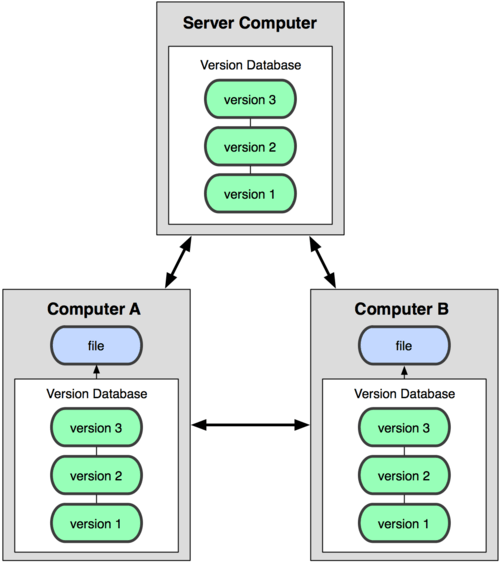
This model is more flexible and robust. Since everyone has a local copy, you can commit changes and view project history even when you're offline. If a central server is used for collaboration, it's just one of many copies. If it fails, any developer's local repository can be used to restore it.
This is where Git comes in. Git is the most popular distributed version control system in the world. Its design emphasizes speed, data integrity, and support for distributed, non-linear workflows. By learning Git, you're learning the standard tool for modern software development.